安装oracle 19c rac报错:2节点执行root.sh asm实例启动失败
默认oracle rac安装的时候,会启动haip功能,会在心跳网卡虚出一个IP,169.254. . ,2节点彼此能ping通。这个是以资源ora.cluster_interconnect.haip形式出现的,那么这个资源可以禁用嘛?也就是haip可以禁用嘛?不使用haip,会有什么影响?
一、背景
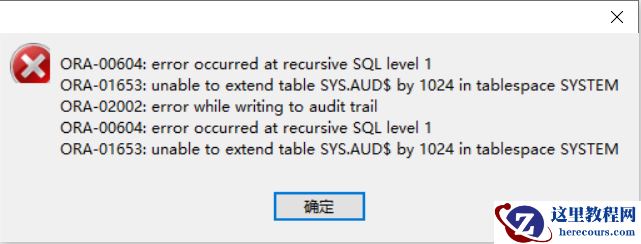
Linux 7.8 RDS环境,安装19c rac,前面安装过程一切顺利,1个节点的root.sh执行完成,在执行2节点的root.sh的时候,所有步骤执行完成,但是在启动asm资源报错。尝试手动启动,稍等hang一会,启动也会报错:
 asm alert日志报错
 但是crs起来了,
 11gR2 RAC+ASM的特殊性,如果asm实例启动失败,那导致CRS也无法正常启动。由于11gR2中CRS服务依赖于ASM,因为ocr存放在ASM中,所以ASM若无法有效启动,这导致CRS服务也无法正常工作。但是19c好像不一样了,还有待查询。
二、解决过程
1、查看lmon trc
由于asm实例异常宕机,alert日志里面明确提示查看lmon trace。
查看lmon trace,注意vi 查看的时候填写绝对路径,相对路径查看会报错。
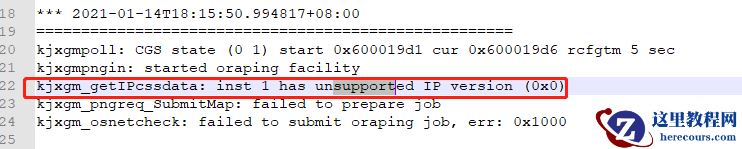 除过这个unsupport看起来有点异常外,其他的都看不出问题。
2、查看mos
根据Doc ID 1383737.1的说明,可以看出以下几点: 1.确保169.254.x.x 地址被绑定到私有网卡上。 2.确保地址是以169.254开头。 3.确保所有节点私有网络之间没有防火墙。 4.确保所有节点的ora.cluster_interconnect.haip资源都启动成功。 5.所有节点的ora.cluster_interconnect.haip资源启动成功后,确保所有节点绑定的169.254.x.x 地址在节点之间都能相互PING通。
注意:在ora.cluster_interconnect.haip资源启动之前,cssd进程会检查私有网络的健康状况,从而判定是否启动cssd进程,这个时候私有网络的IP是在操作系统级别设置的IP地址;当ora.cluster_interconnect.haip资源启动之后,ora.asm中的LMON等进程会检查私有网络的通信的健康状况,从而判定是否启动集群ora.asm,这个时候私有网络的IP地址是169.254.x.x,如果节点相互之间的一个或多个169.254.x.x网络地址不通,实际就是脑裂的情况,asm实例必定只能在部分节点运行,asm实例不能启动,Clusterware和数据库实例都无法启动。 在11.2.0.2以上的GI上使用多网卡构成的HAIP技术,那么不同网卡应该在不同的子网上,如果所有的网卡在同一个子网上,那么拔掉其中一个网卡可能导致节点被踢出。
真实情况:
1、防火墙都已关闭
2、169.254.x.x在2个节点都被绑定到心跳网卡上面
3、ora.cluster_interconnect.haip资源都是online。
4、netstat -rn查看2个节点的路由,都正常。
 5、169.254.x.x 2个节点互相ping,ping不通。(那么问题应该就在这了,haip ping不通导致)。
让网络工程师也检查了,没做什么特殊限制,应该是可以ping通的。
5、169.254.x.x 2个节点互相ping,ping不通。(那么问题应该就在这了,haip ping不通导致)。
让网络工程师也检查了,没做什么特殊限制,应该是可以ping通的。
3、真的是网络的问题
柳暗花明,根据Doc ID 2328941.1,发现RDS环境不支持haip。
 根据mos Doc ID 1664291.1,发现haip是可以禁掉的。
 那么在这里,禁用haip是否会有问题哪?
4、haip
ohasd管理的资源 ohasd所管理的集群初始化资源有haip和chm。 haip 对于Oracle集群,私网通信是非常重要的,因为节点和节点之间的通信绝大部分都是要通过私网来实现的,私网通信基本上可以分为两种: 第一种是集群层面之间的通信; 第二种是数据库实例之间的通信。
第一种通信(例如节点间的网络心跳)的主要特点是持续存在、实时性要求高,但是数据量比较小,所以通过TCP/IP协议传递就可以了。 而第二种通信,也就是我们所熟知的内存融合造成的实例之间的数据传输,他的特点是数据量很大,而且速度要求非常高,TCP/IP协议此时已经不能满足oracle的要求了,所以需要使用UDP或者RDS,同时oracle也一直建议用户对集群的私网进行高可用性和负载均衡的配置。 对于10g和11gR1版本的集群来说,oracle并不提供私网的高可用性和负载均衡特性,而是建议用户在OS层面匹配值,例如:Linux bonding等。而从11.2.0.3版本开始,oracle提供了私网的高可用性和负载均衡特性—HAIP。
----即OS的bonding=oracle HAIP。也就是有前提条件,多块私网网卡存在的条件下,haip才能发挥作用。
HAIP顾名思义就是一个(或多个)IP地址。oracle会自动在集群的每一块私网网卡上绑定一169.254.*.*网段的IP地址,这个IP地址就被称为HAIP,数据库实例(ASM实例也同样适用)之间在进行通信时,会通过这个oracle绑定的IP地址来完成。 当某一块私网网卡出现问题时,随影网卡上绑定的IP地址可以漂移到其他的私网网卡上,这就实现了私网的高可用性。 从另一个角度讲,如果集群包含了多块私网,也就意味着会有多个HAIP被绑定在一块网卡上,每一块网卡都同时承担实例之间的通信,从而实现了私网通信的负载均衡。 因此,能看到HAIP的功能要比很多OS层面的网卡绑定更加强大,而且管理起来更加简单。 到目前为止,oracle集群最多支持4块私网网卡,网卡数量和HAIP数量关系如下: 1块私网网卡,1个HAIP地址 2块私网网卡,2个HAIP地址
需要说明的是,数据库和ASM实例是在启动时去读HAIP地址的,以下时部分alert日志,基于此,可以看到数据库通过UDP协议在IP地址169.254.31.199上实现实例数据传输。 asm alert:
Cluster communication is configured to use the following interface(s) for this instance
  169.254.57.83
cluster interconnect IPC version:Oracle UDP/IP (generic)IPC Vendor 1 proto 21234
db alert:
  diagnostic_dest          = "/u01/app/oracle"Cluster communication is configured to use the following interface(s) for this instance
  169.254.127.7
cluster interconnect IPC version:Oracle UDP/IP (generic)IPC Vendor 1 proto 212345
设计目的:
HAIP allows for redundant cluster interconnect NICs on cluster nodes without requiring any OS level bonding, teaming or aggregating of the NICs.
HAIP provides a layer of transparency between multiple Network Interface Cards (NICs) on a given node that are used for the cluster_interconnect which is used by RDBMS andASM instances. However HAIP is not used for the Clusterware network communication. The Clusterware utilizes a feature called “Redundant Interconnect” for communicationwhich essentially makes use of all available cluster_interconnect paths for communication
测试高可用和负载均衡功能,没有2块心跳网卡,直接引用别人的:




三、禁用haip
因为本次安装使用了一块网卡用于心跳,所以使用haip和不使用haip来进行网卡绑定,是没有区别的。由于RDS环境不支持haip,所以此处选择禁用haip。
1、安装好的环境禁用haip
下面演示已经安装好的环境,禁用haip。
官方建议:
1.Run "crsctl stop crs" on all nodes to stop CRS stack.
2. On one node, run the following commands:
$CRS_HOME/bin/crsctl start crs -excl -nocrs
$CRS_HOME/bin/crsctl stop res ora.asm -init
$CRS_HOME/bin/crsctl modify res ora.cluster_interconnect.haip -attr "ENABLED=0" -init
$CRS_HOME/bin/crsctl modify res ora.asm -attr "START_DEPENDENCIES='hard(ora.cssd,ora.ctssd)pullup(ora.cssd,ora.ctssd)weak(ora.drivers.acfs)',STOP_DEPENDENCIES='hard(intermediate:ora.cssd)'" -init
$CRS_HOME/bin/crsctl stop crs4. 进一步测试
3. Repeat Step(2) on other nodes.
4. Run "crsctl start crs" on all nodes to restart CRS stack.
a、先查询基本环境信息: 资源状态
[grid@11grac1 ~]$ oifcfg getif
eth0  10.1.11.0  global  public
eth1  192.168.1.0  global  cluster_interconnect
[grid@11grac1 ~]$ oifcfg iflist -p -n
eth0  10.1.11.0  PRIVATE  255.255.255.0
eth1  192.168.1.0  PRIVATE  255.255.255.0
eth1  169.254.0.0  UNKNOWN  255.255.0.0
[grid@11grac1 ~]$ crsctl stat res -t -init
--------------------------------------------------------------------------------
NAME           TARGET  STATE        SERVER                   STATE_DETAILS
--------------------------------------------------------------------------------
Cluster Resources
--------------------------------------------------------------------------------
ora.asm
      1        ONLINE  ONLINE       11grac1                  Started
ora.cluster_interconnect.haip
      1        ONLINE  ONLINE       11grac1
ora.crf
      1        ONLINE  ONLINE       11grac1
ora.crsd
      1        ONLINE  ONLINE       11grac1
ora.cssd
      1        ONLINE  ONLINE       11grac1
ora.cssdmonitor
      1        ONLINE  ONLINE       11grac1
ora.ctssd
      1        ONLINE  ONLINE       11grac1                  OBSERVER
ora.diskmon
      1        OFFLINE OFFLINE
ora.drivers.acfs
      1        ONLINE  ONLINE       11grac1
ora.evmd
      1        ONLINE  ONLINE       11grac1
ora.gipcd
      1        ONLINE  ONLINE       11grac1
ora.gpnpd
      1        ONLINE  ONLINE       11grac1
ora.mdnsd
      1        ONLINE  ONLINE       11grac1
[grid@11grac1 ~]$ crsctl stat res ora.cluster_interconnect.haip -init
NAME=ora.cluster_interconnect.haip
TYPE=ora.haip.type
TARGET=ONLINE
STATE=ONLINE on 11grac1
[grid@11grac1 ~]$ crsctl stat res ora.cluster_interconnect.haip -init -p
NAME=ora.cluster_interconnect.haip
TYPE=ora.haip.type
ACL=owner:root:rw-,pgrp:oinstall:rw-,other::r--,user:grid:r-x
ACTION_FAILURE_TEMPLATE=
ACTION_SCRIPT=
ACTIVE_PLACEMENT=0
AGENT_FILENAME=%CRS_HOME%/bin/orarootagent%CRS_EXE_SUFFIX%
AUTO_START=always
CARDINALITY=1
CHECK_INTERVAL=30
DEFAULT_TEMPLATE=
DEGREE=1
DESCRIPTION="Resource type for a Highly Available network IP"
ENABLED=1
FAILOVER_DELAY=0
FAILURE_INTERVAL=0
FAILURE_THRESHOLD=0
HOSTING_MEMBERS=
LOAD=1
LOGGING_LEVEL=1
NOT_RESTARTING_TEMPLATE=
OFFLINE_CHECK_INTERVAL=0
PLACEMENT=balanced
PROFILE_CHANGE_TEMPLATE=
RESTART_ATTEMPTS=5
SCRIPT_TIMEOUT=60
SERVER_POOLS=
START_DEPENDENCIES=hard(ora.gpnpd,ora.cssd)pullup(ora.cssd)
START_TIMEOUT=60
STATE_CHANGE_TEMPLATE=
STOP_DEPENDENCIES=hard(ora.cssd)
STOP_TIMEOUT=0
UPTIME_THRESHOLD=1m
USR_ORA_AUTO=
USR_ORA_IF=
USR_ORA_IF_GROUP=cluster_interconnect
USR_ORA_IF_THRESHOLD=20
USR_ORA_NETMASK=
USR_ORA_SUBNET=
asm实例:
[grid@11grac1 ~]$ crsctl stat res ora.asm -init -p
NAME=ora.asm
TYPE=ora.asm.type
ACL=owner:grid:rw-,pgrp:oinstall:rw-,other::r--,user:grid:rwx
ACTION_FAILURE_TEMPLATE=
ACTION_SCRIPT=
ACTIVE_PLACEMENT=0
AGENT_FILENAME=%CRS_HOME%/bin/oraagent%CRS_EXE_SUFFIX%
AUTO_START=restore
CARDINALITY=1
CHECK_ARGS=
CHECK_COMMAND=
CHECK_INTERVAL=1
CHECK_TIMEOUT=30
CLEAN_ARGS=
CLEAN_COMMAND=
DAEMON_LOGGING_LEVELS=
DAEMON_TRACING_LEVELS=
DEFAULT_TEMPLATE=
DEGREE=1
DESCRIPTION="ASM instance"
DETACHED=true
ENABLED=1
FAILOVER_DELAY=0
FAILURE_INTERVAL=3
FAILURE_THRESHOLD=5
GEN_USR_ORA_INST_NAME=+ASM1
HOSTING_MEMBERS=
LOAD=1
LOGGING_LEVEL=1
NOT_RESTARTING_TEMPLATE=
OFFLINE_CHECK_INTERVAL=0
ORA_VERSION=11.2.0.4.0
PID_FILE=
PLACEMENT=balanced
PROCESS_TO_MONITOR=
PROFILE_CHANGE_TEMPLATE=
RESTART_ATTEMPTS=5
SCRIPT_TIMEOUT=600
SERVER_POOLS=
SPFILE=
START_ARGS=
START_COMMAND=
START_DEPENDENCIES=hard(ora.cssd,ora.cluster_interconnect.haip,ora.ctssd)pullup(ora.cssd,ora.cluster_interconnect.haip,ora.ctssd)weak(ora.drivers.acfs)
START_TIMEOUT=600
STATE_CHANGE_TEMPLATE=
STOP_ARGS=
STOP_COMMAND=
STOP_DEPENDENCIES=hard(intermediate:ora.cssd,shutdown:ora.cluster_interconnect.haip)
STOP_TIMEOUT=600
UNRESPONSIVE_TIMEOUT=180
UPTIME_THRESHOLD=1h
USR_ORA_ENV=
USR_ORA_INST_NAME=
USR_ORA_OPEN_MODE=mount
USR_ORA_OPI=false
USR_ORA_STOP_MODE=immediate
VERSION=11.2.0.3.0
-p是资源的详细信息,请注意输出内容:
1)资源依赖关系 haip: START_DEPENDENCIES=hard(ora.gpnpd,ora.cssd)pullup(ora.cssd) STOP_DEPENDENCIES=hard(ora.cssd) asm实例: START_DEPENDENCIES=hard(ora.cssd,ora.cluster_interconnect.haip,ora.ctssd)pullup(ora.cssd,ora.cluster_interconnect.haip,ora.ctssd)weak(ora.drivers.acfs) STOP_DEPENDENCIES=hard(intermediate:ora.cssd,shutdown:ora.cluster_interconnect.haip) 具体含义请参考另一篇文章。 此处可以看出的是,asm实例对haip有强(hard)依赖关系,上面的意思就是,start,如果asm实例要启动,haip必须要启动。stop,就是haip如果宕了,那么asm实例也必须停止。 所以如果要禁用haip,就必须修改asm实例的强依赖关系。 2)ENABLED=1 表示资源状态为启动。所以此处也必须修改为0,禁用
查看asm实例和db实例的内存融合网络:
[root@11grac1 ~]# su - oracle
[oracle@11grac1 ~]$ sqlplus / as sysdba
set lines 200;
set pages 200;
select * from gv$cluster_interconnects;
   INST_ID NAME            IP_ADDRESS       IS_ SOURCE
---------- --------------- ---------------- --- -------------------------------
         1 eth1:1          169.254.127.7    NO
         2 eth1:1          169.254.57.83    NO
[root@11grac1 ~]# su - grid
[grid@11grac1 ~]$ sqlplus / as sysasm
SQL> set lines 200;
SQL> set pages 200;
SQL> select * from gv$cluster_interconnects;
   INST_ID NAME            IP_ADDRESS       IS_ SOURCE
---------- --------------- ---------------- --- -------------------------------
         1 eth1:1          169.254.127.7    NO
         2 eth1:1          169.254.57.83    NO
可以验证下
[grid@11grac1 ~]$ ip a
1: lo: <LOOPBACK,UP,LOWER_UP> mtu 65536 qdisc noqueue state UNKNOWN
link/loopback 00:00:00:00:00:00 brd 00:00:00:00:00:00
inet 127.0.0.1/8 scope host lo
inet6 ::1/128 scope host
valid_lft forever preferred_lft forever
2: eth0: <BROADCAST,MULTICAST,UP,LOWER_UP> mtu 1500 qdisc pfifo_fast state UP qlen 1000
link/ether 00:0c:29:31:ec:ed brd ff:ff:ff:ff:ff:ff
inet 10.1.11.20/24 brd 10.1.11.255 scope global eth0
inet 10.1.11.29/24 brd 10.1.11.255 scope global secondary eth0:1
inet 10.1.11.24/24 brd 10.1.11.255 scope global secondary eth0:3
inet6 fe80::20c:29ff:fe31:eced/64 scope link
valid_lft forever preferred_lft forever
3: eth1: <BROADCAST,MULTICAST,UP,LOWER_UP> mtu 1500 qdisc pfifo_fast state UP qlen 1000
link/ether 00:0c:29:31:ec:f7 brd ff:ff:ff:ff:ff:ff
inet 192.168.1.20/24 brd 192.168.1.255 scope global eth1
inet
169.254.127.7/16
 brd 169.254.255.255 scope global eth1:1
inet6 fe80::20c:29ff:fe31:ecf7/64 scope link
valid_lft forever preferred_lft forever
b、禁用haip
使用root用户执行以下命令。 1)停止所有节点的CRS
/u01/app/11.2.0/grid/bin/crsctl stop crs -f
2)依次在每个节点中执行以下命令(节点1执行完毕后再在节点2执行)
crsctl start crs -excl -nocrs
crsctl stop res ora.asm -init
crsctl modify res ora.cluster_interconnect.haip -attr "ENABLED=0" -init
crsctl modify res ora.asm -attr "START_DEPENDENCIES='hard(ora.cssd,ora.ctssd)pullup(ora.cssd,ora.ctssd)weak(ora.drivers.acfs)',STOP_DEPENDENCIES='hard(intermediate:ora.cssd)'" -init
crsctl stop crs
其中一个节点输出:
[root@11grac1 bin]# /u01/app/11.2.0/grid/bin/crsctl start crs -excl -nocrs
CRS-4123: Oracle High Availability Services has been started.
CRS-2672: Attempting to start 'ora.mdnsd' on '11grac1'
CRS-2676: Start of 'ora.mdnsd' on '11grac1' succeeded
CRS-2672: Attempting to start 'ora.gpnpd' on '11grac1'
CRS-2676: Start of 'ora.gpnpd' on '11grac1' succeeded
CRS-2672: Attempting to start 'ora.cssdmonitor' on '11grac1'
CRS-2672: Attempting to start 'ora.gipcd' on '11grac1'
CRS-2676: Start of 'ora.cssdmonitor' on '11grac1' succeeded
CRS-2676: Start of 'ora.gipcd' on '11grac1' succeeded
CRS-2672: Attempting to start 'ora.cssd' on '11grac1'
CRS-2672: Attempting to start 'ora.diskmon' on '11grac1'
CRS-2676: Start of 'ora.diskmon' on '11grac1' succeeded
CRS-2676: Start of 'ora.cssd' on '11grac1' succeeded
CRS-2672: Attempting to start 'ora.drivers.acfs' on '11grac1'
CRS-2679: Attempting to clean 'ora.cluster_interconnect.haip' on '11grac1'
CRS-2672: Attempting to start 'ora.ctssd' on '11grac1'
CRS-2681: Clean of 'ora.cluster_interconnect.haip' on '11grac1' succeeded
CRS-2672: Attempting to start 'ora.cluster_interconnect.haip' on '11grac1'
CRS-2676: Start of 'ora.drivers.acfs' on '11grac1' succeeded
CRS-2676: Start of 'ora.ctssd' on '11grac1' succeeded
CRS-2676: Start of 'ora.cluster_interconnect.haip' on '11grac1' succeeded
CRS-2672: Attempting to start 'ora.asm' on '11grac1'
CRS-2676: Start of 'ora.asm' on '11grac1' succeeded
[root@11grac1 bin]# ./crsctl stat res -t
CRS-4535: Cannot communicate with Cluster Ready Services
CRS-4000: Command Status failed, or completed with errors.
[root@11grac1 bin]# ./crsctl stat res -t -init
--------------------------------------------------------------------------------
NAME           TARGET  STATE        SERVER                   STATE_DETAILS
--------------------------------------------------------------------------------
Cluster Resources
--------------------------------------------------------------------------------
ora.asm
      1        ONLINE  ONLINE       11grac1                  Started
ora.cluster_interconnect.haip
      1        ONLINE  ONLINE       11grac1
ora.crf
      1        OFFLINE OFFLINE
ora.crsd
      1        OFFLINE OFFLINE
ora.cssd
      1        ONLINE  ONLINE       11grac1
ora.cssdmonitor
      1        ONLINE  ONLINE       11grac1
ora.ctssd
      1        ONLINE  ONLINE       11grac1                  OBSERVER
ora.diskmon
      1        OFFLINE OFFLINE
ora.drivers.acfs
      1        ONLINE  ONLINE       11grac1
ora.evmd
      1        OFFLINE OFFLINE
ora.gipcd
      1        ONLINE  ONLINE       11grac1
ora.gpnpd
      1        ONLINE  ONLINE       11grac1
ora.mdnsd
      1        ONLINE  ONLINE       11grac1
[root@11grac1 bin]# ps -ef|grep d.bin
root       3348      1  0 16:36 ?        00:00:01 /u01/app/11.2.0/grid/bin/ohasd.bin exclusive
grid       3473      1  0 16:36 ?        00:00:00 /u01/app/11.2.0/grid/bin/oraagent.bin
grid       3484      1  0 16:36 ?        00:00:00 /u01/app/11.2.0/grid/bin/mdnsd.bin
grid       3494      1  0 16:36 ?        00:00:00 /u01/app/11.2.0/grid/bin/gpnpd.bin
root       3505      1  0 16:36 ?        00:00:00 /u01/app/11.2.0/grid/bin/cssdmonitor
grid       3508      1  0 16:36 ?        00:00:00 /u01/app/11.2.0/grid/bin/gipcd.bin
root       3535      1  0 16:36 ?        00:00:00 /u01/app/11.2.0/grid/bin/cssdagent
grid       3557      1  0 16:36 ?        00:00:00 /u01/app/11.2.0/grid/bin/ocssd.bin -X
root       3781      1  0 16:37 ?        00:00:00 /u01/app/11.2.0/grid/bin/orarootagent.bin
root       3792      1  0 16:37 ?        00:00:00 /u01/app/11.2.0/grid/bin/octssd.bin
root       4494   6859  0 16:38 pts/0    00:00:00 grep d.bin
[root@11grac1 bin]# ./crsctl check css
CRS-4529: Cluster Synchronization Services is online
[root@11grac1 bin]# ./crsctl check css
CRS-4529: Cluster Synchronization Services is online
[root@11grac1 bin]# ./crsctl check cluster
CRS-4535: Cannot communicate with Cluster Ready Services
CRS-4529: Cluster Synchronization Services is online
CRS-4534: Cannot communicate with Event Manager
---excl -nocrs也就是独占模式启动,
[root@11grac1 bin]# ./crsctl stop res ora.asm -init
CRS-2673: Attempting to stop 'ora.asm' on '11grac1'
CRS-2677: Stop of 'ora.asm' on '11grac1' succeeded
[root@11grac1 bin]# ./crsctl modify res ora.cluster_interconnect.haip -attr "ENABLED=0" -init
[root@11grac1 bin]# ./crsctl modify res ora.asm -attr "START_DEPENDENCIES='hard(ora.cssd,ora.ctssd)pullup(ora.cssd,ora.ctssd)weak(ora.drivers.acfs)',STOP_DEPENDENCIES='hard(intermediate
:ora.cssd)'" -init
[root@11grac1 bin]# ./crsctl stop crs
CRS-2791: Starting shutdown of Oracle High Availability Services-managed resources on '11grac1'
CRS-2673: Attempting to stop 'ora.mdnsd' on '11grac1'
CRS-2673: Attempting to stop 'ora.cluster_interconnect.haip' on '11grac1'
CRS-2673: Attempting to stop 'ora.ctssd' on '11grac1'
CRS-2673: Attempting to stop 'ora.drivers.acfs' on '11grac1'
CRS-2677: Stop of 'ora.cluster_interconnect.haip' on '11grac1' succeeded
CRS-2677: Stop of 'ora.drivers.acfs' on '11grac1' succeeded
CRS-2677: Stop of 'ora.ctssd' on '11grac1' succeeded
CRS-2673: Attempting to stop 'ora.cssd' on '11grac1'
CRS-2677: Stop of 'ora.mdnsd' on '11grac1' succeeded
CRS-2677: Stop of 'ora.cssd' on '11grac1' succeeded
CRS-2673: Attempting to stop 'ora.gipcd' on '11grac1'
CRS-2677: Stop of 'ora.gipcd' on '11grac1' succeeded
CRS-2673: Attempting to stop 'ora.gpnpd' on '11grac1'
CRS-2677: Stop of 'ora.gpnpd' on '11grac1' succeeded
CRS-2793: Shutdown of Oracle High Availability Services-managed resources on '11grac1' has completed
CRS-4133: Oracle High Availability Services has been stopped.
3)依次在每个节点启动CRS
crsctl start crs
4)检查HAIP是否禁用
crsctl stat res -t -init
若ora.cluster_interconnect.haip为offline则为禁用状态。然后执行如下命令:
ifconfig -a 或ip a |grep 169.254
查看是否还有169.254开头的地址,如果没有了,那么说明已经禁用成功。
[root@11grac1 bin]# ./crsctl stat res -t -init
--------------------------------------------------------------------------------
NAME           TARGET  STATE        SERVER                   STATE_DETAILS
--------------------------------------------------------------------------------
Cluster Resources
--------------------------------------------------------------------------------
ora.cluster_interconnect.haip
      1        ONLINE  OFFLINE

[root@11grac1 bin]# ip a|grep 169.254
SQL> set lines 200;
SQL> set pages 200;
SQL> select * from gv$cluster_interconnects;
   INST_ID NAME            IP_ADDRESS       IS_ SOURCE
---------- --------------- ---------------- --- -------------------------------
         2 eth1            192.168.1.21     NO
         1 eth1            192.168.1.20     NO
现在,asm实例和数据库实例的内存融合都使用真实的心跳ip进行通信。
2、执行root.sh前禁用haip
最简单的方法是在运行 root.sh 前,设置个变量(待验证)
export HAIP_UNSUPPORTED=YES
启动资源
禁用了haip后,asm实例启动成功。下次可以尝试下执行root.sh的时候设置环境变量的方法。
四、恢复haip
和禁用的步骤一致:
crsctl stop crs
crsctl start crs -excl -nocrs
crsctl stop res ora.asm -init
crsctl modify res ora.cluster_interconnect.haip -attr "ENABLED=1" -init
crsctl modify res ora.asm -attr "START_DEPENDENCIES='hard(ora.cssd,ora.ctssd)pullup(ora.cssd,ora.ctssd)weak(ora.cluster_interconnect.haip,ora.drivers.acfs)',STOP_DEPENDENCIES='hard(intermediate:ora.cssd,shutdown:ora.cluster_interconnect.haip)'" -init
crsctl stop crs
crsctl start crs
结论 1、 RDS环境不支持HAIP,导致2个节点指点的haip虽然有,但是ping不通。 2、haip的作用就是高可用和负载均衡,和os层面的bonding是一个效果,只不过它是oracle管理的,所以,可以选择使用haip,也可以选择不适用haip。(之前一直认为haip是必须的资源,必须online,不对的) 3、haip用于数据库实例之间的通信。即内存融合造成的实例之间的数据传输。 4、 默认情况下,db实例和asm实例的内存融合使用的haip地址是169.254.x.x 5、haip的禁用和开始都很简单,主要就是和asm实例强依赖。 6、在ora.cluster_interconnect.haip资源启动之前,cssd进程会检查私有网络的健康状况,从而判定是否启动cssd进程,这个时候私有网络的IP是在操作系统级别设置的IP地址;当ora.cluster_interconnect.haip资源启动之后,ora.asm中的LMON等进程会检查私有网络的通信的健康状况,从而判定是否启动集群ora.asm,这个时候私有网络的IP地址是169.254.x.x,如果节点相互之间的一个或多个169.254.x.x网络地址不通,实际就是脑裂的情况,asm实例必定只能在部分节点运行,asm实例不能启动,Clusterware和数据库实例都无法启动。 7、-nocrs -excl表示以独占模式启动,不需要VF也能启动。log on as root and start CRS in exclusive mode, this mode will allow ASM to start & stay up without the presence of a Voting disk and without the CRS daemon process (crsd.bin) running. Note: On release 11.2.0.1, you need to use the next command: crsctl start crs -excl 8、haip真的可以禁用,其实在单网卡心跳的情况下,是不是用haip,都是一样的,因为单网卡失去了高可用和负载均衡的意义。
参考: ASM on Non-First Node (Second or Others) Fails to Start: PMON (ospid: nnnn): terminating the instance due to error 481 (Doc ID 1383737.1) Grid infrastructure (GI):HAIP on RDS is not supported (Doc ID 2328941.1) Known Issues: Grid Infrastructure Redundant Interconnect and ora.cluster_interconnect.haip (Doc ID 1640865.1) http://blog.itpub.net/23135684/viewspace-752721/ https://blog.csdn.net/ctypyb2002/article/details/90705436 https://www.modb.pro/db/14200 转自:https://blog.csdn.net/fanzhuozhuo/article/details/113007543
编辑推荐:
相关推荐
-

-
-
-
-
-
-
-
-
-
-
-
-
-
-

雷神推出 MIX PRO II 迷你主机:基于 Ultra 200H,玻璃上盖 + ARGB 灯效
2 月 9 日消息,雷神 (THUNDEROBOT) 现已宣布推出基于英
-

制造商 Musnap 推出彩色墨水屏电纸书 Ocean C:支持手写笔、第三方安卓应用
2 月 10 日消息,制造商 Musnap 现已在海外推出一款 Oce