UDEV配置方式
磁盘分区
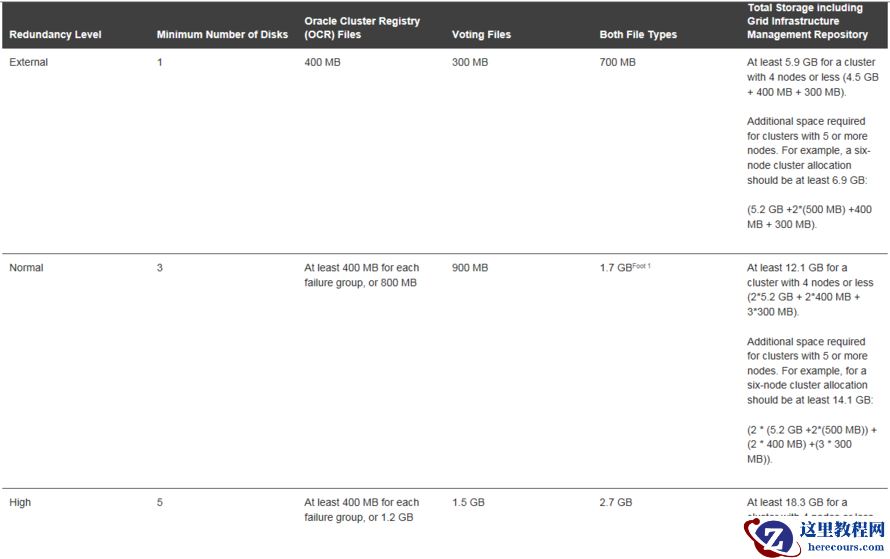

[root@RACNode01 ~]# fdisk /dev/sdb
Welcome to fdisk (util-linux 2.23.2).
Changes will remain in memory only, until you decide to write them.
Be careful before using the write command.
Device does not contain a recognized partition table
Building a new DOS disklabel with disk identifier 0xf6614091.
The device presents a logical sector size that is smaller than
the physical sector size. Aligning to a physical sector (or optimal
I/O) size boundary is recommended, or performance may be impacted.
Command (m for help): p
Disk /dev/sdb: 10.7 GB, 10737418240 bytes, 20971520 sectors
Units = sectors of 1 * 512 = 512 bytes
Sector size (logical/physical): 512 bytes / 4096 bytes
I/O size (minimum/optimal): 4096 bytes / 4096 bytes
Disk label type: dos
Disk identifier: 0xf6614091
   Device Boot      Start         End      Blocks   Id  System
Command (m for help): n
Partition type:
   p   primary (0 primary, 0 extended, 4 free)
   e   extended
Select (default p): p
Partition number (1-4, default 1): 1
First sector (2048-20971519, default 2048):
Using default value 2048
Last sector, +sectors or +size{K,M,G} (2048-20971519, default 20971519):
Using default value 20971519
Partition 1 of type Linux and of size 10 GiB is set
Command (m for help): p
Disk /dev/sdb: 10.7 GB, 10737418240 bytes, 20971520 sectors
Units = sectors of 1 * 512 = 512 bytes
Sector size (logical/physical): 512 bytes / 4096 bytes
I/O size (minimum/optimal): 4096 bytes / 4096 bytes
Disk label type: dos
Disk identifier: 0xf6614091
   Device Boot      Start         End      Blocks   Id  System
/dev/sdb1            2048    20971519    10484736   83  Linux
Command (m for help): w
The partition table has been altered!
Calling ioctl() to re-read partition table.
Syncing disks.
for i in b c d e f g h i ;
do
echo "KERNEL==\"sd*\", ENV{DEVTYPE}==\"disk\", SUBSYSTEM==\"block\", PROGRAM==\"/lib/udev/scsi_id -g -u -d \$devnode\",RESULT==\"`/lib/udev/scsi_id -g -u -d /dev/sd$i`\", SYMLINK+=\"asm-sd$i\", OWNER=\"grid\", GROUP=\"asmadmin\", MODE=\"0660\"" >> /etc/udev/rules.d/99-oracle-asmdevices.rules
done
# 加载rules文件,重新加载udev rule
/sbin/udevadm control --reload
# 检查新的设备名称
/sbin/udevadm trigger --type=devices --action=change
# 诊断udev rule
/sbin/udevadm test /sys/block/*
for i in b c d e f g h i ;
do
echo "KERNEL==\"sd*\", BUS==\"scsi\", PROGRAM==\"/sbin/scsi_id --whitelisted --replace-whitespace --device=/dev/\$name\",RESULT==\"`/sbin/scsi_id --whitelisted --replace-whitespace --device=/dev/sd$i`\", NAME=\"asm-sd$i\", OWNER=\"grid\",GROUP=\"asmadmin\", MODE=\"0660\"" >> /etc/udev/rules.d/99-oracle-asmdevices.rules
done
启动UDEV
/sbin/start_udev
ll -l /dev/asm*
lrwxrwxrwx 1 root root 3 May 26 11:11 /dev/asm-sdb -> sdb
lrwxrwxrwx 1 root root 3 May 26 11:11 /dev/asm-sdc -> sdc
lrwxrwxrwx 1 root root 3 May 26 11:11 /dev/asm-sdd -> sdd
lrwxrwxrwx 1 root root 3 May 26 11:11 /dev/asm-sde -> sde
lrwxrwxrwx 1 root root 3 May 26 11:11 /dev/asm-sdf -> sdf
lrwxrwxrwx 1 root root 3 May 26 11:11 /dev/asm-sdg -> sdg
lrwxrwxrwx 1 root root 3 May 26 11:11 /dev/asm-sdh -> sdh
lrwxrwxrwx 1 root root 3 May 26 11:11 /dev/asm-sdi -> sdi