很久没有进行oracle库打补丁的操作了,今天操作起来有点儿生疏,记录一下操作过程,加深印象。
从 2017 年 7 月开始, Oracle 对数据库和 GI(Grid Infrastructure) 12.2 及之后版本的主动修补程序进行了更改。 Oracle 从 12.2 版本开始补丁不在使用 PSU 、 SPU 的称呼了, 取而代之的为 RU (Release Updates) 和 RUR (Release Update Revisions)。
简单理解:
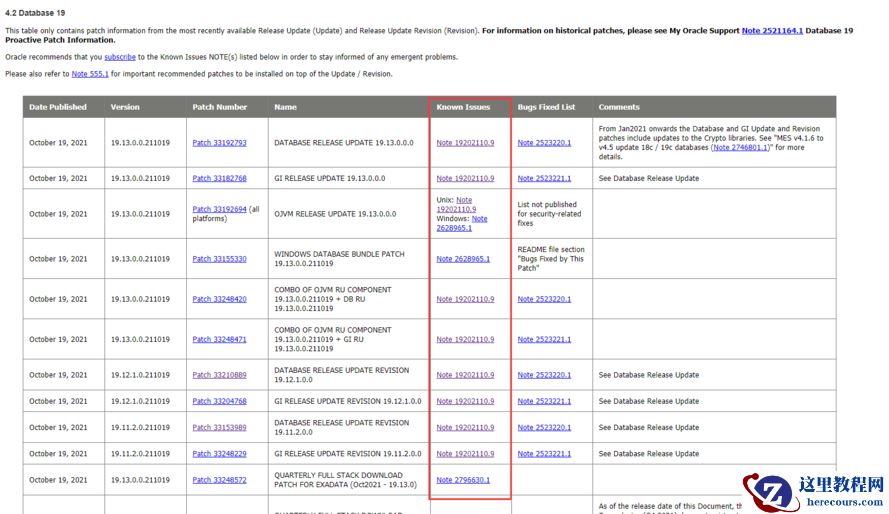
RU的版本第三位为0,相当于新的小版本。如 DB RU 19.13.0.0.211019
RUR的版本第三位非0,是已有小版本的再更新。如 GI RUR 19.12.1.0.211019 GI RUR 19.11.2.0.211019
RU和RUR可以互相做补丁,约束条件是 补丁号2、3位之和大于已有版本号。
补丁分为三类,即DB、GI、OJVM,分别是数据库、grid、java相关的补丁。操作方法有所区别,严格按照readme.html的内容,就不会出大问题。
工欲善其事必先利其器,正式打补丁前先要把家伙更新一下,
需要先安装
6880880
补丁。
地址:https://updates.oracle.com/download/6880880.html
从这里找到对应的补丁集:Primary Note for Database Proactive Patch Program (Doc ID 888.1)。需要保证操作系统和位数不要选错。一定要把已知的问题和解决/规避方法好好读读
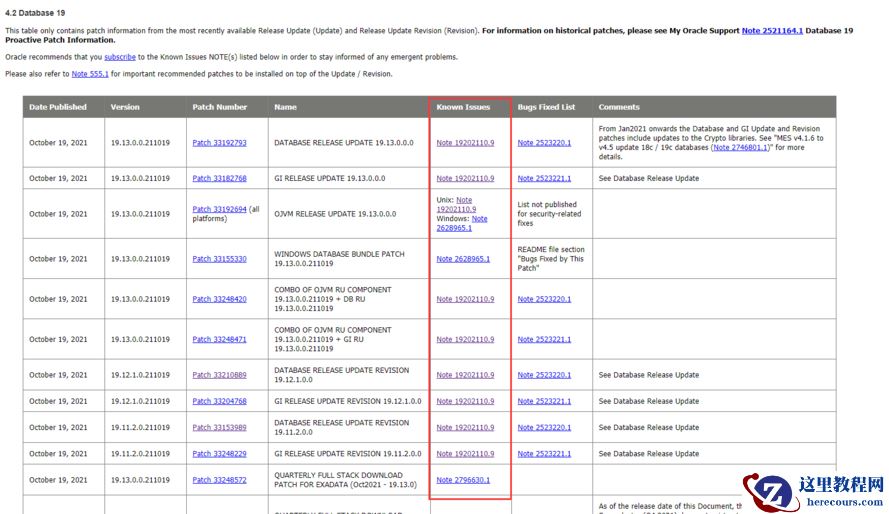 目标:单机oracle从19.3升级到19.12
$ mv p33210889_190000_Linux-x86-64.zip $ORACLE_HOME
$ cd $ORACLE_HOME
$ unzip p33210889_190000_Linux-x86-64.zip
$ cd 33210889/
--冲突检查:
$ opatch prereq CheckConflictAgainstOHWithDetail -ph ./
Oracle Interim Patch Installer version 12.2.0.1.28
Copyright (c) 2021, Oracle Corporation. All rights reserved.
PREREQ session
Oracle Home : /oracle/database/product/19.0.0/dbhome_1
Central Inventory : /oracle/oraInventory
from : /oracle/database/product/19.0.0/dbhome_1/oraInst.loc
OPatch version : 12.2.0.1.28
OUI version : 12.2.0.7.0
Log file location : /oracle/database/product/19.0.0/dbhome_1/cfgtoollogs/opatch/opatch2021-12-01_16-02-36PM_1.log
Invoking prereq "checkconflictagainstohwithdetail"
Prereq "checkConflictAgainstOHWithDetail" passed.
OPatch succeeded.
尝试使用:
$ opatch apply
Oracle Interim Patch Installer version 12.2.0.1.28
Copyright (c) 2021, Oracle Corporation. All rights reserved.
Oracle Home : /oracle/database/product/19.0.0/dbhome_1
Central Inventory : /oracle/oraInventory
from : /oracle/database/product/19.0.0/dbhome_1/oraInst.loc
OPatch version : 12.2.0.1.28
OUI version : 12.2.0.7.0
Log file location : /oracle/database/product/19.0.0/dbhome_1/cfgtoollogs/opatch/opatch2021-12-01_16-03-21PM_1.log
Verifying environment and performing prerequisite checks...
Prerequisite check "CheckSystemCommandAvailable" failed.
The details are:
Missing command :fuser
UtilSession failed:
Prerequisite check "CheckSystemCommandAvailable" failed.
Log file location: /oracle/database/product/19.0.0/dbhome_1/cfgtoollogs/opatch/opatch2021-12-01_16-03-21PM_1.log
OPatch failed with error code 73
安装fuser包:
# yum search fuser
Loaded plugins: fastestmirror
Repodata is over 2 weeks old. Install yum-cron? Or run: yum makecache fast
Loading mirror speeds from cached hostfile
* base: mirrors.bupt.edu.cn
* extras: mirrors.bfsu.edu.cn
* updates: mirrors.bupt.edu.cn
============================================================================= Matched: fuser ==============================================================================
psmisc.x86_64 : Utilities for managing processes on your system
# yum install psmisc.x86_64
Loaded plugins: fastestmirror
Loading mirror speeds from cached hostfile
* base: mirrors.bupt.edu.cn
* extras: mirrors.bfsu.edu.cn
* updates: mirrors.bupt.edu.cn
base | 3.6 kB 00:00:00
extras | 2.9 kB 00:00:00
updates | 2.9 kB 00:00:00
(1/4): extras/7/x86_64/primary_db | 243 kB 00:00:00
(2/4): base/7/x86_64/primary_db | 6.1 MB 00:00:00
(3/4): base/7/x86_64/group_gz | 153 kB 00:00:01
(4/4): updates/7/x86_64/primary_db | 12 MB 00:00:03
Resolving Dependencies
--> Running transaction check
---> Package psmisc.x86_64 0:22.20-17.el7 will be installed
--> Finished Dependency Resolution
Dependencies Resolved
===========================================================================================================================================================================
Package Arch Version Repository Size
===========================================================================================================================================================================
Installing:
psmisc x86_64 22.20-17.el7 base 141 k
Transaction Summary
===========================================================================================================================================================================
Install 1 Package
Total download size: 141 k
Installed size: 475 k
Is this ok [y/d/N]: y
Downloading packages:
psmisc-22.20-17.el7.x86_64.rpm | 141 kB 00:00:00
Running transaction check
Running transaction test
Transaction test succeeded
Running transaction
Installing : psmisc-22.20-17.el7.x86_64 1/1
Verifying : psmisc-22.20-17.el7.x86_64 1/1
Installed:
psmisc.x86_64 0:22.20-17.el7
Complete!
# su - oracle
Last login: Wed Dec 1 16:07:44 CST 2021 on pts/0
$ cd $ORACLE_HOME/33210889/
$ opatch prereq CheckConflictAgainstOHWithDetail -ph ./
Oracle Interim Patch Installer version 12.2.0.1.28
Copyright (c) 2021, Oracle Corporation. All rights reserved.
PREREQ session
Oracle Home : /oracle/database/product/19.0.0/dbhome_1
Central Inventory : /oracle/oraInventory
from : /oracle/database/product/19.0.0/dbhome_1/oraInst.loc
OPatch version : 12.2.0.1.28
OUI version : 12.2.0.7.0
Log file location : /oracle/database/product/19.0.0/dbhome_1/cfgtoollogs/opatch/opatch2021-12-01_16-10-07PM_1.log
Invoking prereq "checkconflictagainstohwithdetail"
Prereq "checkConflictAgainstOHWithDetail" passed.
OPatch succeeded.
--重新应用opatch
$ opatch apply
Oracle Interim Patch Installer version 12.2.0.1.28
Copyright (c) 2021, Oracle Corporation. All rights reserved.
Oracle Home : /oracle/database/product/19.0.0/dbhome_1
Central Inventory : /oracle/oraInventory
from : /oracle/database/product/19.0.0/dbhome_1/oraInst.loc
OPatch version : 12.2.0.1.28
OUI version : 12.2.0.7.0
Log file location : /oracle/database/product/19.0.0/dbhome_1/cfgtoollogs/opatch/opatch2021-12-01_16-10-36PM_1.log
Verifying environment and performing prerequisite checks...
Prerequisite check "CheckActiveFilesAndExecutables" failed.
The details are:
Following active executables are not used by opatch process :
/oracle/database/product/19.0.0/dbhome_1/bin/oracle
Following active executables are used by opatch process :
/oracle/database/product/19.0.0/dbhome_1/lib/libclntsh.so.19.1
/oracle/database/product/19.0.0/dbhome_1/lib/libasmclntsh19.so
/oracle/database/product/19.0.0/dbhome_1/bin/tnslsnr
UtilSession failed: Prerequisite check "CheckActiveFilesAndExecutables" failed.
Log file location: /oracle/database/product/19.0.0/dbhome_1/cfgtoollogs/opatch/opatch2021-12-01_16-10-36PM_1.log
对应日志中看到,是因为oracle和监听都启动着导致的。
[16:13:07][Dec 1, 2021 4:11:04 PM] [INFO] Prerequisite check "CheckActiveFilesAndExecutables" failed.
[16:13:07] The details are:
[16:13:07]
[16:13:07]
[16:13:07] Following active executables are not used by opatch process :
[16:13:07]
[16:13:07]
[16:13:07] /oracle/database/product/19.0.0/dbhome_1/bin/oracle
[16:13:07]
[16:13:07]
[16:13:07] Following active executables are used by opatch process :
[16:13:15] /oracle/database/product/19.0.0/dbhome_1/lib/libclntsh.so.19.1
[16:13:15] /oracle/database/product/19.0.0/dbhome_1/lib/libasmclntsh19.so
关库、停监听后,正常执行:
$ opatch apply
Oracle Interim Patch Installer version 12.2.0.1.28
Copyright (c) 2021, Oracle Corporation. All rights reserved.
Oracle Home : /oracle/database/product/19.0.0/dbhome_1
Central Inventory : /oracle/oraInventory
from : /oracle/database/product/19.0.0/dbhome_1/oraInst.loc
OPatch version : 12.2.0.1.28
OUI version : 12.2.0.7.0
Log file location : /oracle/database/product/19.0.0/dbhome_1/cfgtoollogs/opatch/opatch2021-12-01_16-18-11PM_1.log
Verifying environment and performing prerequisite checks...
OPatch continues with these patches: 33210889
Do you want to proceed? [y|n]
y
User Responded with: Y
All checks passed.
Please shutdown Oracle instances running out of this ORACLE_HOME on the local system.
(Oracle Home = '/oracle/database/product/19.0.0/dbhome_1')
Is the local system ready for patching? [y|n]
y
User Responded with: Y
Backing up files...
Applying interim patch '33210889' to OH '/oracle/database/product/19.0.0/dbhome_1'
ApplySession: Optional component(s) [ oracle.network.gsm, 19.0.0.0.0 ] , [ oracle.rdbms.ic, 19.0.0.0.0 ] , [ oracle.rdbms.tg4db2, 19.0.0.0.0 ] , [ oracle.tfa, 19.0.0.0.0 ] , [ oracle.options.olap, 19.0.0.0.0 ] , [ oracle.options.olap.api, 19.0.0.0.0 ] , [ oracle.network.cman, 19.0.0.0.0 ] , [ oracle.rdbms.tg4msql, 19.0.0.0.0 ] , [ oracle.ons.cclient, 19.0.0.0.0 ] , [ oracle.oid.client, 19.0.0.0.0 ] , [ oracle.rdbms.tg4sybs, 19.0.0.0.0 ] , [ oracle.net.cman, 19.0.0.0.0 ] , [ oracle.rdbms.tg4ifmx, 19.0.0.0.0 ] , [ oracle.xdk.companion, 19.0.0.0.0 ] , [ oracle.ons.eons.bwcompat, 19.0.0.0.0 ] , [ oracle.rdbms.tg4tera, 19.0.0.0.0 ] , [ oracle.jdk, 1.8.0.191.0 ] not present in the Oracle Home or a higher version is found.
Patching component oracle.perlint, 5.28.1.0.0...
Patching component oracle.rdbms.locator, 19.0.0.0.0...
Patching component oracle.perlint.modules, 5.28.1.0.0...
Patching component oracle.rdbms, 19.0.0.0.0...
Patching component oracle.rdbms.util, 19.0.0.0.0...
Patching component oracle.rdbms.rsf, 19.0.0.0.0...
Patching component oracle.assistants.acf, 19.0.0.0.0...
……
Patching component oracle.sdo.locator.jrf, 19.0.0.0.0...
Patching component oracle.sqlplus, 19.0.0.0.0...
Copy failed from '/oracle/database/product/19.0.0/dbhome_1/33210889/files/sqlplus/admin/help/helpus.sql' to '/oracle/database/product/19.0.0/dbhome_1/sqlplus/admin/help/helpus.sql'...
Please verify all applications associated with the Oracle Home '/oracle/database/product/19.0.0/dbhome_1' are shut down. If this is AIX, please perform solution documented in Note 739963.1 on
Do you want to retry copying the file? [y|n]
Could not recognize input. Please re-enter.
Could not recognize input. Please re-enter.
y
User Responded with: Y
……
Patching component oracle.jdk, 1.8.0.201.0...
The following actions have failed:
Copy failed from '/oracle/database/product/19.0.0/dbhome_1/33210889/files/sqlplus/admin/help/helpus.sql' to '/oracle/database/product/19.0.0/dbhome_1/sqlplus/admin/help/helpus.sql'...
Do you want to proceed? [y|n]y
User Responded with: Y
Patch 33210889 successfully applied.
Sub-set patch [29517242] has become inactive due to the application of a super-set patch [33210889].
Please refer to Doc ID 2161861.1 for any possible further required actions.
OPatch Session completed with warnings.
Log file location: /oracle/database/product/19.0.0/dbhome_1/cfgtoollogs/opatch/opatch2021-12-01_16-18-11PM_1.log
OPatch completed with warnings.
warning是由于help信息缺失导致的,可以忽略。
启动数据库,然后执行:
$ ./datapatch -verbose
SQL Patching tool version 19.12.1.0.0 Production on Wed Dec 1 16:25:54 2021
Copyright (c) 2012, 2021, Oracle. All rights reserved.
Log file for this invocation: /oracle/database/cfgtoollogs/sqlpatch/sqlpatch_15771_2021_12_01_16_25_54/sqlpatch_invocation.log
Connecting to database...OK
Gathering database info...done
Bootstrapping registry and package to current versions...done
Determining current state...done
Current state of interim SQL patches:
No interim patches found
Current state of release update SQL patches:
Binary registry:
19.12.1.0.0 Release_Update_Revision 211013043447: Installed
SQL registry:
Applied 19.3.0.0.0 Release_Update 190410122720 successfully on 19-JUN-19 05.34.25.732019 PM
Adding patches to installation queue and performing prereq checks...done
Installation queue:
No interim patches need to be rolled back
Patch 33210889 (Database Release Update Revision : 19.12.1.0.211019 (33210889)):
Apply from 19.3.0.0.0 Release_Update 190410122720 to 19.12.1.0.0 Release_Update_Revision 211013043447
No interim patches need to be applied
Installing patches...
Patch installation complete. Total patches installed: 1
Validating logfiles...done
Patch 33210889 apply: SUCCESS
logfile: /oracle/database/cfgtoollogs/sqlpatch/33210889/24463836/33210889_apply_ORCL_2021Dec01_16_26_38.log (no errors)
SQL Patching tool complete on Wed Dec 1 16:33:03 2021
$ORACLE_HOME/perl/bin/perl $ORACLE_HOME/rdbms/admin/catcon.pl -n 1 -e -b utlrp -d $ORACLE_HOME/rdbms/admin utlrp.sql
catcon::set_log_file_base_path: ALL catcon-related output will be written to [/oracle/database/product/19.0.0/dbhome_1/rdbms/admin/utlrp_catcon_16787.lst]
catcon::set_log_file_base_path: catcon: See [/oracle/database/product/19.0.0/dbhome_1/rdbms/admin/utlrp*.log] files for output generated by scripts
catcon::set_log_file_base_path: catcon: See [/oracle/database/product/19.0.0/dbhome_1/rdbms/admin/utlrp_*.lst] files for spool files, if any
catcon.pl: completed successfully
按照readme.html文件的步骤,还应该进行rman相关的升级,但由于这是一套测试库,没提供sys密码,也确实不用rman,就省略了。
补丁操作到此完成。
有不合理的地方还请看到的各位同行拍砖~
目标:单机oracle从19.3升级到19.12
$ mv p33210889_190000_Linux-x86-64.zip $ORACLE_HOME
$ cd $ORACLE_HOME
$ unzip p33210889_190000_Linux-x86-64.zip
$ cd 33210889/
--冲突检查:
$ opatch prereq CheckConflictAgainstOHWithDetail -ph ./
Oracle Interim Patch Installer version 12.2.0.1.28
Copyright (c) 2021, Oracle Corporation. All rights reserved.
PREREQ session
Oracle Home : /oracle/database/product/19.0.0/dbhome_1
Central Inventory : /oracle/oraInventory
from : /oracle/database/product/19.0.0/dbhome_1/oraInst.loc
OPatch version : 12.2.0.1.28
OUI version : 12.2.0.7.0
Log file location : /oracle/database/product/19.0.0/dbhome_1/cfgtoollogs/opatch/opatch2021-12-01_16-02-36PM_1.log
Invoking prereq "checkconflictagainstohwithdetail"
Prereq "checkConflictAgainstOHWithDetail" passed.
OPatch succeeded.
尝试使用:
$ opatch apply
Oracle Interim Patch Installer version 12.2.0.1.28
Copyright (c) 2021, Oracle Corporation. All rights reserved.
Oracle Home : /oracle/database/product/19.0.0/dbhome_1
Central Inventory : /oracle/oraInventory
from : /oracle/database/product/19.0.0/dbhome_1/oraInst.loc
OPatch version : 12.2.0.1.28
OUI version : 12.2.0.7.0
Log file location : /oracle/database/product/19.0.0/dbhome_1/cfgtoollogs/opatch/opatch2021-12-01_16-03-21PM_1.log
Verifying environment and performing prerequisite checks...
Prerequisite check "CheckSystemCommandAvailable" failed.
The details are:
Missing command :fuser
UtilSession failed:
Prerequisite check "CheckSystemCommandAvailable" failed.
Log file location: /oracle/database/product/19.0.0/dbhome_1/cfgtoollogs/opatch/opatch2021-12-01_16-03-21PM_1.log
OPatch failed with error code 73
安装fuser包:
# yum search fuser
Loaded plugins: fastestmirror
Repodata is over 2 weeks old. Install yum-cron? Or run: yum makecache fast
Loading mirror speeds from cached hostfile
* base: mirrors.bupt.edu.cn
* extras: mirrors.bfsu.edu.cn
* updates: mirrors.bupt.edu.cn
============================================================================= Matched: fuser ==============================================================================
psmisc.x86_64 : Utilities for managing processes on your system
# yum install psmisc.x86_64
Loaded plugins: fastestmirror
Loading mirror speeds from cached hostfile
* base: mirrors.bupt.edu.cn
* extras: mirrors.bfsu.edu.cn
* updates: mirrors.bupt.edu.cn
base | 3.6 kB 00:00:00
extras | 2.9 kB 00:00:00
updates | 2.9 kB 00:00:00
(1/4): extras/7/x86_64/primary_db | 243 kB 00:00:00
(2/4): base/7/x86_64/primary_db | 6.1 MB 00:00:00
(3/4): base/7/x86_64/group_gz | 153 kB 00:00:01
(4/4): updates/7/x86_64/primary_db | 12 MB 00:00:03
Resolving Dependencies
--> Running transaction check
---> Package psmisc.x86_64 0:22.20-17.el7 will be installed
--> Finished Dependency Resolution
Dependencies Resolved
===========================================================================================================================================================================
Package Arch Version Repository Size
===========================================================================================================================================================================
Installing:
psmisc x86_64 22.20-17.el7 base 141 k
Transaction Summary
===========================================================================================================================================================================
Install 1 Package
Total download size: 141 k
Installed size: 475 k
Is this ok [y/d/N]: y
Downloading packages:
psmisc-22.20-17.el7.x86_64.rpm | 141 kB 00:00:00
Running transaction check
Running transaction test
Transaction test succeeded
Running transaction
Installing : psmisc-22.20-17.el7.x86_64 1/1
Verifying : psmisc-22.20-17.el7.x86_64 1/1
Installed:
psmisc.x86_64 0:22.20-17.el7
Complete!
# su - oracle
Last login: Wed Dec 1 16:07:44 CST 2021 on pts/0
$ cd $ORACLE_HOME/33210889/
$ opatch prereq CheckConflictAgainstOHWithDetail -ph ./
Oracle Interim Patch Installer version 12.2.0.1.28
Copyright (c) 2021, Oracle Corporation. All rights reserved.
PREREQ session
Oracle Home : /oracle/database/product/19.0.0/dbhome_1
Central Inventory : /oracle/oraInventory
from : /oracle/database/product/19.0.0/dbhome_1/oraInst.loc
OPatch version : 12.2.0.1.28
OUI version : 12.2.0.7.0
Log file location : /oracle/database/product/19.0.0/dbhome_1/cfgtoollogs/opatch/opatch2021-12-01_16-10-07PM_1.log
Invoking prereq "checkconflictagainstohwithdetail"
Prereq "checkConflictAgainstOHWithDetail" passed.
OPatch succeeded.
--重新应用opatch
$ opatch apply
Oracle Interim Patch Installer version 12.2.0.1.28
Copyright (c) 2021, Oracle Corporation. All rights reserved.
Oracle Home : /oracle/database/product/19.0.0/dbhome_1
Central Inventory : /oracle/oraInventory
from : /oracle/database/product/19.0.0/dbhome_1/oraInst.loc
OPatch version : 12.2.0.1.28
OUI version : 12.2.0.7.0
Log file location : /oracle/database/product/19.0.0/dbhome_1/cfgtoollogs/opatch/opatch2021-12-01_16-10-36PM_1.log
Verifying environment and performing prerequisite checks...
Prerequisite check "CheckActiveFilesAndExecutables" failed.
The details are:
Following active executables are not used by opatch process :
/oracle/database/product/19.0.0/dbhome_1/bin/oracle
Following active executables are used by opatch process :
/oracle/database/product/19.0.0/dbhome_1/lib/libclntsh.so.19.1
/oracle/database/product/19.0.0/dbhome_1/lib/libasmclntsh19.so
/oracle/database/product/19.0.0/dbhome_1/bin/tnslsnr
UtilSession failed: Prerequisite check "CheckActiveFilesAndExecutables" failed.
Log file location: /oracle/database/product/19.0.0/dbhome_1/cfgtoollogs/opatch/opatch2021-12-01_16-10-36PM_1.log
对应日志中看到,是因为oracle和监听都启动着导致的。
[16:13:07][Dec 1, 2021 4:11:04 PM] [INFO] Prerequisite check "CheckActiveFilesAndExecutables" failed.
[16:13:07] The details are:
[16:13:07]
[16:13:07]
[16:13:07] Following active executables are not used by opatch process :
[16:13:07]
[16:13:07]
[16:13:07] /oracle/database/product/19.0.0/dbhome_1/bin/oracle
[16:13:07]
[16:13:07]
[16:13:07] Following active executables are used by opatch process :
[16:13:15] /oracle/database/product/19.0.0/dbhome_1/lib/libclntsh.so.19.1
[16:13:15] /oracle/database/product/19.0.0/dbhome_1/lib/libasmclntsh19.so
关库、停监听后,正常执行:
$ opatch apply
Oracle Interim Patch Installer version 12.2.0.1.28
Copyright (c) 2021, Oracle Corporation. All rights reserved.
Oracle Home : /oracle/database/product/19.0.0/dbhome_1
Central Inventory : /oracle/oraInventory
from : /oracle/database/product/19.0.0/dbhome_1/oraInst.loc
OPatch version : 12.2.0.1.28
OUI version : 12.2.0.7.0
Log file location : /oracle/database/product/19.0.0/dbhome_1/cfgtoollogs/opatch/opatch2021-12-01_16-18-11PM_1.log
Verifying environment and performing prerequisite checks...
OPatch continues with these patches: 33210889
Do you want to proceed? [y|n]
y
User Responded with: Y
All checks passed.
Please shutdown Oracle instances running out of this ORACLE_HOME on the local system.
(Oracle Home = '/oracle/database/product/19.0.0/dbhome_1')
Is the local system ready for patching? [y|n]
y
User Responded with: Y
Backing up files...
Applying interim patch '33210889' to OH '/oracle/database/product/19.0.0/dbhome_1'
ApplySession: Optional component(s) [ oracle.network.gsm, 19.0.0.0.0 ] , [ oracle.rdbms.ic, 19.0.0.0.0 ] , [ oracle.rdbms.tg4db2, 19.0.0.0.0 ] , [ oracle.tfa, 19.0.0.0.0 ] , [ oracle.options.olap, 19.0.0.0.0 ] , [ oracle.options.olap.api, 19.0.0.0.0 ] , [ oracle.network.cman, 19.0.0.0.0 ] , [ oracle.rdbms.tg4msql, 19.0.0.0.0 ] , [ oracle.ons.cclient, 19.0.0.0.0 ] , [ oracle.oid.client, 19.0.0.0.0 ] , [ oracle.rdbms.tg4sybs, 19.0.0.0.0 ] , [ oracle.net.cman, 19.0.0.0.0 ] , [ oracle.rdbms.tg4ifmx, 19.0.0.0.0 ] , [ oracle.xdk.companion, 19.0.0.0.0 ] , [ oracle.ons.eons.bwcompat, 19.0.0.0.0 ] , [ oracle.rdbms.tg4tera, 19.0.0.0.0 ] , [ oracle.jdk, 1.8.0.191.0 ] not present in the Oracle Home or a higher version is found.
Patching component oracle.perlint, 5.28.1.0.0...
Patching component oracle.rdbms.locator, 19.0.0.0.0...
Patching component oracle.perlint.modules, 5.28.1.0.0...
Patching component oracle.rdbms, 19.0.0.0.0...
Patching component oracle.rdbms.util, 19.0.0.0.0...
Patching component oracle.rdbms.rsf, 19.0.0.0.0...
Patching component oracle.assistants.acf, 19.0.0.0.0...
……
Patching component oracle.sdo.locator.jrf, 19.0.0.0.0...
Patching component oracle.sqlplus, 19.0.0.0.0...
Copy failed from '/oracle/database/product/19.0.0/dbhome_1/33210889/files/sqlplus/admin/help/helpus.sql' to '/oracle/database/product/19.0.0/dbhome_1/sqlplus/admin/help/helpus.sql'...
Please verify all applications associated with the Oracle Home '/oracle/database/product/19.0.0/dbhome_1' are shut down. If this is AIX, please perform solution documented in Note 739963.1 on
Do you want to retry copying the file? [y|n]
Could not recognize input. Please re-enter.
Could not recognize input. Please re-enter.
y
User Responded with: Y
……
Patching component oracle.jdk, 1.8.0.201.0...
The following actions have failed:
Copy failed from '/oracle/database/product/19.0.0/dbhome_1/33210889/files/sqlplus/admin/help/helpus.sql' to '/oracle/database/product/19.0.0/dbhome_1/sqlplus/admin/help/helpus.sql'...
Do you want to proceed? [y|n]y
User Responded with: Y
Patch 33210889 successfully applied.
Sub-set patch [29517242] has become inactive due to the application of a super-set patch [33210889].
Please refer to Doc ID 2161861.1 for any possible further required actions.
OPatch Session completed with warnings.
Log file location: /oracle/database/product/19.0.0/dbhome_1/cfgtoollogs/opatch/opatch2021-12-01_16-18-11PM_1.log
OPatch completed with warnings.
warning是由于help信息缺失导致的,可以忽略。
启动数据库,然后执行:
$ ./datapatch -verbose
SQL Patching tool version 19.12.1.0.0 Production on Wed Dec 1 16:25:54 2021
Copyright (c) 2012, 2021, Oracle. All rights reserved.
Log file for this invocation: /oracle/database/cfgtoollogs/sqlpatch/sqlpatch_15771_2021_12_01_16_25_54/sqlpatch_invocation.log
Connecting to database...OK
Gathering database info...done
Bootstrapping registry and package to current versions...done
Determining current state...done
Current state of interim SQL patches:
No interim patches found
Current state of release update SQL patches:
Binary registry:
19.12.1.0.0 Release_Update_Revision 211013043447: Installed
SQL registry:
Applied 19.3.0.0.0 Release_Update 190410122720 successfully on 19-JUN-19 05.34.25.732019 PM
Adding patches to installation queue and performing prereq checks...done
Installation queue:
No interim patches need to be rolled back
Patch 33210889 (Database Release Update Revision : 19.12.1.0.211019 (33210889)):
Apply from 19.3.0.0.0 Release_Update 190410122720 to 19.12.1.0.0 Release_Update_Revision 211013043447
No interim patches need to be applied
Installing patches...
Patch installation complete. Total patches installed: 1
Validating logfiles...done
Patch 33210889 apply: SUCCESS
logfile: /oracle/database/cfgtoollogs/sqlpatch/33210889/24463836/33210889_apply_ORCL_2021Dec01_16_26_38.log (no errors)
SQL Patching tool complete on Wed Dec 1 16:33:03 2021
$ORACLE_HOME/perl/bin/perl $ORACLE_HOME/rdbms/admin/catcon.pl -n 1 -e -b utlrp -d $ORACLE_HOME/rdbms/admin utlrp.sql
catcon::set_log_file_base_path: ALL catcon-related output will be written to [/oracle/database/product/19.0.0/dbhome_1/rdbms/admin/utlrp_catcon_16787.lst]
catcon::set_log_file_base_path: catcon: See [/oracle/database/product/19.0.0/dbhome_1/rdbms/admin/utlrp*.log] files for output generated by scripts
catcon::set_log_file_base_path: catcon: See [/oracle/database/product/19.0.0/dbhome_1/rdbms/admin/utlrp_*.lst] files for spool files, if any
catcon.pl: completed successfully
按照readme.html文件的步骤,还应该进行rman相关的升级,但由于这是一套测试库,没提供sys密码,也确实不用rman,就省略了。
补丁操作到此完成。
有不合理的地方还请看到的各位同行拍砖~