1 系统概述业务系统需要更换SSD存储设备,需要将所有的磁盘替换掉。更换数据磁盘、OCR 、表决磁盘后,在节点1重启集群进行验证,发现数据库实例的资源状态为OFFLINE,使用集群命令servctl也不能启动,报ORA-15017: diskgroup "OCR" cannot be mounted 2 启动数据库,查看集群状态,发现数据库资源状态为offline启动数据库SYS@test1 >startupORACLE instance started.Total System Global Area 2.3517E+11 bytesFixed Size 2267464 bytesVariable Size 5.0466E+10 bytesDatabase Buffers 1.8415E+11 bytesRedo Buffers 553766912 bytesDatabase mounted.Database opened.查看数据库是否启动[grid@testdb1 ~]$ ps -ef|grep smonroot 13667 1 8 Mar26 ? 12:56:12 /opt/app/11.2.0.4/grid/bin/osysmond.bingrid 15764 1 0 Mar26 ? 00:00:17 asm_smon_+ASM1grid 17875 1 0 Mar26 ? 00:26:00 ora_smon_test1grid 163774 163708 0 15:22 pts/1 00:00:00 grep smon查看集群状态,发现节点1数据库实例的状态不对ora.test.db1 ONLINE OFFLINE Instance Shutdown2 ONLINE ONLINE testdb2 Open3 ONLINE ONLINE testdb3 Open 3 关闭数据库,使用集群命令进行启动,发现报错的原因为没有OCR磁盘组,此磁盘组在1小时前已经进行替换和删除。SYS@test1 >shutdown immediate;Database closed.Database dismounted.ORACLE instance shut down.SYS@test1 >exit试着用集群命令启动,发现报错[grid@testdb1 ~]$ srvctl start instance -d test -i test1PRCR-1013 : Failed to start resource ora.test.dbPRCR-1064 : Failed to start resource ora.test.db on node testdb1CRS-5017: The resource action "ora.OCR.dg start" encountered the following error:ORA-15032: not all alterations performedORA-15017: diskgroup "OCR" cannot be mountedORA-15040: diskgroup is incomplete. For details refer to "(:CLSN00107:)" in "/opt/app/11.2.0.4/grid/log/testdb1/agent/crsd/oraagent_grid//oraagent_grid.log".CRS-2674: Start of 'ora.OCR.dg' on 'testdb1' failed 4 查看报错信息的trace文件,还是在寻找OCR磁盘组 2022-03-26 02:23:40.443: [ora.asm][1424000768]{1:20237:2} [check] AsmProxyAgent::createAsmOcrKeys host: testdb1 oracleSid_lc:+asm1 oracleSid_uc: +ASM1 tempHost1: testdb1.+asm1[ OCRAPI][1424000768]a_is_valid_user_group: User [oracle] does not match with init user[ OCRUTL][1424000768]u_fill_errorbuf: Error Info : [User [oracle] does not match with initialized user][ OCRAPI][1424000768]a_create_n_set_key:THE SECURITY ATTRIBUTE PASSED is invalid2022-03-26 02:23:40.454: [ OCRAPI][1424000768]a_batch_execute: Check batch exec failed [5]2022-03-26 02:23:40.454: [ OCRAPI][1424000768]a_batch_execute: Failed to execute batch. Return [5]2022-03-26 02:23:40.454: [ora.asm][1424000768]{1:20237:2} [check] OcrBatch Execute failed 52022-03-26 02:23:40.455: [ora.asm][1424000768]{1:20237:2} [check] AsmProxyAgent::createAsmOcrKeys failed[ OCRUTL][1424000768]u_check_tag: Tag check failed on 0th comparison for [PROCRKEY]. Ptr passed was [40446f0] Byte was [0]2022-03-26 02:23:40.455: [ora.asm][1424000768]{1:20237:2} [check] AsmProxyAgent::createAsmOcrKeys exit }2022-03-26 02:23:40.455: [ora.asm][1424000768]{1:20237:2} [check] CrsCmd::ClscrsCmdData::stat entity 1 statflag 33 useFilter 02022-03-26 02:23:40.477: [ora.OCR.dg][787871488]{1:20237:207} [start] ORA-15032: not all alterations performedORA-15017: diskgroup "OCR" cannot be mountedORA-15040: diskgroup is incomplete2022-03-26 02:23:40.478: [ USRTHRD][1424000768]{1:20237:2} CrsCmd::ClscrsCmdData::destroy2022-03-26 02:23:40.478: [ora.OCR.dg][787871488]{1:20237:207} [start] clsnUtils::error Exception type=2 string=CRS-5017: The resource action "ora.OCR.dg start" encountered the following error:ORA-15032: not all alterations performedORA-15017: diskgroup "OCR" cannot be mountedORA-15040: diskgroup is incomplete. For details refer to "(:CLSN00107:)" in "/opt/app/11.2.0.4/grid/log/testdb1/agent/crsd/oraagent_grid//oraagent_grid.log". 5 原因分析根据如上信息,可以确定集群需要OCR磁盘组,但此磁盘组由于更换存储设备,已经进行了删除,迁移到新的磁盘组下。故判断是由于将数据库相关信息注册到OCR磁盘组下,导致集群状态不正常及不能使用集群命令启动数据库。查看20分钟官方文档,未找到合适的官方文档,经过思考,认为就是集群注册信息在老的OCR磁盘组下,故可以将数据库及实例的集群注册信息删除,并重建,估计就恢复正常了。经测试,一切OK。 5.1 关闭所有数据库实例 5.2 使用如下命令删除数据库资源的相关信息删除:cd /opt/app/11.2.0.4/grid/bin./srvctl remove database -d test./srvctl remove instance -d test -i test1./srvctl remove instance -d test -i test2./srvctl remove instance -d test -i test3 5.3 使用如下命令添加数据库资源的相关信息添加:srvctl add database -d test -o $ORACLE_HOMEsrvctl add instance -d test -i test1 -n testdb1srvctl add instance -d test -i test2 -n testdb2srvctl add instance -d test -i test3 -n testdb3 5.4 使用集群命令启动数据库,并查看集群信息,发现集群信息已经恢复正常ora.test.db1 ONLINE ONLINE testdb1 Open2 ONLINE ONLINE testdb2 Open3 ONLINE ONLINE testdb3 Open
替换OCR和表决磁盘后,重启集群,数据库资源的集群状态为OFFLINE
来源:这里教程网
时间:2026-03-03 17:32:26
作者:
编辑推荐:
- 墨天轮最受DBA欢迎的数据库技术文档-故障处理案例篇03-03
- 东航空难为什么找不见人却能找着身份证,难道身份证不被烧毁吗?03-03
- 替换OCR和表决磁盘后,重启集群,数据库资源的集群状态为OFFLINE03-03
- OGG的replicat进程的Time Since Chkpt一直增加,进程处于假死状态03-03
- 数据库创建组件时报错ORA-30554: XDB.XDB$ACL_XIDX is disabled03-03
- 无线网性能质量,决定了办公学习效率03-03
- MPT可以实现轻客户端和数据追溯通过StateRoot可以查询到区块的状态03-03
- [重庆思庄每日技术分享]-11g rac scan ip 如何手动切换到其他节点上03-03
相关推荐
-

-
-
-
-
-
-
-
-
-
-
-
-
-
-

雷神推出 MIX PRO II 迷你主机:基于 Ultra 200H,玻璃上盖 + ARGB 灯效
2 月 9 日消息,雷神 (THUNDEROBOT) 现已宣布推出基于英
-

制造商 Musnap 推出彩色墨水屏电纸书 Ocean C:支持手写笔、第三方安卓应用
2 月 10 日消息,制造商 Musnap 现已在海外推出一款 Oce

热文推荐
- 东航空难为什么找不见人却能找着身份证,难道身份证不被烧毁吗?
东航空难为什么找不见人却能找着身份证,难道身份证不被烧毁吗?
26-03-03 - OGG的replicat进程的Time Since Chkpt一直增加,进程处于假死状态
- 《Oracle 19c从入门到精通(视频教学超值版)》简介

《Oracle 19c从入门到精通(视频教学超值版)》简介
26-03-03 - 职业教育:旧挑战、后来者、新方向
职业教育:旧挑战、后来者、新方向
26-03-03 - 云安对于数据中心容灾恢复及数据库监控
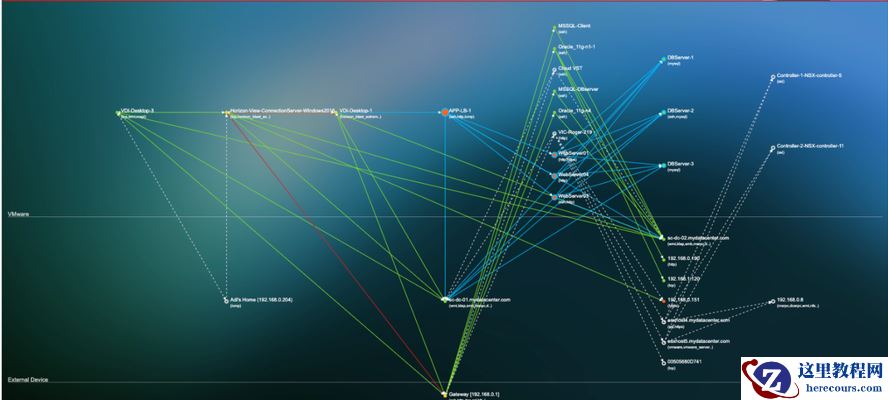
云安对于数据中心容灾恢复及数据库监控
26-03-03 - 云安对于物理服务器监控
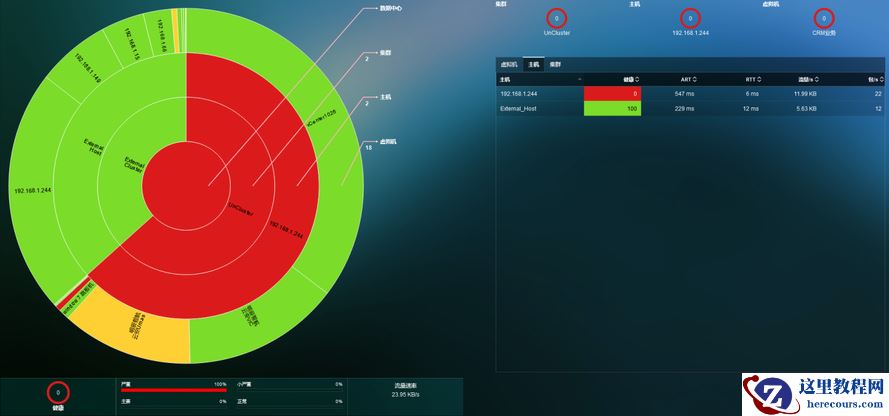
云安对于物理服务器监控
26-03-03 - MPT可以实现轻客户端和数据追溯通过StateRoot可以查询到区块的状态
- QDecoder更名o2k!新增了这个功能!
QDecoder更名o2k!新增了这个功能!
26-03-03 - 【NULL】Oracle null值介绍
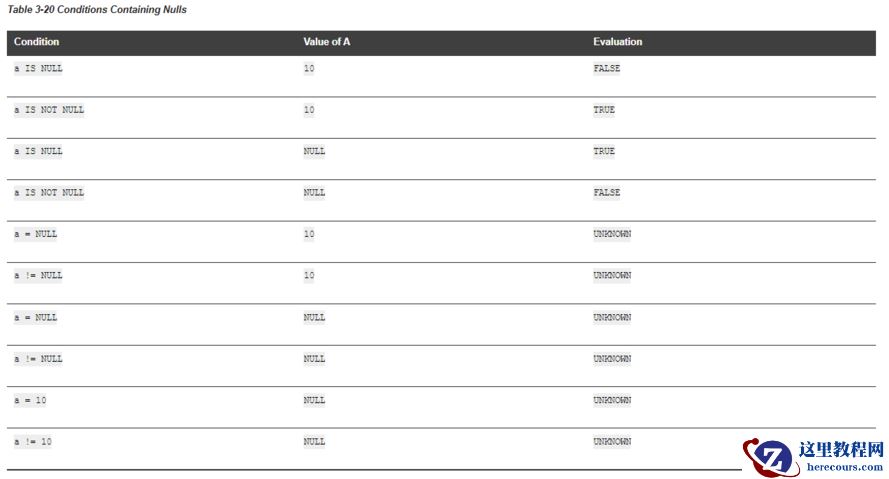
【NULL】Oracle null值介绍
26-03-03 - 抖音拉拢搜狐,版权战转折来了?
抖音拉拢搜狐,版权战转折来了?
26-03-03