在帮助业务部门迁移数据时,使用impdp进行数据加载时报错,错误信息如下所示。
报错现象
[oracle@zkrkf dpdump]$ impdp '"/ as sysdba"'  directory=DATA_PUMP_DIR dumpfile=0704.dump  logfile=0704_imp.log
Import: Release 19.0.0.0.0 - Production on Thu Jul 4 08:49:19 2024
Version 19.9.0.0.0
Copyright (c) 1982, 2019, Oracle and/or its affiliates.  All rights reserved.
Connected to: Oracle Database 19c Enterprise Edition Release 19.0.0.0.0 - Production
ORA-39002: invalid operation
ORA-39405: Oracle Data Pump does not support importing from a source database with TSTZ version 42 into a target database with TSTZ version 32.
错误提示信息已经非常显示,源端数据库的TSTZ版本为42,而目标端数据库为32,所以不支持这个数据导入操作。检查发现源端数据库版本为Version 19.22.0.0.0,而目标端数据库版本为Version 19.9.0.0.0。要解决这个问题,有两种方法:一种可以将目标端数据库升级至与源端相同的版本;另一种也可以单独升级目标端的TSTZ版本。 参考如下Mos文章 ORA-39405: Oracle Data Pump Does Not Support Importing From A Source Database With TSTZ Version (Doc ID 2793311.1) Oracle Database - Enterprise Edition - Version 19.0.0.0 and later Got below error while running import: ORA-39405: Oracle Data Pump does not support importing from a source database with TSTZ version 35 into a target database with TSTZ version 34 CHANGES Doing import with mismatch DST TZ version. CAUSE Oracle Data Pump does not support importing from a source database with TSTZ version 35 or 36 into a target database with TSTZ version 34. OR ORA-39405: Oracle Data Pump does not support importing from a source database with TSTZ version 34 into a target database with TSTZ version 32. This error is expected because the Oracle Data Pump does not support importing from a source database with higher TSTZ version into a target database with lower TSTZ version. Applying the DSTv34 update for the Oracle Database (Doc ID 2602555.1) Applying the DSTv36 update for the Oracle Database(Doc ID 2767770.1) Applying the DSTv35 update for the Oracle Database(Doc ID 2676922.1) for any latest DST patches, refer this document section C.1) Oracle RDBMS and OJVM DST-related notes Updated DST Transitions and New Time Zones in Oracle RDBMS and OJVM Time Zone File Patches (Doc ID 412160.1) 阅读Mos可以发现这个ORA报错明确指向了Oracle 19+都存在的现象,及高版本的时区导出,导入低版本时区的库会报错不兼容,解决方案也说的很清楚及升级低版本时区的数据库。
解决过程
查看当前DST的版本
[oracle@zkrkf dpdump]$ sqlplus / as sysdba
SQL*Plus: Release 19.0.0.0.0 - Production on Thu Jul 4 08:53:20 2024
Version 19.9.0.0.0
Copyright (c) 1982, 2020, Oracle.  All rights reserved.
Connected to:
Oracle Database 19c Enterprise Edition Release 19.0.0.0.0 - Production
Version 19.9.0.0.0
SQL>  SELECT * FROM v$timezone_file;
FILENAME		VERSION     CON_ID
-------------------- ---------- ----------
timezlrg_32.dat 	     32 	 0
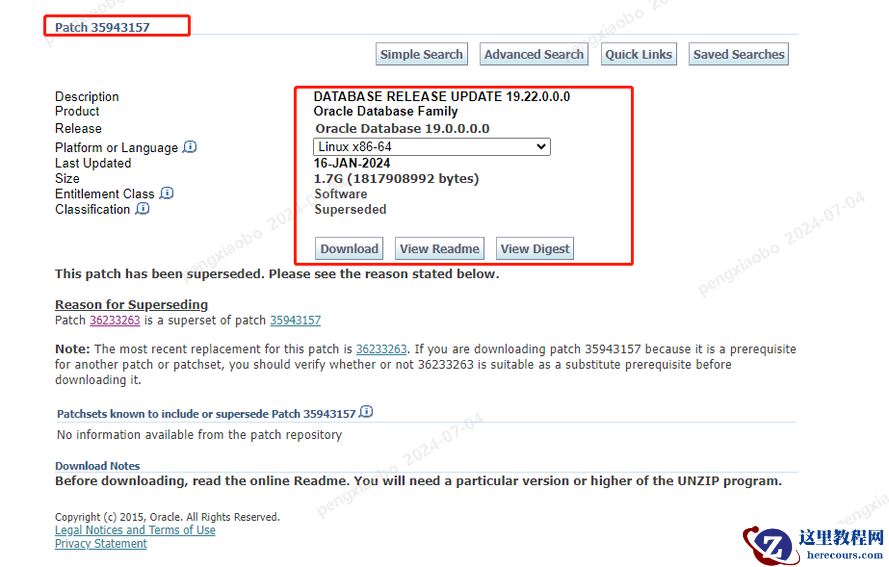
下载补丁
p35943157_190000_Linux-x86-64.zip
https://updates.oracle.com/Orion/SimpleSearch/process_form?search_type=patch&patch_number=35943157&plat_lang=226P&display_type=&search_style=8&orderby=3&direction=d&old_type_list=&gobuttonpressed=&sortcolpressed=&tab_number=&email=pxboracle%40live.com&userid=o-pxboracle%40live.com&c_release_parent=product&c_product_child=release
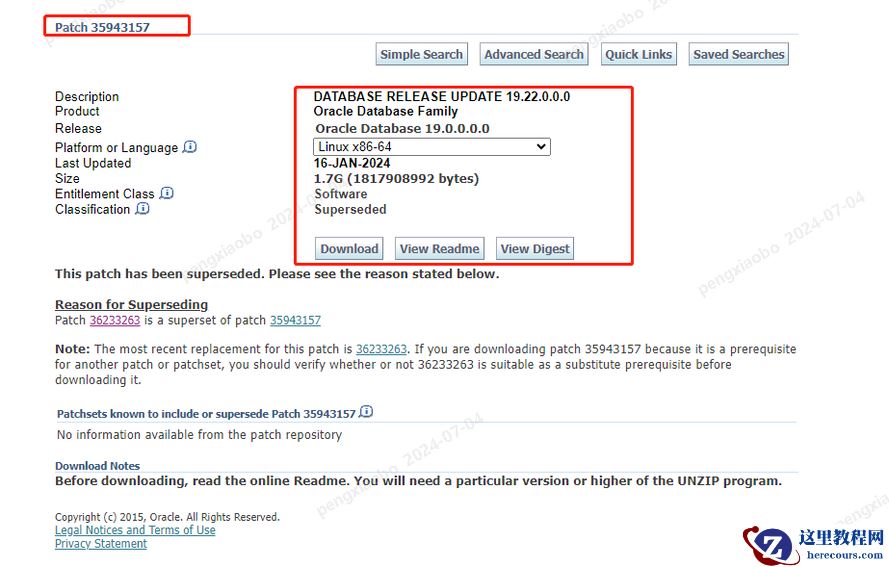 安装补丁:过程省略........
unzip
p35943157_190000_Linux-x86-64.zip -d /app/35099667
cd /app/
35943157/
opatch apply
opatch lspatches更新数据库中DST的版本信息更新DST信息有两种方式:(1).利用DBMS_DST包进行更新;(2).利用$ORACLE_HOME/rdbms/admin目录下的utltz_*脚本进行更新。推荐使用第二种方式进行更新。
安装补丁:过程省略........
unzip
p35943157_190000_Linux-x86-64.zip -d /app/35099667
cd /app/
35943157/
opatch apply
opatch lspatches更新数据库中DST的版本信息更新DST信息有两种方式:(1).利用DBMS_DST包进行更新;(2).利用$ORACLE_HOME/rdbms/admin目录下的utltz_*脚本进行更新。推荐使用第二种方式进行更新。
SQL> @?/rdbms/admin/utltz_countstats.sql
SQL> @?/rdbms/admin/utltz_countstar.sql
SQL> exec dbms_scheduler.purge_log;

SQL> @?/rdbms/admin/utltz_upg_check.sql
 如果是rac环境,需要修改参数cluster_database=false
SQL> alter system set cluster_database=false scope=spfile sid='*';

SQL> @?/rdbms/admin/utltz_upg_check.sql
SQL> @?/rdbms/admin/utltz_upg_apply.sql
Session altered.
INFO: If an ERROR occurs, the script will EXIT SQL*Plus.
INFO: The database RDBMS DST version will be updated to DSTv32 .
WARNING: This script will restart the database 2 times
WARNING: WITHOUT asking ANY confirmation.
WARNING: Hit control-c NOW if this is not intended.
INFO: Restarting the database in UPGRADE mode to start the DST upgrade.
Database closed.
Database dismounted.
ORACLE instance shut down.
ORACLE instance started.
Total System Global Area 9302436904 bytes
Fixed Size                  6904423 bytes
Variable Size             612368384 bytes
Database Buffers          2732931245 bytes
Redo Buffers               6873214 bytes
Database mounted.
Database opened.
INFO: Starting the RDBMS DST upgrade.
INFO: Upgrading all SYS owned TSTZ data.
INFO: It might take time before any further output is seen ...
An upgrade window has been successfully started.
INFO: Restarting the database in NORMAL mode to upgrade non-SYS TSTZ data.
Database closed.
Database dismounted.
ORACLE instance shut down.
ORACLE instance started.
Total System Global Area 9302436904 bytes
Fixed Size                  6904423 bytes
Variable Size             612368384 bytes
Database Buffers          2732931245 bytes
Redo Buffers               6873214 bytes
Database mounted.
Database opened.
INFO: Upgrading all non-SYS TSTZ data.
INFO: It might take time before any further output is seen ...
INFO: Do NOT start any application yet that uses TSTZ data!
INFO: Next is a list of all upgraded tables:
Table list: "MDSYS"."SDO_DIAG_MESSAGES_TABLE"
Number of failures: 0
Table list: "APEX_190200"."WWV_FLOW_ACTIVITY_LOG1$"
Number of failures: 0
Table list: "APEX_190200"."WWV_FLOW_ACTIVITY_LOG2$"
Number of failures: 0
Table list: "APEX_190200"."WWV_FLOW_DEBUG_MESSAGES"
Number of failures: 0
Table list: "APEX_190200"."WWV_FLOW_DEBUG_MESSAGES2"
Number of failures: 0
Table list: "APEX_190200"."WWV_FLOW_FEEDBACK"
Number of failures: 0
Table list: "APEX_190200"."WWV_FLOW_FEEDBACK_FOLLOWUP"
Number of failures: 0
Table list: "APEX_190200"."WWV_FLOW_ISSUE_NOTIFICATIONS"
Number of failures: 0
Table list: "APEX_190200"."WWV_FLOW_WORKSHEET_NOTIFY"
Number of failures: 0
Table list: "APEX_190200"."WWV_QS_RANDOM_NAMES"
Number of failures: 0
Table list: "GSMADMIN_INTERNAL"."AQ$_CHANGE_LOG_QUEUE_TABLE_L"
Number of failures: 0
Table list: "GSMADMIN_INTERNAL"."AQ$_CHANGE_LOG_QUEUE_TABLE_S"
Number of failures: 0
INFO: Total failures during update of TSTZ data: 0 .
An upgrade window has been successfully ended.
INFO: Your new Server RDBMS DST version is DSTv32 .
INFO: The RDBMS DST update is successfully finished.
INFO: Make sure to exit this SQL*Plus session.
INFO: Do not use it for timezone related selects.
Session altered.
 如果是rac环境,需要修改参数cluster_database=true
SQL> alter system set cluster_database=true scope=spfile sid='*';
查看更新后的DST版本
SQL*Plus: Release 19.0.0.0.0 - Production on Thu Jul 4 08:53:31 2024
Version 19.22.0.0.0
Copyright (c) 1982, 2023, Oracle.  All rights reserved.
Connected to:
Oracle Database 19c Enterprise Edition Release 19.0.0.0.0 - Production
Version 19.22.0.0.0
SQL>  SELECT * FROM v$timezone_file;
FILENAME		VERSION     CON_ID
-------------------- ---------- ----------
timezlrg_42.dat 	     42 	 0
建议
1.建议在安装19c时,尽量选择一个 统一的标准,compatible ,时区版本,都选择同一个,所有的19c都可以使用时区42的版本,但是尽量避免一部分使用默认版本32,从而导致高版本导出,低版本数据泵导入报错! 2.时区的补丁更新,对于业务来说是会影响业务使用的,因为需要停机!