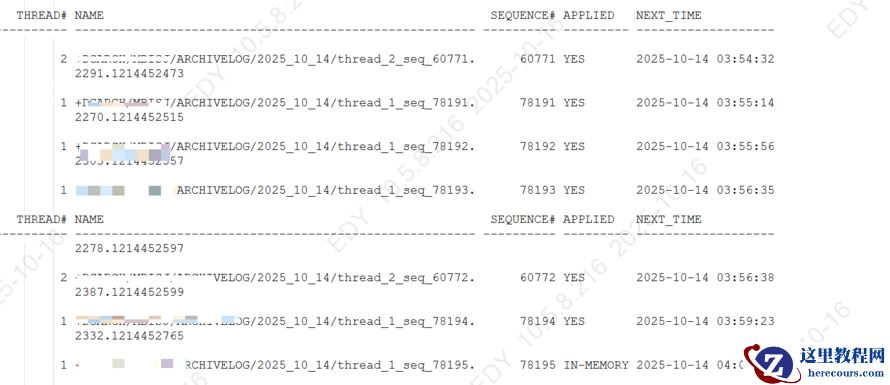
检查归档产生量,12号以后
SQL> col name for a55
SQL> SELECT count(*) from V$ARCHIVED_LOG where next_time>'2025-10-12' and APPLIED='YES';
COUNT(*)
----------
2203
1 确定2025-10-13 19:48:00以前都应用过了SQL>alter session set nls_date_format='yyyy-mm-dd hh24:mi:ss';
SQL> col name for a55
SQL> SELECT THREAD#, name,SEQUENCE#, applied,next_time FROM V$ARCHIVED_LOG
2 where next_time<'2025-10-13 19:48:00' and next_time>'2025-10-13 00:48:00' and applied='NO' order by next_time desc;
---19:48 刚好是8小时以前的时间点
no rows selected 代表这个时间段都应用过了(2025-10-13 00:48---2025-10-13 19:48 全部应用过了applied=yes,否则查询结果不止1条记录)
2 确认应用最新的时间:APPLIED=yes最新时间2025-10-14 03:59:23
alter session set nls_date_format='yyyy-mm-dd hh24:mi:ss';
col name for a55
SELECT THREAD#, name,SEQUENCE#, applied,next_time FROM V$ARCHIVED_LOG where next_time>'2025-10-14';
 [oracle@mbisjt1 ~]$ cat /home/oracle/scripts/delete_arch_mlllsj.sh
#!/bin/sh
. /home/oracle/.bash_profile
export ORACLE_SID=mbllll1
echo "******Begin delete*****";date
$ORACLE_HOME/bin/rman target / <<EOF
run {
allocate channel c1 device type disk;
allocate channel c2 device type disk;
crosscheck archivelog all;
delete noprompt expired archivelog all;
#delete noprompt archivelog until time 'sysdate -3';
delete noprompt archivelog until time 'sysdate-8/24';
release channel c1;
release channel c2;
}
exit;
EOF
echo "**********end delete*************"
date
sh 运行脚本/home/oracle/scripts/delete_arch_mllj.sh
grid asmcmd 检查lsdg 剩余空间651G
ASMCMD> lsdg
State Type Rebal Sector Logical_Sector Block AU Total_MB Free_MB Req_mir_free_MB Usable_file_MB Offline_disks Voting_files Name
MOUNTED EXTERN N 512 512 4096 4194304 1048576 651264 0 651264 0 N DGARCH/
成功后,修改脚本/home/oracle/scripts/delete_arch_mlllj.sh回原来until time 'sysdate -3';
4 持续观察日志应用情况
SELECT PROCESS, STATUS, THREAD#, SEQUENCE#,BLOCK#, BLOCKS FROM V$MANAGED_STANDBY;
[oracle@mbisjt1 ~]$ cat /home/oracle/scripts/delete_arch_mlllsj.sh
#!/bin/sh
. /home/oracle/.bash_profile
export ORACLE_SID=mbllll1
echo "******Begin delete*****";date
$ORACLE_HOME/bin/rman target / <<EOF
run {
allocate channel c1 device type disk;
allocate channel c2 device type disk;
crosscheck archivelog all;
delete noprompt expired archivelog all;
#delete noprompt archivelog until time 'sysdate -3';
delete noprompt archivelog until time 'sysdate-8/24';
release channel c1;
release channel c2;
}
exit;
EOF
echo "**********end delete*************"
date
sh 运行脚本/home/oracle/scripts/delete_arch_mllj.sh
grid asmcmd 检查lsdg 剩余空间651G
ASMCMD> lsdg
State Type Rebal Sector Logical_Sector Block AU Total_MB Free_MB Req_mir_free_MB Usable_file_MB Offline_disks Voting_files Name
MOUNTED EXTERN N 512 512 4096 4194304 1048576 651264 0 651264 0 N DGARCH/
成功后,修改脚本/home/oracle/scripts/delete_arch_mlllj.sh回原来until time 'sysdate -3';
4 持续观察日志应用情况
SELECT PROCESS, STATUS, THREAD#, SEQUENCE#,BLOCK#, BLOCKS FROM V$MANAGED_STANDBY;
oracle 备库归档日志某一天突发暴增到2000多个
来源:这里教程网
时间:2026-03-03 22:47:53
作者:
编辑推荐:
下一篇:
相关推荐
-

-
-
-
-
-
-
-
-
-
-
-
-
-
-

雷神推出 MIX PRO II 迷你主机:基于 Ultra 200H,玻璃上盖 + ARGB 灯效
2 月 9 日消息,雷神 (THUNDEROBOT) 现已宣布推出基于英
-

制造商 Musnap 推出彩色墨水屏电纸书 Ocean C:支持手写笔、第三方安卓应用
2 月 10 日消息,制造商 Musnap 现已在海外推出一款 Oce


热文推荐
- oracle 备库归档日志某一天突发暴增到2000多个
oracle 备库归档日志某一天突发暴增到2000多个
26-03-03 - Oracle RMAN三种不完全恢复实战详解:归档序号、时间点与SCN恢复对比
- 数据库管理-第373期 23ai:变化,不支持的功能与参数(20251011)
- Oracle 常见的33个等待事件

Oracle 常见的33个等待事件
26-03-03 - 第47期 OGG DownStream 部署
第47期 OGG DownStream 部署
26-03-03 - Oracle 数据库巡检脚本(增强版)
Oracle 数据库巡检脚本(增强版)
26-03-03 - 数据库管理-第374期 23ai:弃用的功能、视图与参数(20251013)
- 破解Oracle难题:用搜索引擎+AI高效处理cursor:pin S等待事件
- 商汤科技押注“1+X”:是破局利刃,还是盲目挣扎?
商汤科技押注“1+X”:是破局利刃,还是盲目挣扎?
26-03-03 - 数据库管理-第375期 26ai:除了改名,还有什么(20251015)

数据库管理-第375期 26ai:除了改名,还有什么(20251015)
26-03-03