antimalware service executable其实是win10杀毒软件windows defender的一个进程,主要用于移除、隔离和预防间谍软件,有些用户觉得antimalware service executable进程占用了极高的cpu,就想将其关闭,要怎么操作呢?下面就给大家分享解决的办法。
方法一:排除扫描非系统盘
打开Windows Defender,点击“设置”选项,在左侧面板点击切换到“排除的文件和位置”选项,通过“浏览”和“添加”的方式,将非系统盘从自动扫描中排除。
![[已解决]antimalware service executable cpu占用率高怎么办?](/d/file/efpub/2026/02-22/6a25fe53c5b7c18da1cbe2aa1c38967c.jpg)
方法二:停用Windows Defender
打开Windows Defender,在设置界面,点击左侧“管理员”,将“启用此应用的勾选”取消。
![[已解决]antimalware service executable cpu占用率高怎么办?](/d/file/efpub/2026/02-22/5b2fb2e97256e7ad2ac351081026dc80.jpg)
方法三:本地组策略
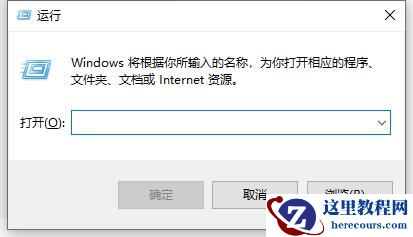
1、鼠标移动到电脑桌面左下角,右键点一下开始,点里面的“运行”,或着win键+R键打开“运行”。
![[已解决]antimalware service executable cpu占用率高怎么办?](/d/file/efpub/2026/02-22/dbd924f81e95c5f60c890e60b7dd1dea.jpg)
2、在运行里输入:gpedit.msc。
![[已解决]antimalware service executable cpu占用率高怎么办?](/d/file/efpub/2026/02-22/0f4232404712b785f77180715131fe6c.jpg)
3、确定后就会打开:本地组策略编辑器。
![[已解决]antimalware service executable cpu占用率高怎么办?](/d/file/efpub/2026/02-22/56472509b65f79d6406c600048278369.jpg)
4、依次打开:管理模板----windows组件----windows Defender。
![[已解决]antimalware service executable cpu占用率高怎么办?](/d/file/efpub/2026/02-22/a24400951dd02cdb3da8c46d1c908d79.jpg)
5、找到windows Defender下的“实时保护”。
然后鼠标双击右侧的“不论何时启用实时保护,都会启用进程扫描。
![[已解决]antimalware service executable cpu占用率高怎么办?](/d/file/efpub/2026/02-22/f2e04409cf93e2a6133f6e70fbc30a44.jpg)
6、在弹出的设置页面选已禁用。保存就行了。
![[已解决]antimalware service executable cpu占用率高怎么办?](/d/file/efpub/2026/02-22/764e5ca2394fd56ead18b155d8c35dab.jpg)




![[已解决]antimalware service executable cpu占用率高怎么办?](https://www.herecours.com/d/file/efpub/2026/21-21/20260221193513235073.jpg "[已解决]antimalware service executable cpu占用率高怎么办?")