
本文是利用c# 开发截图软件的小例子,以供学习分享使用。
思路:
截取屏幕图片。
获取要截取的范围,即左上角,右下角坐标
填充到PictureBox中。
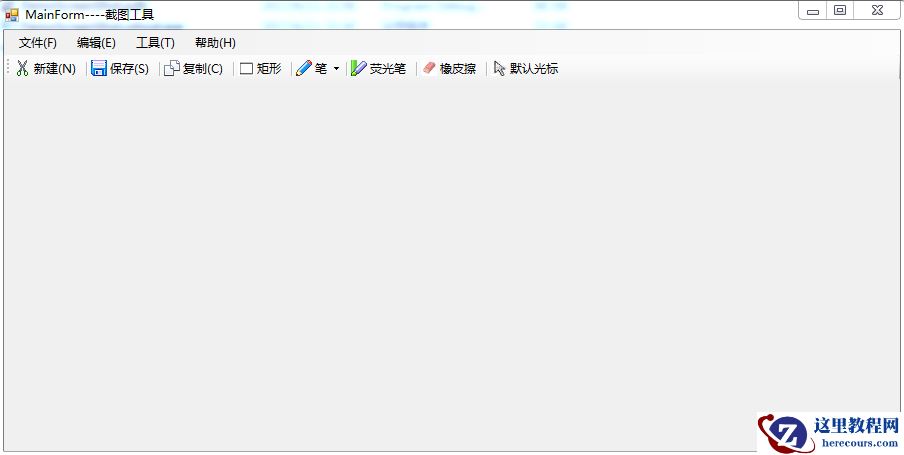
笔触功能,荧光笔,矩形,橡皮擦,复制,保存功能
涉及的知识点:
MenuStrip:为窗体提供菜单系统。以ToolStripMenuItem为菜单子选项
ToolStrip:为 Windows 工具栏对象提供容器。以ToolStripButton【表示包含文本和图像的可选】为工具栏子元素
PictureBox:表示用于显示图像的 Windows 图片框控件。不过本文对此空间进行了重写
Screen:可用于获取工作屏幕区域
Graphics:封装一个 GDI+ 绘图图面。此类不能被继承。此类的CopyFromScreen方法用于获取屏幕图像
鼠标事件:包括MouseDown,MouseMove,MouseUp事件,通过MouseEventArgs中的Location获取鼠标的位置。
Clipboard: 提供将数据置于系统剪贴板中以及从中检索数据的方法。此类不能被继承。
Cursor:设置鼠标的显示的光标的样式。
OnPaint:重绘事件,当控件刷新时响应此事件。
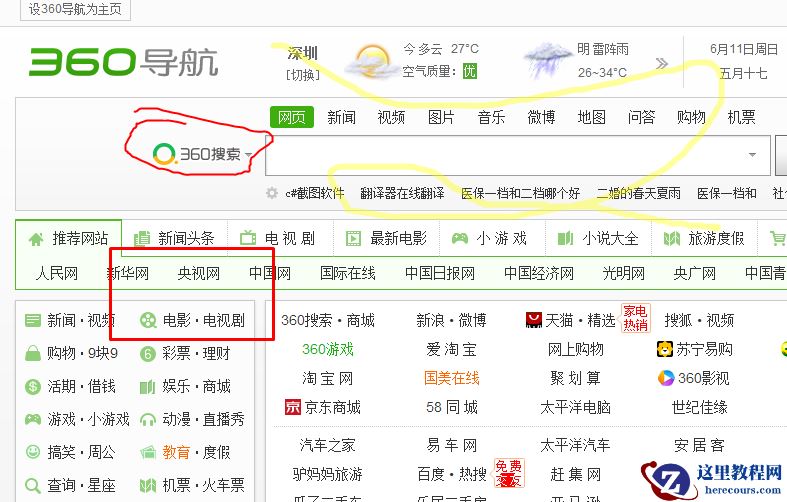
效果图如下【主要实现了截图,保存,复制,画矩形,笔触,荧光笔,橡皮擦等功能】:
保存后图片如下:
-------------------------------------------------------------------------------------------------------------------------------
核心代码如下:
截取屏幕图像:


1 public Bitmap GetScreen() 2 { 3 //获取整个屏幕图像,不包括任务栏 4 Rectangle ScreenArea = Screen.GetWorkingArea(this); 5 Bitmap bmp = new Bitmap(ScreenArea.Width, ScreenArea.Height); 6 using (Graphics g = Graphics.FromImage(bmp)) 7 { 8 g.CopyFromScreen(0, 0, 0, 0, new Size(ScreenArea.Width,ScreenArea.Height)); 9 }10 return bmp;11 }
View Code
绘制图形功能:


1 #region 绘制功能 2 3 protected override void OnPaint(PaintEventArgs pe) 4 { 5 base.OnPaint(pe); 6 Graphics g = pe.Graphics; 7 DrawHistory(g); 8 //绘制当前线 9 if (startDraw && this.curLine.PointList != null && this.curLine.PointList.Count > 0) 10 { 11 DrawLine(g,this.curLine); 12 } 13 if (startDraw && this.curRect.Start != null && this.curRect.End != null && this.curRect.Start != this.curRect.End) { 14 DrawRectangle(g, this.curRect); 15 } 16 } 17 18 public void DrawHistory(Graphics g) { 19 //绘制线历史记录 20 if (LineHistory != null) 21 { 22 foreach (HLine lh in LineHistory) 23 { 24 if (lh.PointList.Count > 10) 25 { 26 DrawLine(g, lh); 27 } 28 } 29 } 30 //绘制矩形历史记录 31 if (RectHistory != null) 32 { 33 foreach (HRectangle lh in RectHistory) 34 { 35 if (lh.Start!=null&& lh.End!=null && lh.Start!=lh.End) 36 { 37 DrawRectangle(g, lh); 38 } 39 } 40 } 41 } 42 43 /// <summary> 44 /// 绘制线 45 /// </summary> 46 /// <param name="g"></param> 47 /// <param name="line"></param> 48 private void DrawLine(Graphics g,HLine line) { 49 g.SmoothingMode = SmoothingMode.AntiAlias; 50 using (Pen p = new Pen(line.LineColor, line.LineWidth)) 51 { 52 //设置起止点线帽 53 p.StartCap = LineCap.Round; 54 p.EndCap = LineCap.Round; 55 56 //设置连续两段的联接样式 57 p.LineJoin = LineJoin.Round; 58 g.DrawCurve(p, line.PointList.ToArray()); //画平滑曲线 59 } 60 } 61 62 /// <summary> 63 /// 绘制矩形 64 /// </summary> 65 /// <param name="g"></param> 66 /// <param name="rect"></param> 67 private void DrawRectangle(Graphics g, HRectangle rect) 68 { 69 g.SmoothingMode = SmoothingMode.AntiAlias; 70 using (Pen p = new Pen(rect.LineColor, rect.LineWidth)) 71 { 72 //设置起止点线帽 73 p.StartCap = LineCap.Round; 74 p.EndCap = LineCap.Round; 75 76 //设置连续两段的联接样式 77 p.LineJoin = LineJoin.Round; 78 g.DrawRectangle(p, rect.Start.X, rect.Start.Y, rect.End.X - rect.Start.X, rect.End.Y - rect.Start.Y); //画平滑曲线 79 } 80 } 81 82 public void Earser(Point p0) 83 { 84 for (int i = lineHistory.Count - 1; i >= 0; i--) 85 { 86 HLine line = lineHistory[i]; 87 bool flag = false; 88 foreach (Point p1 in line.PointList) 89 { 90 double distance = GetDistance(p0, p1); 91 if (Math.Abs(distance) < 6) 92 { 93 //需要删除 94 flag = true; 95 break; 96 } 97 98 } 99 if (flag)100 {101 lineHistory.RemoveAt(i);102 }103 }104 //擦除矩形105 for (int i = rectHistory.Count - 1; i >= 0; i--)106 {107 HRectangle rect = rectHistory[i];108 109 if (p0.X>rect.Start.X && p0.X<rect.End.X && p0.Y > rect.Start.Y && p0.Y < rect.End.Y) {110 111 rectHistory.RemoveAt(i);112 }113 }114 }115 116 /// <summary>117 /// 获取两点之间的距离118 /// </summary>119 /// <param name="p0"></param>120 /// <param name="p1"></param>121 /// <returns></returns>122 private double GetDistance(Point p0, Point p1) {123 return Math.Sqrt(Math.Pow((p0.X - p1.X), 2) + Math.Pow((p0.Y - p1.Y), 2));124124 }125 126 #endregion
View Code
编辑推荐:


相关推荐
-

-
-
-
-
-
-
-
-
-
-
-
-
-
-

雷神推出 MIX PRO II 迷你主机:基于 Ultra 200H,玻璃上盖 + ARGB 灯效
2 月 9 日消息,雷神 (THUNDEROBOT) 现已宣布推出基于英
-

制造商 Musnap 推出彩色墨水屏电纸书 Ocean C:支持手写笔、第三方安卓应用
2 月 10 日消息,制造商 Musnap 现已在海外推出一款 Oce
热文推荐
- C# 实现截图功能的操作实例
C# 实现截图功能的操作实例
26-02-21 - UWP中使用Composition API实现吸顶的实例教程
UWP中使用Composition API实现吸顶的实例教程
26-02-21 - .net core mvc实现一个在线房间棋牌游戏微信支付和及时通讯的简易框架
- 操作 ASP.NET Web API 的实例教程
操作 ASP.NET Web API 的实例教程
26-02-21 - .Net Core + Angular Cli 实现开发环境搭建
.Net Core + Angular Cli 实现开发环境搭建
26-02-21 - 关于操作 ASP.NET Web API的实例
关于操作 ASP.NET Web API的实例
26-02-21 - 分享一个手机微网站的设计与实现
分享一个手机微网站的设计与实现
26-02-21 - socket传输protobuf字节流的实例详解

socket传输protobuf字节流的实例详解
26-02-21 - Task用法之任务等待wait实例
Task用法之任务等待wait实例
26-02-21 - 编写一个webapi框架的开端
编写一个webapi框架的开端
26-02-21