在 Spring Boot Thymeleaf 配置教程中,我们将展示如何使用 Spring Boot Web 应用配置 Thymeleaf。 当 Spring Boot 在 Maven POM 文件中找到 Thymeleaf 依赖项时,它会自动配置 Thymeleaf 模板引擎。 本教程显示了如何在 Java 配置中手动进行操作。
Spring 是流行的 Java 应用框架。 Spring Boot 致力于以最小的努力创建独立的,基于生产级别的基于 Spring 的应用。
Thymeleaf
Thymeleaf 是适用于 Web 和独立环境的现代服务器端 Java 模板引擎。 它基于自然模板的概念:模板文件可以在浏览器中直接打开,并且仍然可以正确显示为网页。
Spring Boot Thymeleaf 示例
以下示例使用 Java 配置通过 Spring Boot 设置 Thymeleaf。
pom.xmlsrc├───main│ ├───java│ │ └───com│ │ └───zetcode│ │ │ Application.java│ │ └───config│ │ WebConfig.java│ └───resources│ └───mytemplates│ index.html└───test └───java
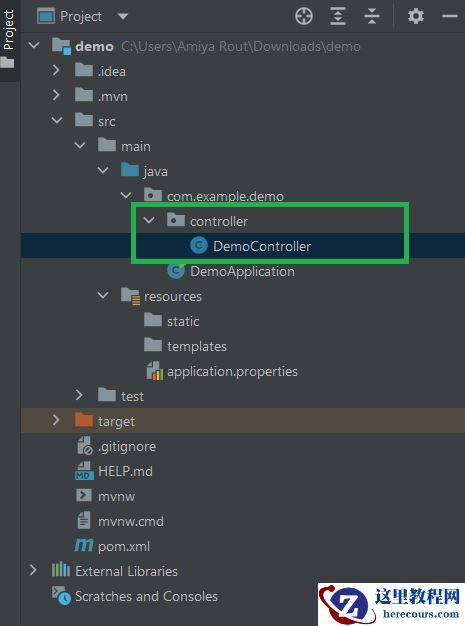
这是项目结构。 Thymeleaf 模板文件位于自定义src/main/resources/mytemplates目录中。 默认模板目录为src/main/resources/templates。
pom.xml
<?xml version="1.0" encoding="UTF-8"?><project xmlns="http://maven.apache.org/POM/4.0.0" xmlns:xsi="http://www.w3.org/2001/XMLSchema-instance" xsi:schemaLocation="http://maven.apache.org/POM/4.0.0 http://maven.apache.org/xsd/maven-4.0.0.xsd"> <modelVersion>4.0.0</modelVersion> <groupId>com.zetcode</groupId> <artifactId>thymeleafconfigex</artifactId> <version>1.0-SNAPSHOT</version> <packaging>jar</packaging> <properties> <project.build.sourceEncoding>UTF-8</project.build.sourceEncoding> <maven.compiler.source>11</maven.compiler.source> <maven.compiler.target>11</maven.compiler.target> </properties> <parent> <groupId>org.springframework.boot</groupId> <artifactId>spring-boot-starter-parent</artifactId> <version>2.1.0.RELEASE</version> </parent> <dependencies> <dependency> <groupId>org.springframework.boot</groupId> <artifactId>spring-boot-devtools</artifactId> <optional>true</optional> </dependency> <dependency> <groupId>org.springframework.boot</groupId> <artifactId>spring-boot-starter-web</artifactId> <optional>true</optional> </dependency> <dependency> <groupId>org.springframework.boot</groupId> <artifactId>spring-boot-starter-thymeleaf</artifactId> </dependency> </dependencies> <build> <plugins> <plugin> <groupId>org.springframework.boot</groupId> <artifactId>spring-boot-maven-plugin</artifactId> </plugin> </plugins> </build></project>
这是 Maven 构建文件。 spring-boot-devtools启用热插拔,禁用模板缓存并启用实时重新加载。 spring-boot-starter-thymeleaf是使用 Thymeleaf 构建 Spring MVC 应用的入门工具。 spring-boot-starter-web是 Web 应用的启动器。
com/zetcode/config/WebConfig.java
package com.zetcode.config;import org.springframework.context.annotation.Bean;import org.springframework.context.annotation.Configuration;import org.springframework.context.annotation.Description;import org.springframework.web.servlet.ViewResolver;import org.springframework.web.servlet.config.annotation.ViewControllerRegistry;import org.springframework.web.servlet.config.annotation.WebMvcConfigurer;import org.thymeleaf.spring5.SpringTemplateEngine;import org.thymeleaf.spring5.view.ThymeleafViewResolver;import org.thymeleaf.templateresolver.ClassLoaderTemplateResolver;@Configurationpublic class WebConfig implements WebMvcConfigurer { @Bean @Description("Thymeleaf template resolver serving HTML 5") public ClassLoaderTemplateResolver templateResolver() { var templateResolver = new ClassLoaderTemplateResolver(); templateResolver.setPrefix("mytemplates/"); templateResolver.setCacheable(false); templateResolver.setSuffix(".html"); templateResolver.setTemplateMode("HTML5"); templateResolver.setCharacterEncoding("UTF-8"); return templateResolver; } @Bean @Description("Thymeleaf template engine with Spring integration") public SpringTemplateEngine templateEngine() { var templateEngine = new SpringTemplateEngine(); templateEngine.setTemplateResolver(templateResolver()); return templateEngine; } @Bean @Description("Thymeleaf view resolver") public ViewResolver viewResolver() { var viewResolver = new ThymeleafViewResolver(); viewResolver.setTemplateEngine(templateEngine()); viewResolver.setCharacterEncoding("UTF-8"); return viewResolver; } @Override public void addViewControllers(ViewControllerRegistry registry) { registry.addViewController("/").setViewName("index"); }}在WebConfig中,我们配置 Thymeleaf 并设置主页的视图和控制器。 模板引擎是用 Java 代码配置的。
@Bean@Description("Thymeleaf template resolver serving HTML 5")public ClassLoaderTemplateResolver templateResolver() {这个 bean 定义了一个模板解析器。 模板解析器将模板解析为TemplateResolution对象,其中包含其他信息,例如模板模式,缓存,模板的前缀和后缀。 ClassLoaderTemplateResolver用于加载位于类路径上的模板。
templateResolver.setPrefix("mytemplates/");我们将模板目录设置为mytemplates。 使用ClassLoaderTemplateResolver时,前缀中没有classpath:。
templateResolver.setTemplateMode("HTML5");模板引擎将提供 HTML5 内容。
@Bean@Description("Thymeleaf template engine with Spring integration")public SpringTemplateEngine templateEngine() { var templateEngine = new SpringTemplateEngine(); templateEngine.setTemplateResolver(templateResolver()); return templateEngine;}创建具有 Spring 集成的 Thymeleaf 模板引擎。
@Bean@Description("Thymeleaf view resolver")public ViewResolver viewResolver() { var viewResolver = new ThymeleafViewResolver(); viewResolver.setTemplateEngine(templateEngine()); viewResolver.setCharacterEncoding("UTF-8"); return viewResolver;} 在这里,我们配置一个创建ThymeleafViewResolver的 bean。 视图解析器负责获取特定操作和语言环境的 View 对象。 然后将视图对象渲染为 HTML 文件。
@Overridepublic void addViewControllers(ViewControllerRegistry registry) { registry.addViewController("/").setViewName("index");}在这个简单的应用中,我们没有特定的控制器类。 我们用addViewController()方法定义一个自动控制器。
resources/templates/index.html
<!DOCTYPE html><html xmlns:th="http://www.thymeleaf.org"> <head> <title>Home page</title> <meta charset="UTF-8"/> <meta name="viewport" content="width=device-width, initial-scale=1.0"/> </head> <body> <p> <span th:text="'Today is: ' + ${#dates.format(#dates.createNow(), 'dd MMM yyyy HH:mm')}" th:remove="tag"></span> </p> </body></html>这是 Thymeleaf 模板文件。 它显示当前日期。
com/zetcode/Application.java
package com.zetcode;import org.springframework.boot.SpringApplication;import org.springframework.boot.autoconfigure.SpringBootApplication;@SpringBootApplicationpublic class Application { public static void main(String[] args) { SpringApplication.run(Application.class, args); }}这段代码设置了 Spring Boot 应用。 @SpringBootApplication启用自动配置和组件扫描。
$ mvn spring-boot:run
我们启动该应用。
$ curl localhost:8080<!DOCTYPE html><html><head> <title>Home page</title> <meta charset="UTF-8"> <meta name="viewport" content="width=device-width, initial-scale=1.0"></head><body><p> Today is: 17 Jan 2019 23:46</p></body>
在本教程中,我们使用 Thymeleaf 创建了 Spring Boot Web 应用。