在本教程中,我们展示了如何在 Spring Boot RESTful Web 应用中提供图像文件。 该图像是位于资源目录中的 JPEG 文件。
Spring 是用于开发 Java 企业应用的 Java 应用框架。 它还有助于集成各种企业组件。 Spring Boot 使创建具有 Spring 动力的生产级应用和服务变得很容易,而对安装的要求却最低。
我们将展示将图像数据发送到客户端的三种方式。
Spring 图像示例
该 Web 应用在src/main/resources/image目录中包含一个sid.jpg文件。 ClassPathResource用于获取图像文件。
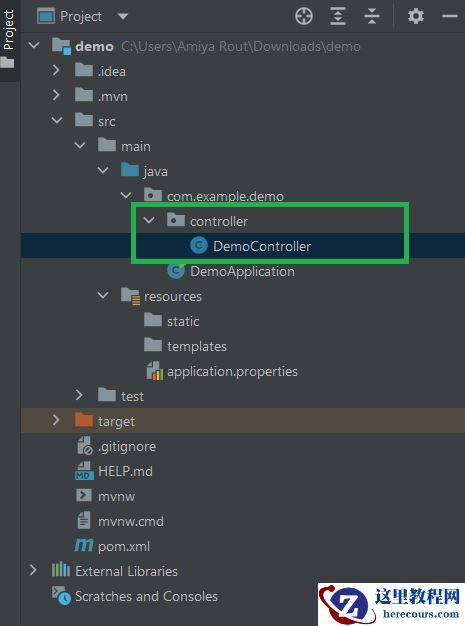
pom.xmlsrc├── main│ ├── java│ │ └── com│ │ └── zetcode│ │ ├── Application.java│ │ └── controller│ │ └── MyController.java│ └── resources│ └── image│ └── sid.jpg└── test └── java
这是项目结构。
pom.xml
<?xml version="1.0" encoding="UTF-8"?><project xmlns="http://maven.apache.org/POM/4.0.0" xmlns:xsi="http://www.w3.org/2001/XMLSchema-instance" xsi:schemaLocation="http://maven.apache.org/POM/4.0.0 http://maven.apache.org/xsd/maven-4.0.0.xsd"> <modelVersion>4.0.0</modelVersion> <groupId>com.zetcode</groupId> <artifactId>springimage</artifactId> <version>1.0-SNAPSHOT</version> <packaging>jar</packaging> <properties> <project.build.sourceEncoding>UTF-8</project.build.sourceEncoding> <maven.compiler.source>11</maven.compiler.source> <maven.compiler.target>11</maven.compiler.target> </properties> <parent> <groupId>org.springframework.boot</groupId> <artifactId>spring-boot-starter-parent</artifactId> <version>2.1.1.RELEASE</version> </parent> <dependencies> <dependency> <groupId>org.springframework.boot</groupId> <artifactId>spring-boot-starter-web</artifactId> </dependency> </dependencies> <build> <plugins> <plugin> <groupId>org.springframework.boot</groupId> <artifactId>spring-boot-maven-plugin</artifactId> </plugin> </plugins> </build></project>
这是 Maven 构建文件。 Spring Boot 启动器是一组有用的依赖项描述符,可大大简化 Maven 配置。 spring-boot-starter-parent具有 Spring Boot 应用的一些常用配置。 spring-boot-starter-web是使用 Spring MVC 构建 Web 应用的入门工具。 它使用 Tomcat 作为默认的嵌入式服务器。 spring-boot-maven-plugin在 Maven 中提供了 Spring Boot 支持,使我们可以打包可执行的 JAR 或 WAR 档案。 它的spring-boot:run目标执行 Spring Boot 应用。
com/zetcode/Application.java
package com.zetcode;import org.springframework.boot.SpringApplication;import org.springframework.boot.autoconfigure.SpringBootApplication;@SpringBootApplicationpublic class Application { public static void main(String[] args) { SpringApplication.run(Application.class, args); }}Application设置 Spring Boot 应用。 @SpringBootApplication启用组件扫描和自动配置。
使用HttpServletResponse提供图像
在第一种情况下,我们直接写入HttpServletResponse。
com/zetcode/controller/MyController.java
package com.zetcode.controller;import java.io.IOException;import javax.servlet.http.HttpServletResponse;import org.springframework.core.io.ClassPathResource;import org.springframework.http.MediaType;import org.springframework.util.StreamUtils;import org.springframework.web.bind.annotation.RequestMapping;import org.springframework.web.bind.annotation.RequestMethod;import org.springframework.web.bind.annotation.RestController;@RestControllerpublic class MyController { @RequestMapping(value = "/sid", method = RequestMethod.GET, produces = MediaType.IMAGE_JPEG_VALUE) public void getImage(HttpServletResponse response) throws IOException { var imgFile = new ClassPathResource("image/sid.jpg"); response.setContentType(MediaType.IMAGE_JPEG_VALUE); StreamUtils.copy(imgFile.getInputStream(), response.getOutputStream()); }}在此控制器中,我们获取图像资源并将其直接写入响应对象。
var imgFile = new ClassPathResource("image/sid.jpg");我们从类路径与ClassPathResource图片资源中(src /主/资源目录是在 Java 类路径)。
response.setContentType(MediaType.IMAGE_JPEG_VALUE);
响应的内容类型设置为MediaType.IMAGE_JPEG_VALUE。
StreamUtils.copy(imgFile.getInputStream(), response.getOutputStream());
使用StreamUtils,我们将数据从图像复制到响应对象。
用ResponseEntity提供图像
在第二种情况下,我们使用ResponseEntity。
com/zetcode/controller/MyController.java
package com.zetcode.controller;import java.io.IOException;import org.springframework.core.io.ClassPathResource;import org.springframework.http.MediaType;import org.springframework.http.ResponseEntity;import org.springframework.util.StreamUtils;import org.springframework.web.bind.annotation.RequestMapping;import org.springframework.web.bind.annotation.RequestMethod;import org.springframework.web.bind.annotation.RestController;@RestControllerpublic class MyController { @RequestMapping(value = "/sid", method = RequestMethod.GET, produces = MediaType.IMAGE_JPEG_VALUE) public ResponseEntity<byte[]> getImage() throws IOException { var imgFile = new ClassPathResource("image/sid.jpg"); byte[] bytes = StreamUtils.copyToByteArray(imgFile.getInputStream()); return ResponseEntity .ok() .contentType(MediaType.IMAGE_JPEG) .body(bytes); }}getImage()方法的返回类型设置为ResponseEntity<byte[]>。
byte[] bytes = StreamUtils.copyToByteArray(imgFile.getInputStream());
使用StreamUtils.copyToByteArray(),我们将图像数据复制到字节数组中。
return ResponseEntity .ok() .contentType(MediaType.IMAGE_JPEG) .body(bytes);
字节数组提供给ResponseEntity的主体。
使用ResponseEntity和InputStreamResource提供图像
在第三种情况下,我们使用ResponseEntity和InputStreamResource。 InputStreamResource是 Spring 对低级资源的抽象。
com/zetcode/controller/MyController.java
package com.zetcode.controller;import java.io.IOException;import org.springframework.core.io.ClassPathResource;import org.springframework.core.io.InputStreamResource;import org.springframework.http.MediaType;import org.springframework.http.ResponseEntity;import org.springframework.web.bind.annotation.RequestMapping;import org.springframework.web.bind.annotation.RequestMethod;import org.springframework.web.bind.annotation.RestController;@RestControllerpublic class MyController { @RequestMapping(value = "/sid", method = RequestMethod.GET, produces = MediaType.IMAGE_JPEG_VALUE) public ResponseEntity<InputStreamResource> getImage() throws IOException { var imgFile = new ClassPathResource("image/sid.jpg"); return ResponseEntity .ok() .contentType(MediaType.IMAGE_JPEG) .body(new InputStreamResource(imgFile.getInputStream())); }}getImage()方法的返回类型设置为ResponseEntity<InputStreamResource>。
return ResponseEntity .ok() .contentType(MediaType.IMAGE_JPEG) .body(new InputStreamResource(imgFile.getInputStream()));
ResponseEntity的主体返回InputStreamResource。
$ mvn spring-boot:run
我们启动 Spring Boot 应用。
我们导航到http://localhost:8080/sid在浏览器中显示图像。
在本教程中,我们展示了如何从 Spring Boot 应用向客户端发送图像数据。 我们使用了三种不同的方法。