
重要:做好目录备份。补丁信息: Patch 32226239 - GI Release Update 19.10.0.0.210119 补丁与数据库版本匹配信息:
| Configuration | GI Version | Database Versions | Patch | OPatch Command(1) | Comments |
|---|---|---|---|---|---|
|
GI Home in conjunction with RAC, RACOne, or Single Instance home |
19 |
19 |
GI RU/RUR |
opatchauto |
GI Home and all the Database Homes will be patched |
|
GI Home in conjunction with RAC, RACOne, or Single Instance home |
19 |
19 and prior versions |
GI RU/RUR |
opatchauto |
GI Home and Database Home at 19 version will be patched. For Database home with version other than 19, apply the appropriate Database RU for that version. For example, apply 12.2.0.1.x RU to Database version 12.2.0.1.0. |
|
GI Home in conjunction with RAC, RACOne, or Single Instance home |
19 |
Versions prior to 19 |
GI RU/RUR |
opatchauto |
GI Home alone is patched. For Database home, apply the appropriate Database RU for that version. For example, apply 12.2.0.1.x RU to Database version 12.2.0.1.0. |
|
Oracle Restart Home |
19 |
19 |
GI RU/RUR |
opatchauto |
GI Home and all the Database Homes will be patched. |
|
Database Single Instance home |
NA |
19 |
DB RU/RUR |
opatch apply |
None |
|
Database Client home |
NA |
19 |
DB RU/RUR |
opatch apply |
None |
该补丁包含的patch
| Patch Number | Description | Applicable Homes |
|---|---|---|
|
32218454 |
Database Release Update 19.10.0.0.210119 |
Only DB Home for non-Oracle RAC setup. Both DB Homes and Grid Home for Oracle RAC setup. |
|
32222571 |
OCW Release Update 19.10.0.0.210119 |
Both DB Homes and Grid Home |
|
32218663 |
ACFS Release Update 19.10.0.0.210119 |
Only Grid Home |
|
29340594 |
DBWLM Release Update 19.0.0.0.0 |
Only Grid Home |
|
32240590 |
Tomcat Release Update 19.0.0.0.0 |
Only Grid Home |
1.opatch组件需求: OPatch utility version 12.2.0.1.23 or later 上传opatch组件包并查看版本(2节点grid及oracle目录下都需要上传,且权限给够) [oracle@19crac1 OPatch]$ ./opatch version OPatch Version: 12.2.0.1.24 OPatch succeeded. 2.验证数据库组件清单
$ <ORACLE_HOME>/OPatch/opatch lsinventory -detail -oh <ORACLE_HOME>
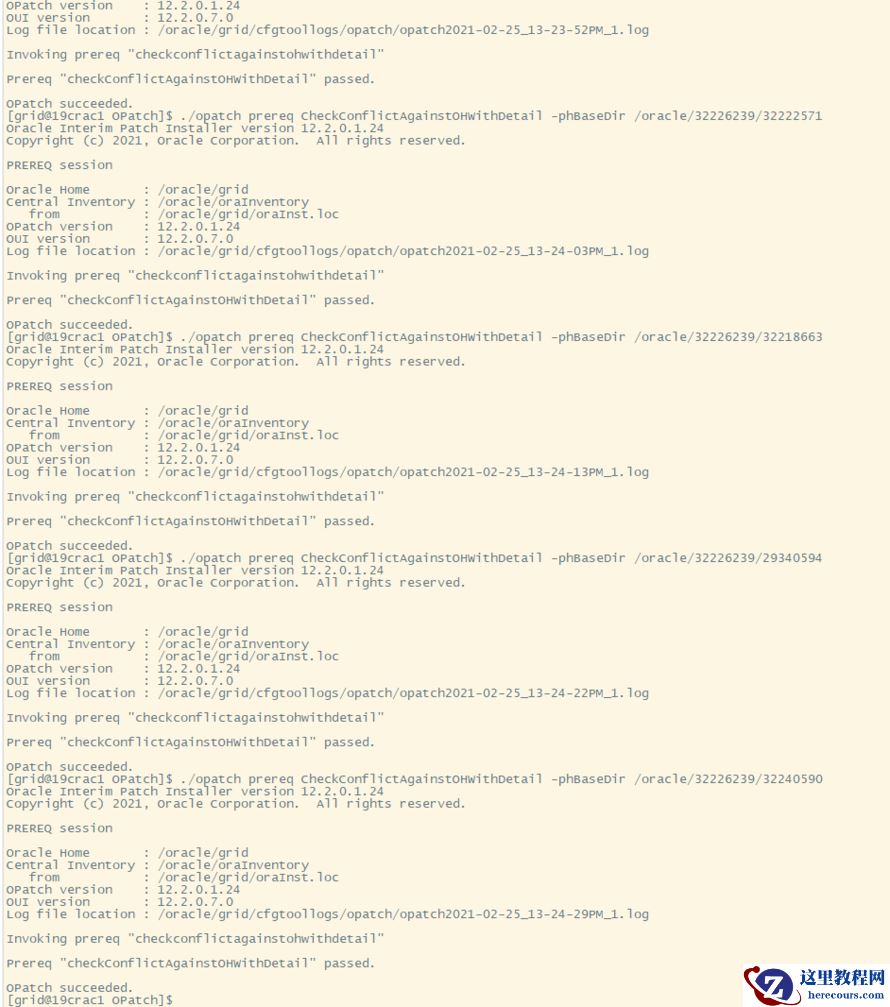
3.使用grid用户上传psu及解压缩 4.执行opatch冲突预检脚本
grid用户
% $ORACLE_HOME/OPatch/opatch prereq CheckConflictAgainstOHWithDetail -phBaseDir <UNZIPPED_PATCH_LOCATION>/32226239/32218454
% $ORACLE_HOME/OPatch/opatch prereq CheckConflictAgainstOHWithDetail -phBaseDir <UNZIPPED_PATCH_LOCATION>/32226239/32222571
% $ORACLE_HOME/OPatch/opatch prereq CheckConflictAgainstOHWithDetail -phBaseDir <UNZIPPED_PATCH_LOCATION>/32226239/32218663
% $ORACLE_HOME/OPatch/opatch prereq CheckConflictAgainstOHWithDetail -phBaseDir <UNZIPPED_PATCH_LOCATION>/32226239/29340594
% $ORACLE_HOME/OPatch/opatch prereq CheckConflictAgainstOHWithDetail -phBaseDir <UNZIPPED_PATCH_LOCATION>/32226239/32240590
Oracle用户
% $ORACLE_HOME/OPatch/opatch prereq CheckConflictAgainstOHWithDetail -phBaseDir <UNZIPPED_PATCH_LOCATION>/32226239/32218454
% $ORACLE_HOME/OPatch/opatch prereq CheckConflictAgainstOHWithDetail -phBaseDir <UNZIPPED_PATCH_LOCATION>/32226239/32222571
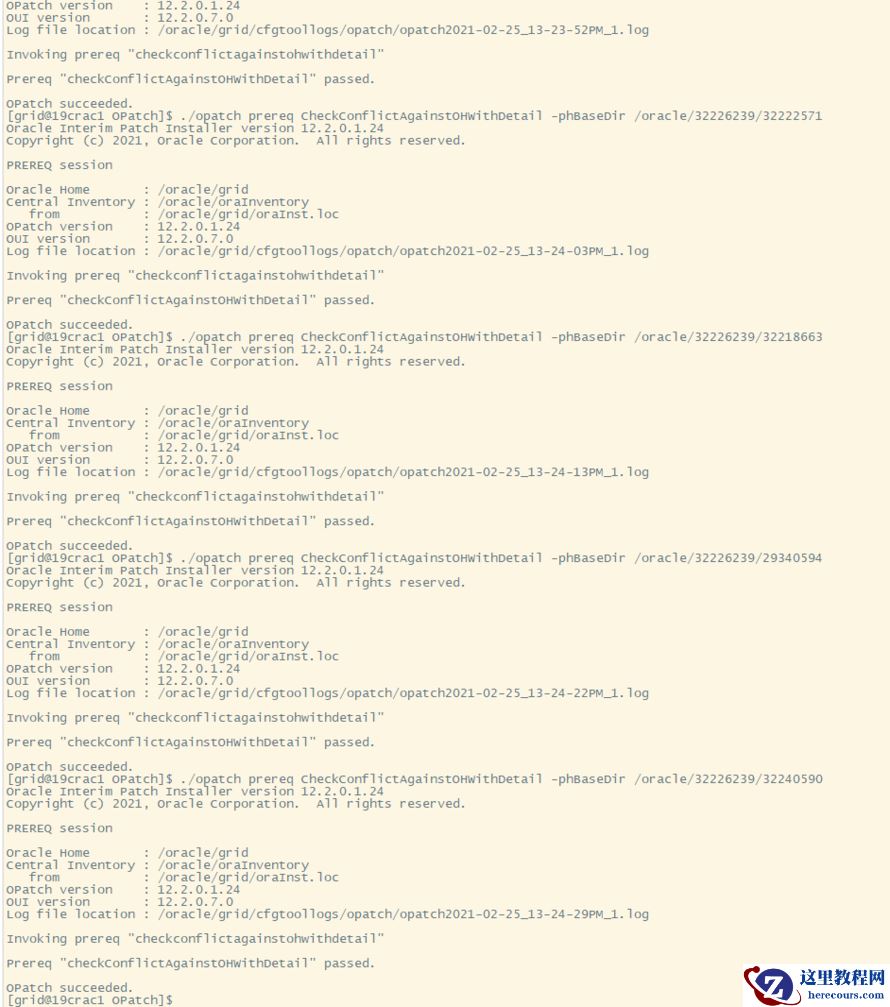
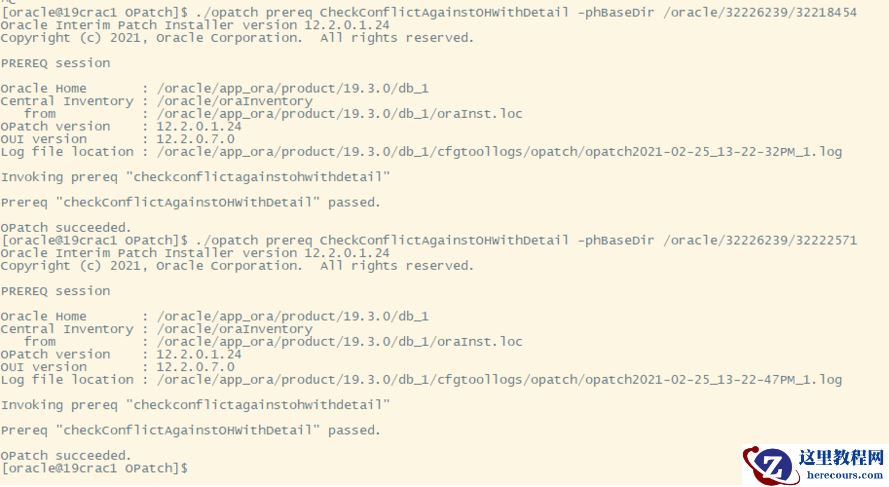 5.执行opatch 系统空间检查脚本:
grid用户
Create file
/tmp/patch_list_gihome.txt with the following content:
% cat /tmp/patch_list_gihome.txt
<UNZIPPED_PATCH_LOCATION>/32226239/32218454
<UNZIPPED_PATCH_LOCATION>/32226239/32222571
<UNZIPPED_PATCH_LOCATION>/32226239/32218663
<UNZIPPED_PATCH_LOCATION>/32226239/29340594
<UNZIPPED_PATCH_LOCATION>/32226239/32240590
Run the opatch command to check if enough free space is available in the Grid Infrastructure Home:
% $ORACLE_HOME/OPatch/opatch prereq CheckSystemSpace -phBaseFile /tmp/patch_list_gihome.txt
Oracle用户
Create file
/tmp/patch_list_dbhome.txt with the following content:
% cat /tmp/patch_list_dbhome.txt
<UNZIPPED_PATCH_LOCATION>/32226239/32218454
<UNZIPPED_PATCH_LOCATION>/32226239/32222571
Run opatch command to check if enough free space is available in the Database Home:
% $ORACLE_HOME/OPatch/opatch prereq CheckSystemSpace -phBaseFile /tmp/patch_list_dbhome.txt
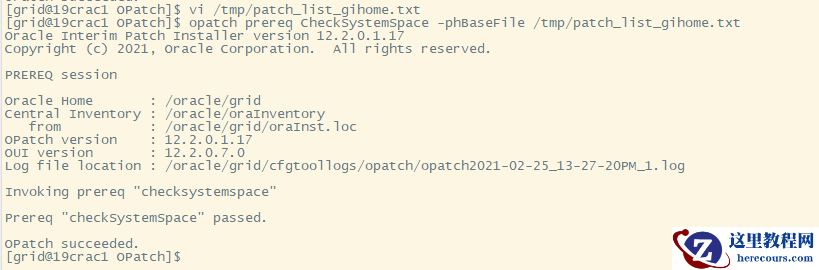 6.冲突检测:
The following commands check for conflicts in both the 12.1 GI home and the 12.1 DB homes.
In case you are applying the patch, run this command:
#GRID_HOME/OPatch/opatchauto apply <UNZIPPED_PATCH_LOCATION>/32226239 -analyze
In case you are rolling back the patch, run this command:
#GRID_HOME/OPatch/opatchauto rollback <UNZIPPED_PATCH_LOCATION>/32226239 -analyze
7.opatchauto 2节点分别打补丁:
Oracle RAC, where the GI Home and the Database Homes are not shared and ACFS file system is not configured.
As root user, execute the following command on each node of the cluster:
# <GI_HOME>/OPatch/opatchauto apply <UNZIPPED_PATCH_LOCATION>/32226239

[root@19crac1 ~]# /oracle/grid/OPatch/opatchauto apply /oracle/32226239/
OPatchauto session is initiated at Thu Feb 25 13:59:24 2021
System initialization log file is /oracle/grid/cfgtoollogs/opatchautodb/systemconfig2021-02-25_01-59-27PM.log.
Session log file is /oracle/grid/cfgtoollogs/opatchauto/opatchauto2021-02-25_01-59-37PM.log
The id for this session is H3CQ
Executing OPatch prereq operations to verify patch applicability on home /oracle/grid
Patch applicability verified successfully on home /oracle/grid
Executing patch validation checks on home /oracle/grid
Patch validation checks successfully completed on home /oracle/grid
Performing prepatch operations on CRS - bringing down CRS service on home /oracle/grid
Prepatch operation log file location: /oracle/gridbase/crsdata/19crac1/crsconfig/crs_prepatch_apply_inplace_19crac1_2021-02-25_02-00-20PM.log
CRS service brought down successfully on home /oracle/grid
Start applying binary patch on home /oracle/grid

Binary patch applied successfully on home /oracle/grid
Performing postpatch operations on CRS - starting CRS service on home /oracle/grid
Postpatch operation log file location: /oracle/gridbase/crsdata/19crac1/crsconfig/crs_postpatch_apply_inplace_19crac1_2021-02-25_02-14-41PM.log
CRS service started successfully on home /oracle/grid
OPatchAuto successful.
--------------------------------Summary--------------------------------
Patching is completed successfully. Please find the summary as follows:
Host:19crac1
CRS Home:/oracle/grid
Version:19.0.0.0.0
Summary:
==Following patches were SUCCESSFULLY applied:
Patch: /oracle/32226239/29340594
Log: /oracle/grid/cfgtoollogs/opatchauto/core/opatch/opatch2021-02-25_14-03-16PM_1.log
Patch: /oracle/32226239/32218454
Log: /oracle/grid/cfgtoollogs/opatchauto/core/opatch/opatch2021-02-25_14-03-16PM_1.log
Patch: /oracle/32226239/32218663
Log: /oracle/grid/cfgtoollogs/opatchauto/core/opatch/opatch2021-02-25_14-03-16PM_1.log
Patch: /oracle/32226239/32222571
Log: /oracle/grid/cfgtoollogs/opatchauto/core/opatch/opatch2021-02-25_14-03-16PM_1.log
Patch: /oracle/32226239/32240590
Log: /oracle/grid/cfgtoollogs/opatchauto/core/opatch/opatch2021-02-25_14-03-16PM_1.log
OPatchauto session completed at Thu Feb 25 14:18:07 2021
Time taken to complete the session 18 minutes, 43 seconds
8.检查补丁情况/oracle/grid/OPatch/opatch lsinv 版本号也从19.3升级到19.10 [grid@19crac1 log]$ sqlplus -v SQL*Plus: Release 19.0.0.0.0 - ProductionVersion 19.10.0.0.0 ++++++++++++++++++++++++++++++++++++++++++++++++++++++++
众所周知,oracle19.3版本的集群环境中,在opatch升级时,因为oraInventory/ContentsXML目录下的oui-patch的权限问题,在打DBpatch时除了第一节点之外,均会有如下报错:

手动打补丁报错信息:

自动打补丁报错信息:
Patch: /tmp/grid_path/30116789/30122149
Log: /u01/app/oracle/product/19.3.0/db_1/cfgtoollogs/opatchauto/core/opatch/opatch2020-03-09_17-44-51PM_1.log

Reason: Failed during Patching: oracle.opatch.opatchsdk.OPatchException: ApplySession failed in system modification phase... 'ApplySession::apply failed: java.io.IOException: oracle.sysman.oui.patch.PatchException: java.io.FileNotFoundException: /u01/app/oraInventory/ContentsXML/oui-patch.xml (Permission denied)'


After fixing the cause of failure Run opatchauto resume


]

OPATCHAUTO-68061: The orchestration engine failed.

OPATCHAUTO-68061: The orchestration engine failed with return code 1

OPATCHAUTO-68061: Check the log for more details.

OPatchAuto failed.


OPatchauto session completed at Mon Mar  9 17:45:31 2020

Time taken to complete the session 1 minute, 16 seconds


opatchauto failed with error code 42
当然如果oui-patch.xml文件在执行chmod+w 解决完权限问题之后,opatchautoresume可以自动执行,但是如果你是手动打补丁,权限问题解决之后并不能解决问题,并且不能回退,如下图所示:

上述问题可以通过如下方法可以避免和解决:
a)、在开始打除了第一节点之外的DBpatch之前,就执行chmod+w
b)、安装时加上applyPSU参数
c)、还原备份文件
d)、如果此时你也没有备份,那能做的只有删除再添加节点了。

编辑推荐:
相关推荐
-

-
-
-
-
-
-
-
-
-
-
-
-
-
-

雷神推出 MIX PRO II 迷你主机:基于 Ultra 200H,玻璃上盖 + ARGB 灯效
2 月 9 日消息,雷神 (THUNDEROBOT) 现已宣布推出基于英
-

制造商 Musnap 推出彩色墨水屏电纸书 Ocean C:支持手写笔、第三方安卓应用
2 月 10 日消息,制造商 Musnap 现已在海外推出一款 Oce
热文推荐
- windows 下 文件内容清理且不删除-拾亿

windows 下 文件内容清理且不删除-拾亿
26-03-03 - Oracle 19c rac 安装补丁 Patch 32226239
Oracle 19c rac 安装补丁 Patch 32226239
26-03-03 - ORACLE 19C RAC集群安装与PRCR-1079&CRS-5017&ORA-03113
- 12c使用DBLINK连接9i报ORA-03134
12c使用DBLINK连接9i报ORA-03134
26-03-03 - oracle客户端安装步骤—附图形界面启用失败处理方法
oracle客户端安装步骤—附图形界面启用失败处理方法
26-03-03 - 记一次utlrp.sql脚本执行引发的结果

记一次utlrp.sql脚本执行引发的结果
26-03-03 - Rax App 研发框架背后的思考
Rax App 研发框架背后的思考
26-03-03 - 源码级别人话说:Virtual DOM和DOM diff算法
源码级别人话说:Virtual DOM和DOM diff算法
26-03-03 - oracle uncatalog数据库备份文件

oracle uncatalog数据库备份文件
26-03-03 - 记一次expdp导出任务中某张大表报错问题的解决过程
记一次expdp导出任务中某张大表报错问题的解决过程
26-03-03