1. 目标说明
    本文档旨在帮助Oracle管理及维护人员标准、高效安装Oracle 11G/19C/21C 数据库,
    实现Oracle一键安装。
    下载方式:关注公众号“xaoug”,回复 “x_onekey”。
2. 软件规划
| 序号 | 软件名称 | 软件版本 | 备注 |
|---|---|---|---|
| 1 | Oracle Linux | 7.5 | 64bit |
| 2 | Oracle Database | 11.2.0.4 | – |
| 3 | Oracle Database | 19.3.0.0 | – |
| 4 | Oracle Database | 21.3.0.0 | – |
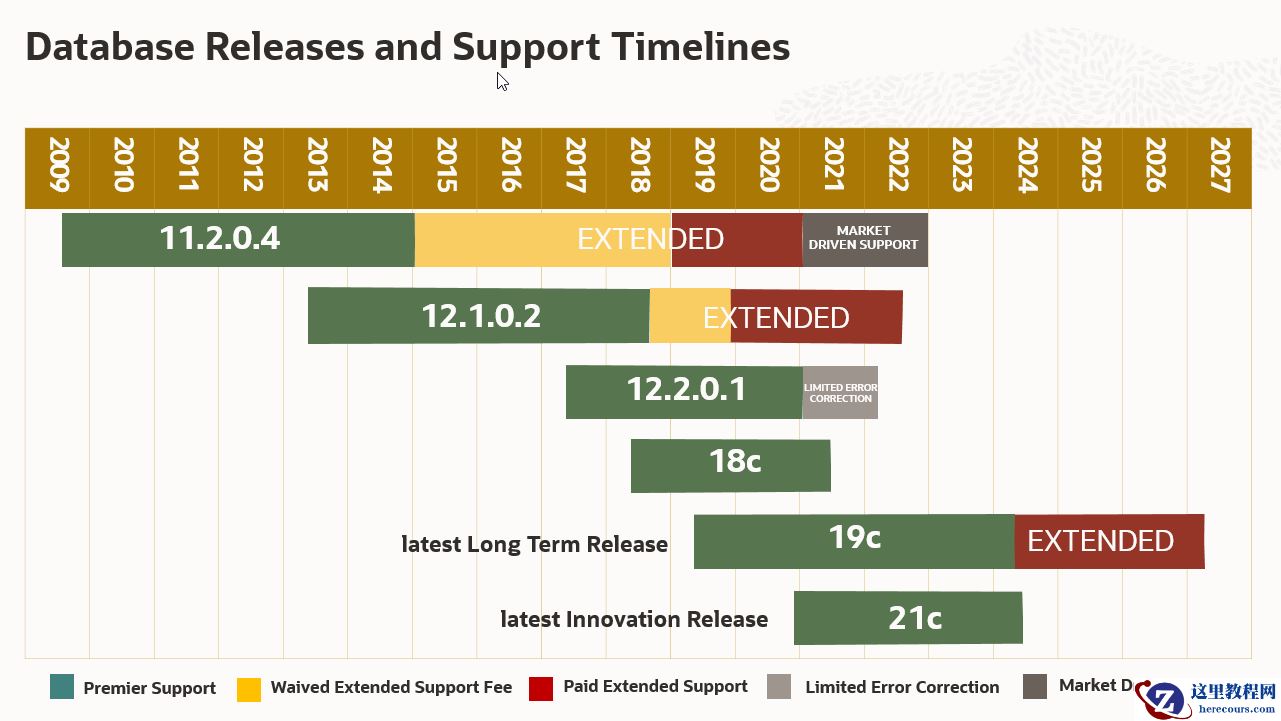
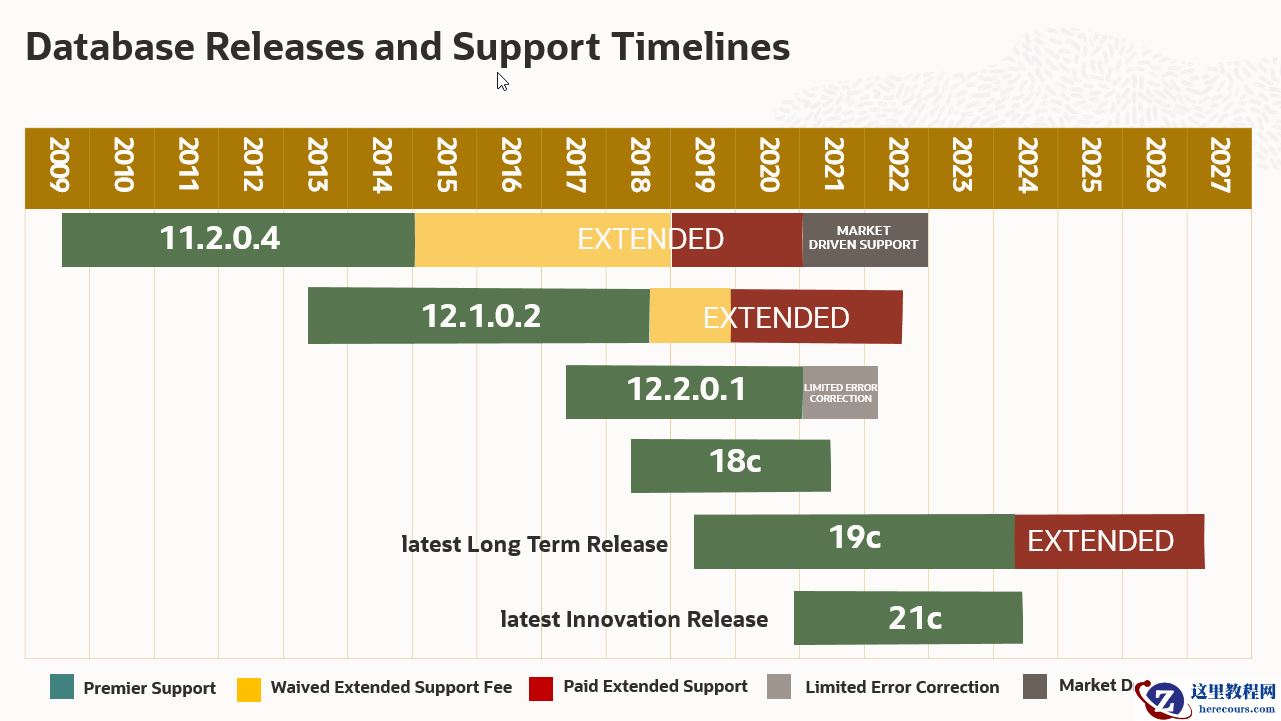
Oracle版本支持规划如下所示,
3. 文件系统
| 序号 | 目录 | 用途 | 建议值 | 管理方式 | FS 类型 |
|---|---|---|---|---|---|
| 1 | /boot | 系统内核 | 500M | 标准分区 | – |
| 2 | /var | 日志存放目录 | 10G | LVM | XFS |
| 3 | /u01 | 软件安装目录 | 80G | LVM | XFS |
| 4 | swap | 交换分区 | 32G | LVM | XFS |
| 5 | / | 根目录 | 剩余可用空间 | LVM | XFS |
| 6 | /oradata | 数据文件 | 按业务需求 | LVM | XFS |
| 7 | /arch | 归档日志 | 按业务需求 | LVM | XFS |
| 8 | /backup | 备份目录 | 按业务需求 | LVM | XFS |
注: 测试环境根据实际存储量调整以上目录大小,测试环境可以只安装OS不用创建其它目录,
测试环境建议存储40G以上。
4. OS时区
时区选择东八区:Shanghai,Asia;
5. 上传安装文件
创建软件包目录并上传Oracle安装文件
[root@ora11g ~]# mkdir -p /soft
[root@oradb ~]# tree /soft
/soft
|-- LINUX.X64_193000_db_home.zip  <-- 仅安装19C时需上传
|-- LINUX.X64_213000_db_home.zip  <-- 仅安装21C时需上传
|-- p13390677_112040_Linux-x86-64_1of7.zip    <-- 仅安装11G时需上传
|-- p13390677_112040_Linux-x86-64_2of7.zip    <-- 仅安装11G时需上传`-- x_onekey_v0.2.sh
4. 安装过程演示
[root@ora11g ~]# chmod a+x /soft/x_onekey_v0.2.sh
[root@ora11g ~]# sh /soft/x_onekey_v0.2.sh
INSTANCE_NAME    STATUS
---------------- ------------
orcl             OPEN
SQL>
    CON_ID CON_NAME                       OPEN MODE  RESTRICTED
    ---------- ------------------------------ ---------- ----------
         2 PDB$SEED                       READ ONLY  NO
         3 ENMO                           READ WRITE NO
SQL>
LSNRCTL for Linux: Version 21.0.0.0.0 - Production on 08-NOV-2021 01:58:39
Copyright (c) 1991, 2021, Oracle.  All rights reserved.
Connecting to (DESCRIPTION=(ADDRESS=(PROTOCOL=TCP)(HOST=oradb)(PORT=1521)))
STATUS of the LISTENER------------------------Alias                     LISTENER
Version                   TNSLSNR for Linux: Version 21.0.0.0.0 - ProductionStart Date                08-NOV-2021 01:53:22Uptime                    0 days 0 hr. 5 min. 16 secTrace Level               offSecurity                  ON: Local OS AuthenticationSNMP                      OFFListener Parameter File   /u01/app/oracle/homes/OraDB21Home1/network/admin/listener.ora
Listener Log File         /u01/app/oracle/diag/tnslsnr/oradb/listener/alert/log.xml
Listening Endpoints Summary...
  (DESCRIPTION=(ADDRESS=(PROTOCOL=tcp)(HOST=oradb)(PORT=1521)))
  (DESCRIPTION=(ADDRESS=(PROTOCOL=ipc)(KEY=EXTPROC1521)))
Services Summary...
Service "c8209f27c6b16005e053362ee80ae60e" has 1 instance(s).  Instance "orcl", status READY, has 1 handler(s) for this service...
Service "d0379fe8a6ab2c6ee055bbdcb00a5558" has 1 instance(s).  Instance "orcl", status READY, has 1 handler(s) for this service...
Service "enmo" has 1 instance(s).  Instance "orcl", status READY, has 1 handler(s) for this service...
Service "orcl" has 1 instance(s).  Instance "orcl", status READY, has 1 handler(s) for this service...
Service "orclXDB" has 1 instance(s).  Instance "orcl", status READY, has 1 handler(s) for this service...
The command completed successfullySQL> Disconnected from Oracle Database 21c Enterprise Edition Release 21.0.0.0.0 - ProductionVersion 21.3.0.0.0******* 19.2 check HugePage info
AnonHugePages:      8192 kB
HugePages_Total:    2025HugePages_Free:        0HugePages_Rsvd:        0HugePages_Surp:        0Hugepagesize:       2048 kB
db install used: 441 seconds
************** complete install Oracle db 21.3.0 on Linux 7.x *********************
************** if you need any support,contact my wechat: xidoublestar *************
5. 常见问题
问题1 syntax error near unexpected token `$'{\r''
windows格式问题使用以下语句修复
sed -i 's/\r//g'  install_oracle11g_linux7_single.sh
问题2 7装11.2.4不需要打补丁吗
Installation of Oracle 11.2.0.4 Database Software on OL7 fails with 'Error in invoking target
'agent nmhs' of makefile ' & “undefined reference to symbol ‘B_DestroyKeyObject’” error (Doc ID 1965691.1),
solution:
01) Ignore the undefined symbol error during Oracle 11.2.0.4 installation and proceed further.
The software installation will succeed without any further errors.
02) Download and install patch 19692824
6. 版本功能说明
****************x_onekey_v0.1.sh*****************
1). 自动安装Oracle 11G on Linux 7.x软件
2). 自动完成大页配置整改
3). 自动关闭防火墙/selinux等37项OS服务
4). 自动配置Oracle监听
5). 自动创建Oracle实例
****************x_onekey_v0.2.sh*****************
1). 自动安装Oracle 19C/21C软件
2). 自动配置Oracle 19C/21C监听
3). 自动创建Oracle 19C/21C实例
欢迎关注公众号交流沟通“xaoug”









![Oracle DataBase Recovery数据库dbf中了勒索病毒[Ransomwaree2020@cock.li].eking](https://www.herecours.com/d/file/efpub/2026/03-03/20260303160505843030.jpg?x-oss-process=style/bb "Oracle DataBase Recovery数据库dbf中了勒索病毒[Ransomwaree2020@cock.li].eking")