[20251014]建立完善通用的prx.sql脚本.txt --//前几天更改了tpt的prr.sql,想实现一个更加通用pr.sql的版本。自己做一些尝试: --//参数1支持2种格式,第1种格式使用数字序列使用,分开,输出对应字段。第2种格式使用正则表达式输出对应字段. --//参数2支持参数2|n,2表示使用dbms_sql.desc_tab2。n 输出带字段的顺序号, $ cat -v prx.sql -- Notes: This script is based on Tom Kyte's original printtbl code ( http://asktom.oracle.com ) -- For coding simplicity (read: lazyness) I'm using custom quotation marks ( q'\ ) so -- this script works only from Oracle 10gR2 onwards def _pr_tmpfile=&_tpt_tempdir/pr_&_tpt_tempfile..tmp def _set_tmpfile=&_tpt_tempdir/set_&_tpt_tempfile..sql @@saveset set serverout on size 1000000 termout off save &_pr_tmpfile replace col tpt_pr new_value _tpt_pr format a10 col tpt_pr2 new_value _tpt_pr2 format a10 col tpt_prn new_value _tpt_prn format a10 col tpt_prnn new_value _tpt_prnn format a10 col tpt_pri new_value _tpt_pri format a10 col tpt_prr new_value _tpt_prr format a10 col 1 new_value 1 col 2 new_value 2 SELECT NULL "1", NULL "2" FROM DUAL WHERE 1 = 2; SELECT CASE WHEN INSTR (LOWER ('&2'), '2') > 0 THEN '--' ELSE ' ' END tpt_pr ,CASE WHEN INSTR (LOWER ('&2'), '2') > 0 THEN ' ' ELSE '--' END tpt_pr2 ,CASE WHEN INSTR (LOWER ('&2'), 'n') > 0 THEN '--' ELSE ' ' END tpt_prnn ,CASE WHEN INSTR (LOWER ('&2'), 'n') > 0 THEN ' ' ELSE '--' END tpt_prn ,CASE WHEN INSTR (LOWER ('&1'), ',') > 0 THEN ' ' WHEN '&1' IS NULL THEN '--' ELSE '--' END tpt_pri ,CASE WHEN INSTR (LOWER ('&1'), ',') > 0 THEN '--' WHEN '&1' IS NULL THEN '--' ELSE ' ' END tpt_prr FROM DUAL; set termout on get &_pr_tmpfile nolist . 0 c clob := q'^F 0 declare 999999 ^F';; 999999 l_theCursor integer default dbms_sql.open_cursor;; 999999 l_columnValue varchar2(4000);; 999999 l_status integer;; 999999 &_tpt_pr l_descTbl dbms_sql.desc_tab;; 999999 &_tpt_pr2 l_descTbl dbms_sql.desc_tab2;; 999999 l_colCnt number;; 999999 begin 999999 dbms_sql.parse( l_theCursor, c, dbms_sql.native );; 999999 &_tpt_pr dbms_sql.describe_columns( l_theCursor, l_colCnt, l_descTbl );; 999999 &_tpt_pr2 dbms_sql.describe_columns2( l_theCursor, l_colCnt, l_descTbl );; 999999 for i in 1 .. l_colCnt loop 999999 dbms_sql.define_column( l_theCursor, i, 999999 l_columnValue, 4000 );; 999999 end loop;; 999999 l_status := dbms_sql.execute(l_theCursor);; 999999 while ( dbms_sql.fetch_rows(l_theCursor) > 0 ) loop 999999 dbms_output.put_line( '==============================' );; 999999 for i in 1 .. l_colCnt loop 999999 &_tpt_prr if regexp_like(lower(l_descTbl(i).col_name), lower('&1')) then 999999 &_tpt_pri if i in (&1) then 999999 dbms_sql.column_value( l_theCursor, i,l_columnValue );; 999999 &_tpt_prnn dbms_output.put_line ( rpad( l_descTbl(i).col_name,30 ) || ': ' || l_columnValue );; 999999 &_tpt_prn dbms_output.put_line ( lpad(i,3,'0')||' '||rpad( l_descTbl(i).col_name,30 ) || ': ' || l_columnValue );; 999999 &_tpt_pri end if;; 999999 &_tpt_prr end if;; 999999 end loop;; 999999 end loop;; 999999 exception 999999 when others then 999999 dbms_output.put_line(dbms_utility.format_error_backtrace);; 999999 raise;; 999999 end;; / set serverout off term on @@loadset get &_pr_tmpfile nolist host &_delete &_pr_tmpfile &_set_tmpfile --//注:在get与host两行之际最后存在1个空行,里面的^F在vim下按ctrl+v,ctrl+f输入。 2.简单测试: $ cat tt.txt SELECT UPPER(NVL(PROGRAM, 'null')) , UPPER(MODULE) , TYPE , DECODE(NVL(INSTR(PROCESS, ':'), 0), 0, NVL(PROCESS, 1234), SUBSTR(PROCESS, 1, INSTR(PROCESS, ':') - 1)) , OSUSER , MACHINE , SCHEMANAME , USERNAME , SERVICE_NAME , SID , SERIAL# FROM SYS.V_$SESSION WHERE SID = SYS_CONTEXT('userenv', 'sid'); SCOTT@book01p> @ tt.txt UPPER(NVL(PROGRAM,'NULL')) UPPER(MODULE) TYPE DECODE(NVL(INSTR(PROCESS,':'),0),0,NVL(PROCESS,1 OSUSER ------------------------------------------------------------------------------------ ---------------------------------------------------------------- ------------------------------ ------------------------------------------------ ------------------------------ MACHINE SCHEMANAME USERNAME SERVICE_NAME SID SERIAL# -------------------- ------------------------------ ------------------------------ ------------------------------ ---------- ---------- SQLPLUS@CENTTEST (TNS V1-V3) SQL*PLUS USER 3566 oracle centtest SCOTT SCOTT book01p 146 53724 SCOTT@book01p> @ pr ORA-06512: at "SYS.DBMS_SQL", line 2129 ORA-06512: at line 24 declare * ERROR at line 1: ORA-06502: PL/SQL: numeric or value error: character string buffer too small ORA-06512: at line 43 ORA-06512: at "SYS.DBMS_SQL", line 2129 ORA-06512: at line 24 --//直接执行pr报错,因为DECODE(NVL(INSTR(PROCESS, ':'), 0), 0, NVL(PROCESS, 1234), SUBSTR(PROCESS, 1, INSTR(PROCESS, --//':') - 1)没有定义别名,字段名太长,程序报错,要使用dbms_sql.desc_tab2. SCOTT@book01p> @ prx '' 2 ============================== UPPER(NVL(PROGRAM,'NULL')) : SQLPLUS@CENTTEST (TNS V1-V3) UPPER(MODULE) : SQL*PLUS TYPE : USER DECODE(NVL(INSTR(PROCESS,':'),: 3566 OSUSER : oracle MACHINE : centtest SCHEMANAME : SCOTT USERNAME : SCOTT SERVICE_NAME : book01p SID : 146 SERIAL# : 53724 PL/SQL procedure successfully completed. SCOTT@book01p> @ prx name$ 2 ============================== SCHEMANAME : SCOTT USERNAME : SCOTT SERVICE_NAME : book01p PL/SQL procedure successfully completed. --//输出name结尾的字段名。 SCOTT@book01p> @ prx name$ 2n ============================== 007 SCHEMANAME : SCOTT 008 USERNAME : SCOTT 009 SERVICE_NAME : book01p PL/SQL procedure successfully completed. --//参数2加入n,支持输出字段顺序号。 SCOTT@book01p> @ prx 7,8,9 2n ============================== 007 SCHEMANAME : SCOTT 008 USERNAME : SCOTT 009 SERVICE_NAME : book01p PL/SQL procedure successfully completed. --//参数1使用数字序列,输出7,8,9字段信息。 SCOTT@book01p> select * from v$database 2 @ prx ^dbid|supp n ============================== 001 DBID : 1617337831 030 SUPPLEMENTAL_LOG_DATA_MIN : YES 031 SUPPLEMENTAL_LOG_DATA_PK : NO 032 SUPPLEMENTAL_LOG_DATA_UI : NO 040 SUPPLEMENTAL_LOG_DATA_FK : NO 041 SUPPLEMENTAL_LOG_DATA_ALL : NO 052 SUPPLEMENTAL_LOG_DATA_PL : NO 059 SUPPLEMENTAL_LOG_DATA_SR : NO PL/SQL procedure successfully completed. --//输出dbid开头的字段名以及包含supp的字段名。 --//如果有一些脚本使用参数1,参数2就不行了。例子如下: SCOTT@book01p> @ tpt/seg2 dept SEG_MB OWNER SEGMENT_NAME SEGMENT_TYPE SEG_TABLESPACE_NAME BLOCKS HDRFIL HDRBLK ---------- -------------------- ------------------------------ -------------------- ------------------------------ ---------- ---------- ---------- 0 SCOTT DEPT TABLE USERS 8 12 130 SCOTT@book01p> @ prx '' '' PL/SQL procedure successfully completed. --//seg2.sql脚本参数1是dept。而prx执行时设置参数1='' --//继续执行: SCOTT@book01p> @ pr PL/SQL procedure successfully completed. --//因为参数1已经重置,没有输出。 SCOTT@book01p> @ pr dept ============================== SEG_MB : 0 SEG_OWNER : SCOTT SEG_SEGMENT_NAME : DEPT SEG_PARTITION_NAME : SEG_SEGMENT_TYPE : TABLE SEG_TABLESPACE_NAME : USERS BLOCKS : 8 HDRFIL : 12 HDRBLK : 130 PL/SQL procedure successfully completed. 3.补充说明: --//为什么在get与host两行之间最后存在1个空行。 --//测试遇到的问题,通过例子演示: SCOTT@book01p> select * from emp where mgr is null 2 ; EMPNO ENAME JOB MGR HIREDATE SAL COMM DEPTNO ---------- ---------- --------- ---------- ------------------- ---------- ---------- ---------- 7839 KING PRESIDENT 1981-11-17 00:00:00 5000 10 --//注意分号在第2行。 SCOTT@book01p> @ prx 1,2,3 '' ============================== EMPNO : 7839 ENAME : KING JOB : PRESIDENT PL/SQL procedure successfully completed. --//第1次执行没有问题 SCOTT@book01p> @ prx 1,2,3 '' ORA-06512: at "SYS.DBMS_SQL", line 1244 ORA-06512: at line 13 declare * ERROR at line 1: ORA-00933: SQL command not properly ended ORA-06512: at line 36 ORA-06512: at "SYS.DBMS_SQL", line 1244 ORA-06512: at line 13 --//第2次执行没有问题. SCOTT@book01p>edit select * from emp where mgr is null host &_delete &_pr_tmpfile &_set_tmpfile / --//edit打开后看到的内容如上,明显执行错误。 --//在get与host两行之间最后存在1个空行,就不存在这个问题,建议pr系列的版本都在这两行之间加入1个空行。 SCOTT@book01p> select * from emp where mgr is null 2 ; EMPNO ENAME JOB MGR HIREDATE SAL COMM DEPTNO ---------- ---------- --------- ---------- ------------------- ---------- ---------- ---------- 7839 KING PRESIDENT 1981-11-17 00:00:00 5000 10 SCOTT@book01p> @ prx 1,2,3 '' ============================== EMPNO : 7839 ENAME : KING JOB : PRESIDENT PL/SQL procedure successfully completed. SCOTT@book01p> @ prx 1,2,3 '' ============================== EMPNO : 7839 ENAME : KING JOB : PRESIDENT PL/SQL procedure successfully completed. --//还有1个问题就是我通过判断参数2是否存在逗号是否是数字顺序,如果仅仅输入1个数字没有逗号会存在问题,可以简单加入,0规避 --//这个问题或者输入一个很大的数字比如1001代替0.
[20251014]建立完善通用的prx.sql脚本.txt
来源:这里教程网
时间:2026-03-03 22:47:54
作者:
编辑推荐:
下一篇:
相关推荐
-

-
-
-
-
-
-
-
-
-
-
-
-
-
-

雷神推出 MIX PRO II 迷你主机:基于 Ultra 200H,玻璃上盖 + ARGB 灯效
2 月 9 日消息,雷神 (THUNDEROBOT) 现已宣布推出基于英
-

制造商 Musnap 推出彩色墨水屏电纸书 Ocean C:支持手写笔、第三方安卓应用
2 月 10 日消息,制造商 Musnap 现已在海外推出一款 Oce


热文推荐
- oracle 备库归档日志某一天突发暴增到2000多个
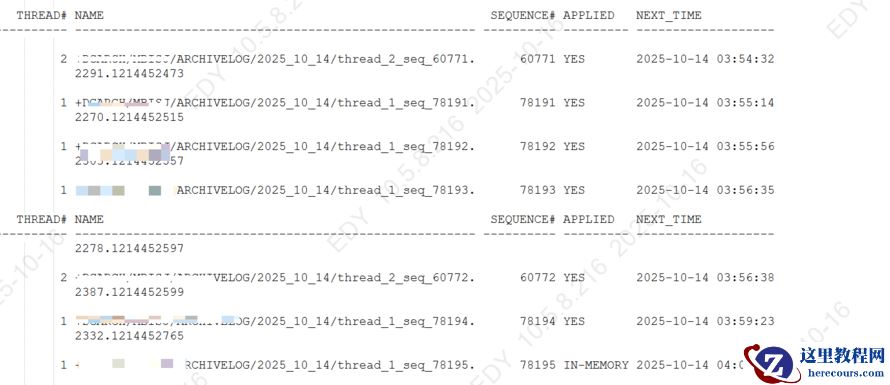
oracle 备库归档日志某一天突发暴增到2000多个
26-03-03 - Oracle RMAN三种不完全恢复实战详解:归档序号、时间点与SCN恢复对比
- 数据库管理-第373期 23ai:变化,不支持的功能与参数(20251011)
- Oracle 常见的33个等待事件

Oracle 常见的33个等待事件
26-03-03 - 第47期 OGG DownStream 部署
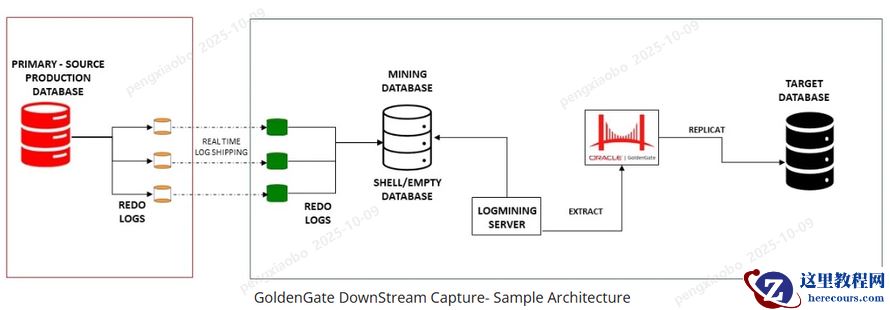
第47期 OGG DownStream 部署
26-03-03 - Oracle 数据库巡检脚本(增强版)
Oracle 数据库巡检脚本(增强版)
26-03-03 - 数据库管理-第374期 23ai:弃用的功能、视图与参数(20251013)
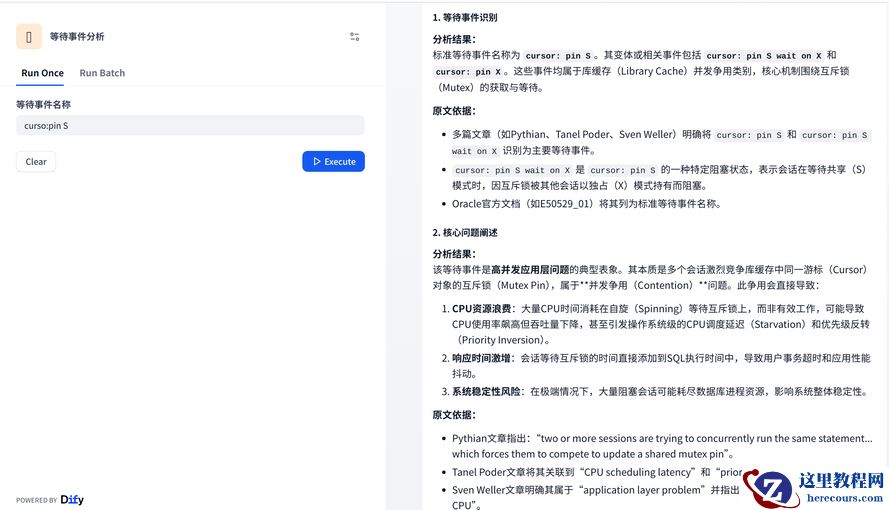
- 破解Oracle难题:用搜索引擎+AI高效处理cursor:pin S等待事件
- 商汤科技押注“1+X”:是破局利刃,还是盲目挣扎?
商汤科技押注“1+X”:是破局利刃,还是盲目挣扎?
26-03-03 - 数据库管理-第375期 26ai:除了改名,还有什么(20251015)

数据库管理-第375期 26ai:除了改名,还有什么(20251015)
26-03-03