???? 1.时序数据库
什么是时序数据库?顾名思义,
用于处理按照时间变化顺序的数据的数据库即为时序数据库(time-series database),
时序数据库专门优化处理带时间标签的数据,
为什么会衍生时序数据库这一种新趋势呢?
我们知道像PostgreSQL和MySQL这种关系型数据库对于短期需求不大的情况下下还是可以满足的,
但是一旦数据量增长,其性能不足以支持频繁的添加和读取需求。
运用时间模型来构造的应用非常需要时序数据库的加持,包括未来大数据的趋势,时序数据库必然会成为一个新潮流。
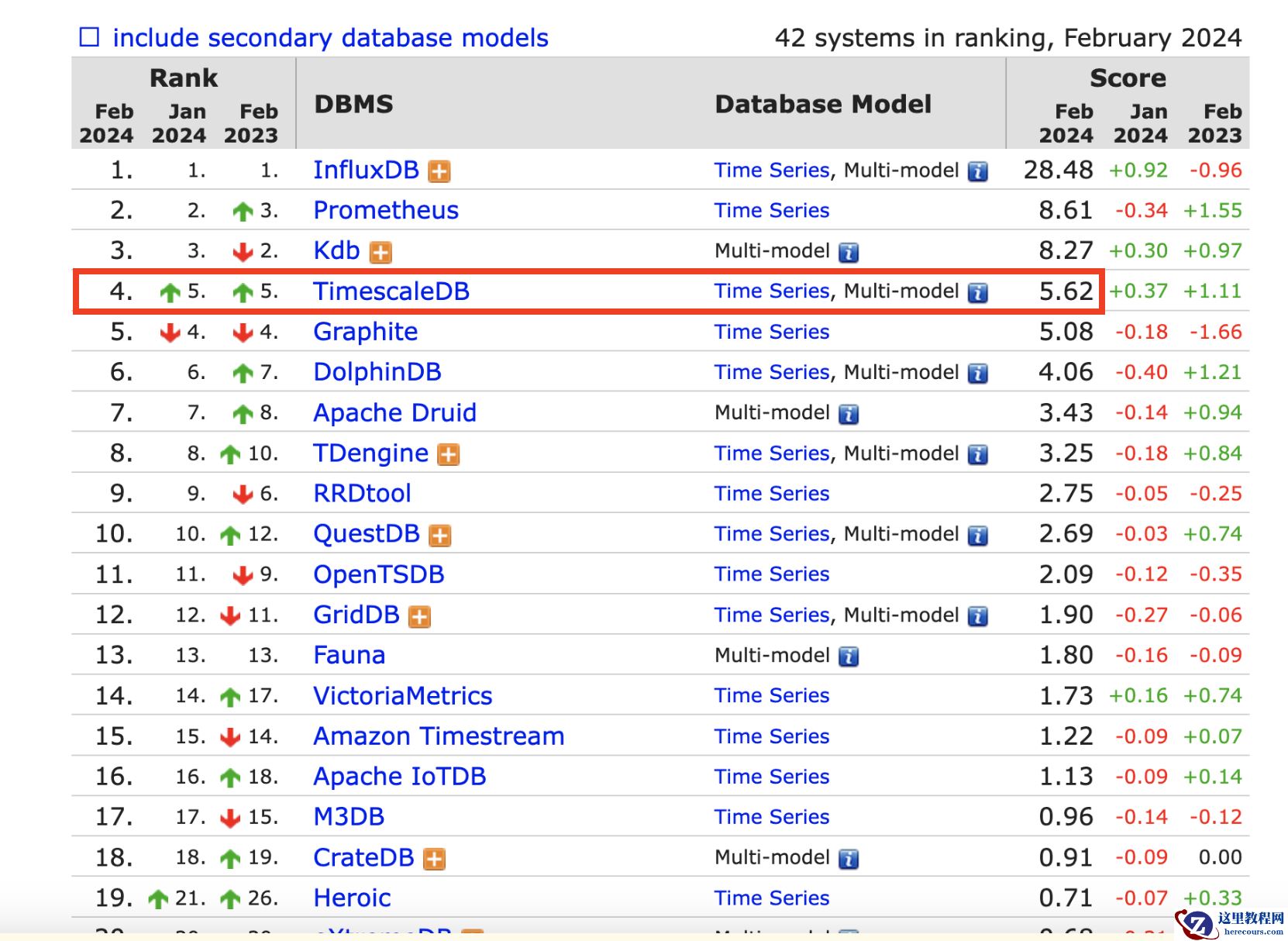
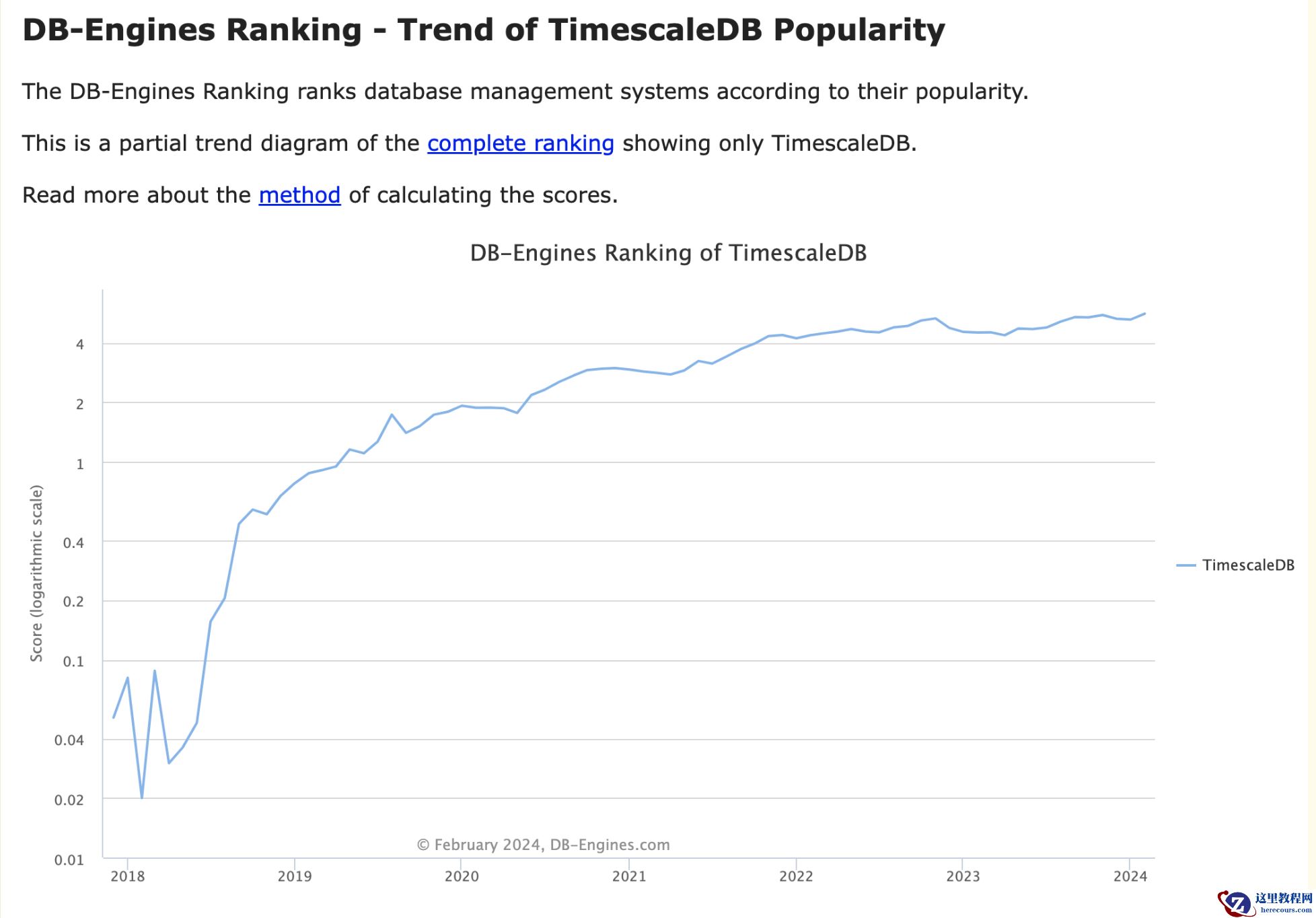
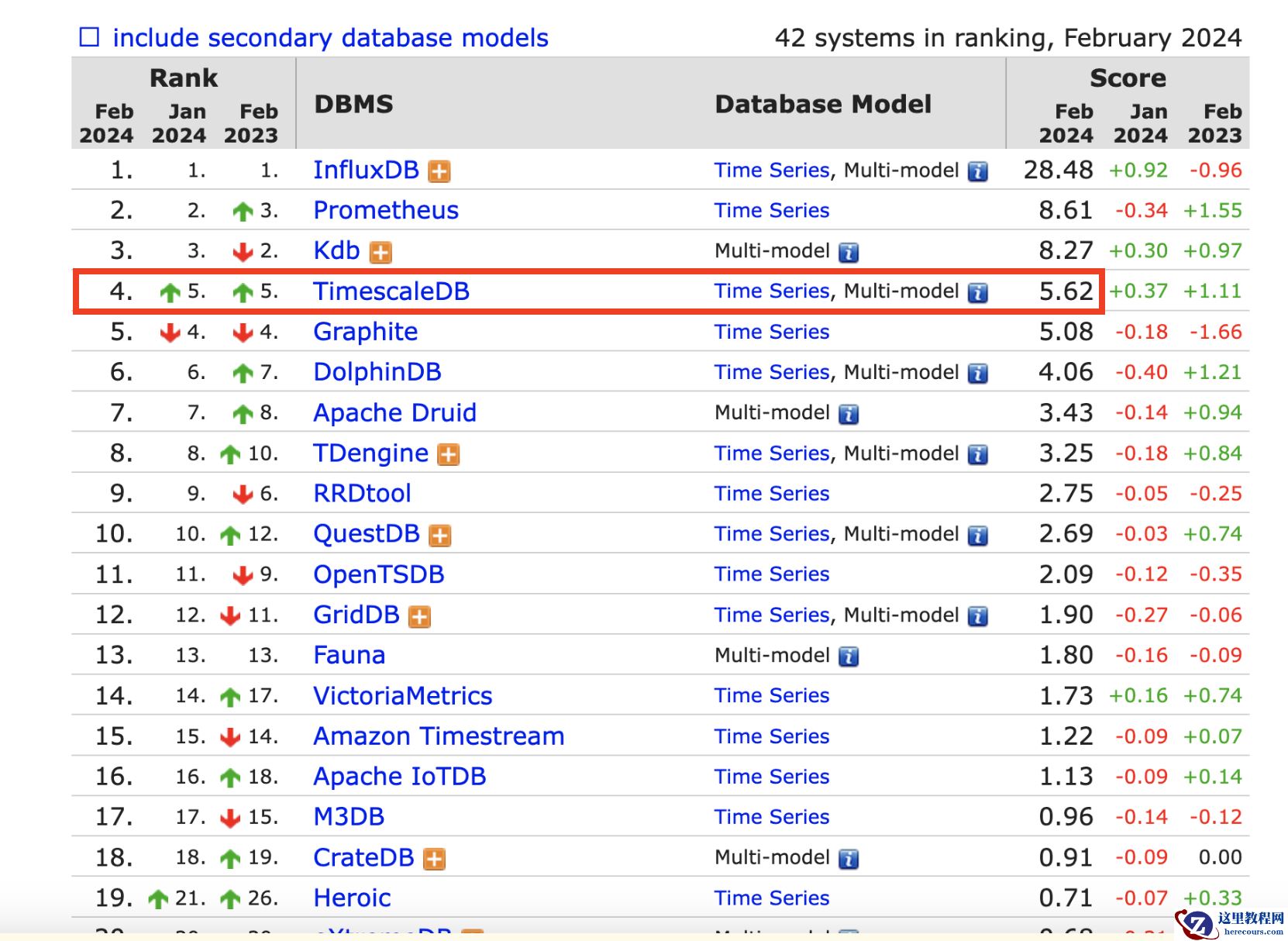
截止2024年2月,
TimescaleDB在DB-Engines中排名的处于第4位,
并一直处于上升的趋势。
 ???? 2.TimescaleDB
>对于TimescaleDB来说,在功能的丰富程度上战胜了排名更靠前的几位选手,
但是对于性能上可能处于下风,因此TimescaleDB如何持续地发展下去、如何发展地更好,
除了探寻在性能等综合素质方面的提升外,在PostgreSQL的肩膀上怎么样更好地适应现代化需求才是重中之重。
时序数据库应该具备的特点总结如下
1. 压缩能力
2. 自动rotate
3. 支持分片,水平扩展
4. 自动扩展分区,
5. 插入性能
6. 分区可删除
7. 易用性(SQL接口)
8. 类型丰富
9. 高效分析能力
???? 2.TimescaleDB
>对于TimescaleDB来说,在功能的丰富程度上战胜了排名更靠前的几位选手,
但是对于性能上可能处于下风,因此TimescaleDB如何持续地发展下去、如何发展地更好,
除了探寻在性能等综合素质方面的提升外,在PostgreSQL的肩膀上怎么样更好地适应现代化需求才是重中之重。
时序数据库应该具备的特点总结如下
1. 压缩能力
2. 自动rotate
3. 支持分片,水平扩展
4. 自动扩展分区,
5. 插入性能
6. 分区可删除
7. 易用性(SQL接口)
8. 类型丰富
9. 高效分析能力
 ???? 3.TimescaleDB部署
✨ 3.1 repository
tee /etc/yum.repos.d/timescale_timescaledb.repo <<EOL
[timescale_timescaledb]
name=timescale_timescaledb
baseurl=https://packagecloud.io/timescale/timescaledb/el/$(rpm -E %{rhel})/\$basearch
repo_gpgcheck=1
gpgcheck=0
enabled=1
gpgkey=https://packagecloud.io/timescale/timescaledb/gpgkey
sslverify=1
sslcacert=/etc/pki/tls/certs/ca-bundle.crt
metadata_expire=300
EOL
✨ 3.2 yum在线安装
1.Update your local repository list:
yum update --skip-broken --nobest
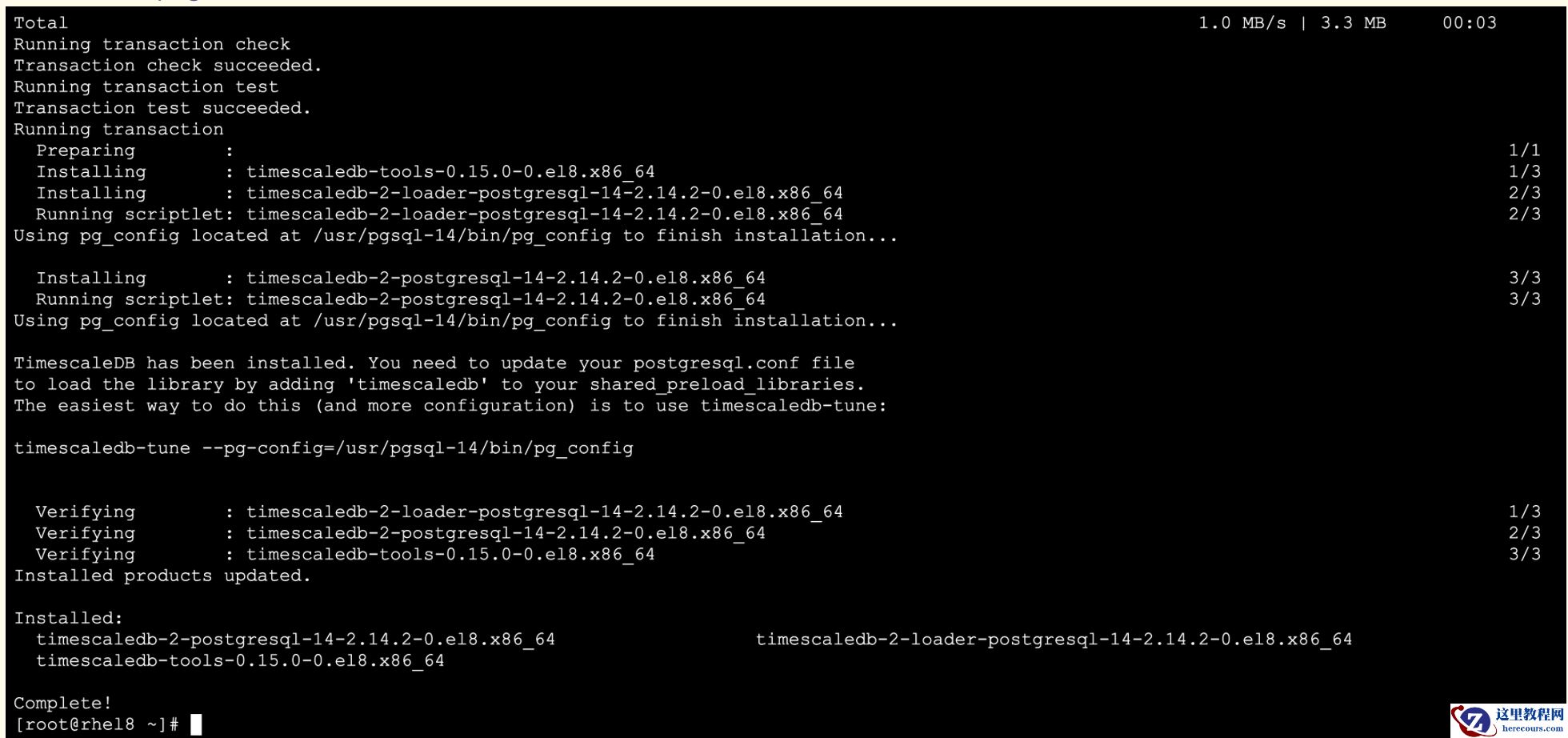
2.Install TimescaleDB:
yum install timescaledb-2-postgresql-14
在Red Hat Enterprise Linux 8上安装时,需要使用:
sudo dnf module disable postgresql
命令禁用系统中内置的PostgreSQL模块。
???? 3.TimescaleDB部署
✨ 3.1 repository
tee /etc/yum.repos.d/timescale_timescaledb.repo <<EOL
[timescale_timescaledb]
name=timescale_timescaledb
baseurl=https://packagecloud.io/timescale/timescaledb/el/$(rpm -E %{rhel})/\$basearch
repo_gpgcheck=1
gpgcheck=0
enabled=1
gpgkey=https://packagecloud.io/timescale/timescaledb/gpgkey
sslverify=1
sslcacert=/etc/pki/tls/certs/ca-bundle.crt
metadata_expire=300
EOL
✨ 3.2 yum在线安装
1.Update your local repository list:
yum update --skip-broken --nobest
2.Install TimescaleDB:
yum install timescaledb-2-postgresql-14
在Red Hat Enterprise Linux 8上安装时,需要使用:
sudo dnf module disable postgresql
命令禁用系统中内置的PostgreSQL模块。
 ✨ 3.3 插件配置
修改postgresql config文件,使timescaledb这个插件能正常工作,通过调优脚本来配置数据库
[root@rhel8 ~]# find / -name pg_config
/usr/pgsql-14/bin/pg_config
sudo timescaledb-tune --pg-config=/usr/pgsql-14/bin/pg_config
##重启
systemctl restart postgresql-14
[root@rhel8 ~]# systemctl status postgresql-14
● postgresql-14.service - PostgreSQL 14 database server
Loaded: loaded (/usr/lib/systemd/system/postgresql-14.service; enabled; vendor preset: disabled)
Active: active (running) since Wed 2024-02-21 22:33:06 CST; 14s ago
Docs: https://www.postgresql.org/docs/14/static/
Process: 4938 ExecStartPre=/usr/pgsql-14/bin/postgresql-14-check-db-dir ${PGDATA} (code=exited, status=0/SUCCESS)
Main PID: 4945 (postmaster)
Tasks: 22 (limit: 49633)
Memory: 118.3M
CGroup: /system.slice/postgresql-14.service
├─4945 /usr/pgsql-14/bin/postmaster -D /var/lib/pgsql/14/data/
???? 4.TimescaleDB使用
✨ 4.1 登陆PG
[root@rhel8 ~]# su - postgres
[postgres@rhel8 ~]$
[postgres@rhel8 ~]$ psql
psql (14.10)
Type "help" for help.
postgres=# create database jemdb;
CREATE DATABASE
postgres=# \c jemdb
You are now connected to database "jemdb" as user "postgres".
✨ 4.2 创建插件
1.创建插件
CREATE EXTENSION IF NOT EXISTS timescaledb;
2.删除插件
DROP EXTENSION IF EXISTS timescaledb;
jemdb=# \dx
List of installed extensions
Name | Version | Schema | Description
-------------+---------+------------+--------------------------------------------------------------------------------------
plpgsql | 1.0 | pg_catalog | PL/pgSQL procedural language
timescaledb | 2.14.2 | public | Enables scalable inserts and complex queries for time-series data (Apache 2 Edition)
(2 rows)
psql -U postgres -h 192.168.3.10 -d jemdb -p 5432
✨ 4.3 使用超表
1、创建普通测试表
CREATE TABLE conditions (
time TIMESTAMPTZ NOT NULL,
location TEXT NOT NULL,
temperature DOUBLE PRECISION NULL,
humidity DOUBLE PRECISION NULL
);
2、基于time分区将上一步创建的普通表转换为超表
jemdb=# SELECT create_hypertable('conditions', 'time');
create_hypertable
-------------------------
(1,public,conditions,t)
(1 row)
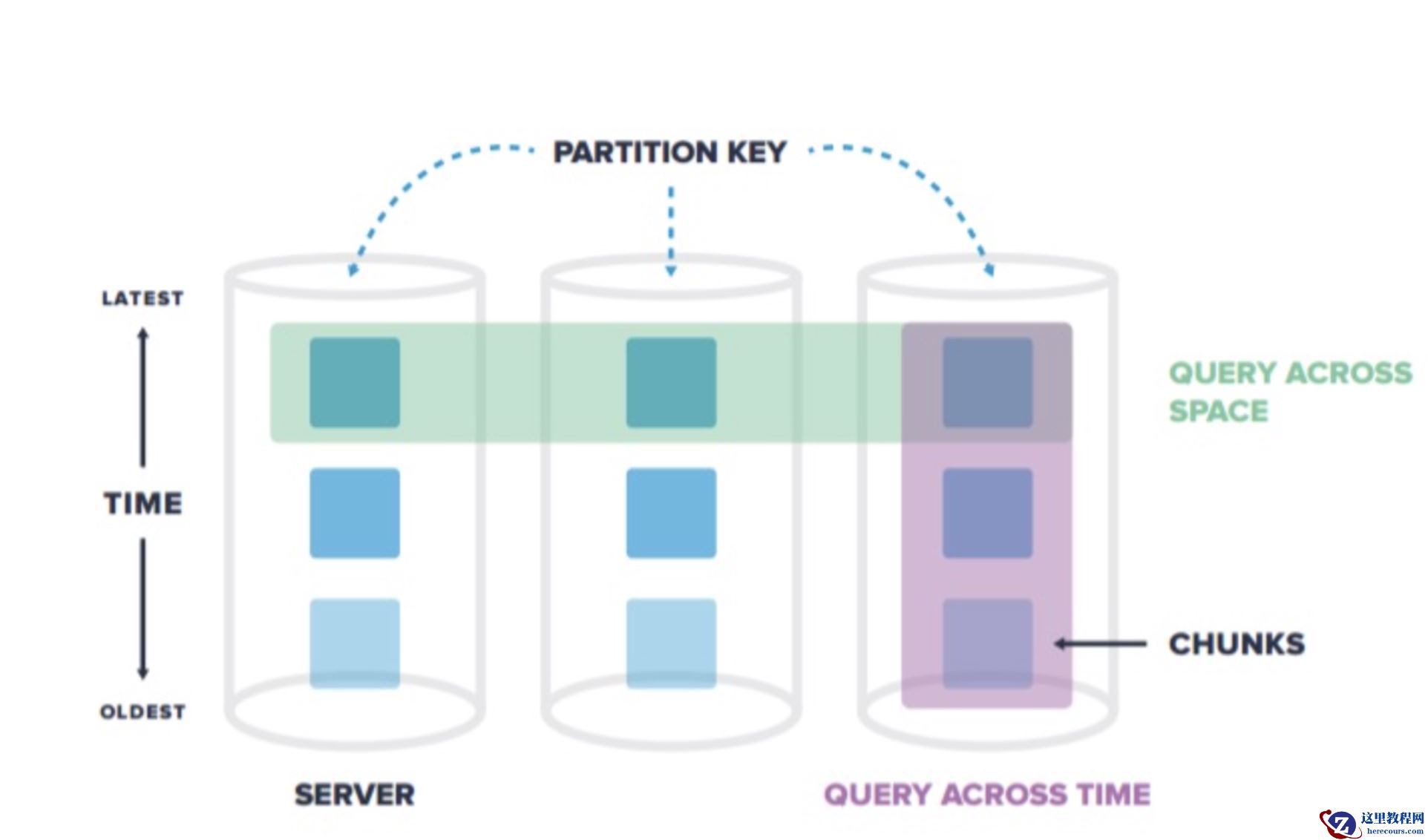
超表(hypertable)是具有特殊功能的PostgreSQL表,可以很容易地处理时间序列数据。与它们交互就像与普通PostgreSQL表交互一样,但在幕后,超表会自动按时间将数据划分为块。在TimescaleDB中,超表与普通PostgreSQL表可以一起存在。超表用来存储时序数据,这样可以提高插入和查询的性能,而且可以访问一些有用的时间序列特性。普通PostgreSQL表用来存储其它关系型数据。
3、插入数据并查询
jemdb=# INSERT INTO conditions(time, location, temperature, humidity)
SELECT now(), to_char(i, 'FM0000'), random()*i, random()*i FROM generate_series(1,10000) i;
4.针对过去3小时的数据,每15分钟采集度量一次,按照时间和温度降序排序
SELECT time_bucket('15 minutes', time) AS fifteen_min,
location, COUNT(*),
MAX(temperature) AS max_temp,
MAX(humidity) AS max_hum
FROM conditions
WHERE time > NOW() - interval '3 hours'
GROUP BY fifteen_min, location
ORDER BY fifteen_min DESC, max_temp DESC;
5.更改现有超表上的块间隔长度
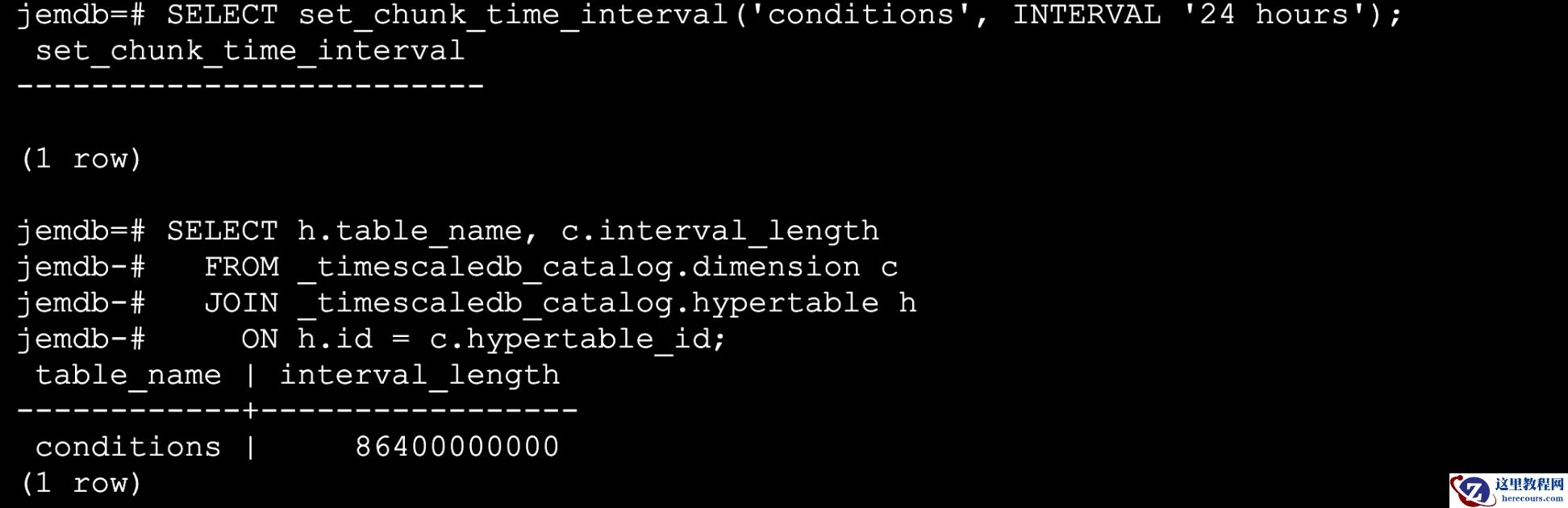
SELECT set_chunk_time_interval('conditions', INTERVAL '24 hours');
SELECT h.table_name, c.interval_length
FROM _timescaledb_catalog.dimension c
JOIN _timescaledb_catalog.hypertable h
ON h.id = c.hypertable_id;
✨ 3.3 插件配置
修改postgresql config文件,使timescaledb这个插件能正常工作,通过调优脚本来配置数据库
[root@rhel8 ~]# find / -name pg_config
/usr/pgsql-14/bin/pg_config
sudo timescaledb-tune --pg-config=/usr/pgsql-14/bin/pg_config
##重启
systemctl restart postgresql-14
[root@rhel8 ~]# systemctl status postgresql-14
● postgresql-14.service - PostgreSQL 14 database server
Loaded: loaded (/usr/lib/systemd/system/postgresql-14.service; enabled; vendor preset: disabled)
Active: active (running) since Wed 2024-02-21 22:33:06 CST; 14s ago
Docs: https://www.postgresql.org/docs/14/static/
Process: 4938 ExecStartPre=/usr/pgsql-14/bin/postgresql-14-check-db-dir ${PGDATA} (code=exited, status=0/SUCCESS)
Main PID: 4945 (postmaster)
Tasks: 22 (limit: 49633)
Memory: 118.3M
CGroup: /system.slice/postgresql-14.service
├─4945 /usr/pgsql-14/bin/postmaster -D /var/lib/pgsql/14/data/
???? 4.TimescaleDB使用
✨ 4.1 登陆PG
[root@rhel8 ~]# su - postgres
[postgres@rhel8 ~]$
[postgres@rhel8 ~]$ psql
psql (14.10)
Type "help" for help.
postgres=# create database jemdb;
CREATE DATABASE
postgres=# \c jemdb
You are now connected to database "jemdb" as user "postgres".
✨ 4.2 创建插件
1.创建插件
CREATE EXTENSION IF NOT EXISTS timescaledb;
2.删除插件
DROP EXTENSION IF EXISTS timescaledb;
jemdb=# \dx
List of installed extensions
Name | Version | Schema | Description
-------------+---------+------------+--------------------------------------------------------------------------------------
plpgsql | 1.0 | pg_catalog | PL/pgSQL procedural language
timescaledb | 2.14.2 | public | Enables scalable inserts and complex queries for time-series data (Apache 2 Edition)
(2 rows)
psql -U postgres -h 192.168.3.10 -d jemdb -p 5432
✨ 4.3 使用超表
1、创建普通测试表
CREATE TABLE conditions (
time TIMESTAMPTZ NOT NULL,
location TEXT NOT NULL,
temperature DOUBLE PRECISION NULL,
humidity DOUBLE PRECISION NULL
);
2、基于time分区将上一步创建的普通表转换为超表
jemdb=# SELECT create_hypertable('conditions', 'time');
create_hypertable
-------------------------
(1,public,conditions,t)
(1 row)
超表(hypertable)是具有特殊功能的PostgreSQL表,可以很容易地处理时间序列数据。与它们交互就像与普通PostgreSQL表交互一样,但在幕后,超表会自动按时间将数据划分为块。在TimescaleDB中,超表与普通PostgreSQL表可以一起存在。超表用来存储时序数据,这样可以提高插入和查询的性能,而且可以访问一些有用的时间序列特性。普通PostgreSQL表用来存储其它关系型数据。
3、插入数据并查询
jemdb=# INSERT INTO conditions(time, location, temperature, humidity)
SELECT now(), to_char(i, 'FM0000'), random()*i, random()*i FROM generate_series(1,10000) i;
4.针对过去3小时的数据,每15分钟采集度量一次,按照时间和温度降序排序
SELECT time_bucket('15 minutes', time) AS fifteen_min,
location, COUNT(*),
MAX(temperature) AS max_temp,
MAX(humidity) AS max_hum
FROM conditions
WHERE time > NOW() - interval '3 hours'
GROUP BY fifteen_min, location
ORDER BY fifteen_min DESC, max_temp DESC;
5.更改现有超表上的块间隔长度
SELECT set_chunk_time_interval('conditions', INTERVAL '24 hours');
SELECT h.table_name, c.interval_length
FROM _timescaledb_catalog.dimension c
JOIN _timescaledb_catalog.hypertable h
ON h.id = c.hypertable_id;
 ???? 5.总结
>随着物联网的发展,时序数据库的需求越来越多,
比如水文监控、工厂的设备监控、国家安全相关的数据监控、
通讯监控、金融行业指标数据、传感器数据等。
在互联网行业中,也有着非常多的时序数据,
例如用户访问网站的行为轨迹,应用程序产生的日志数据等等。
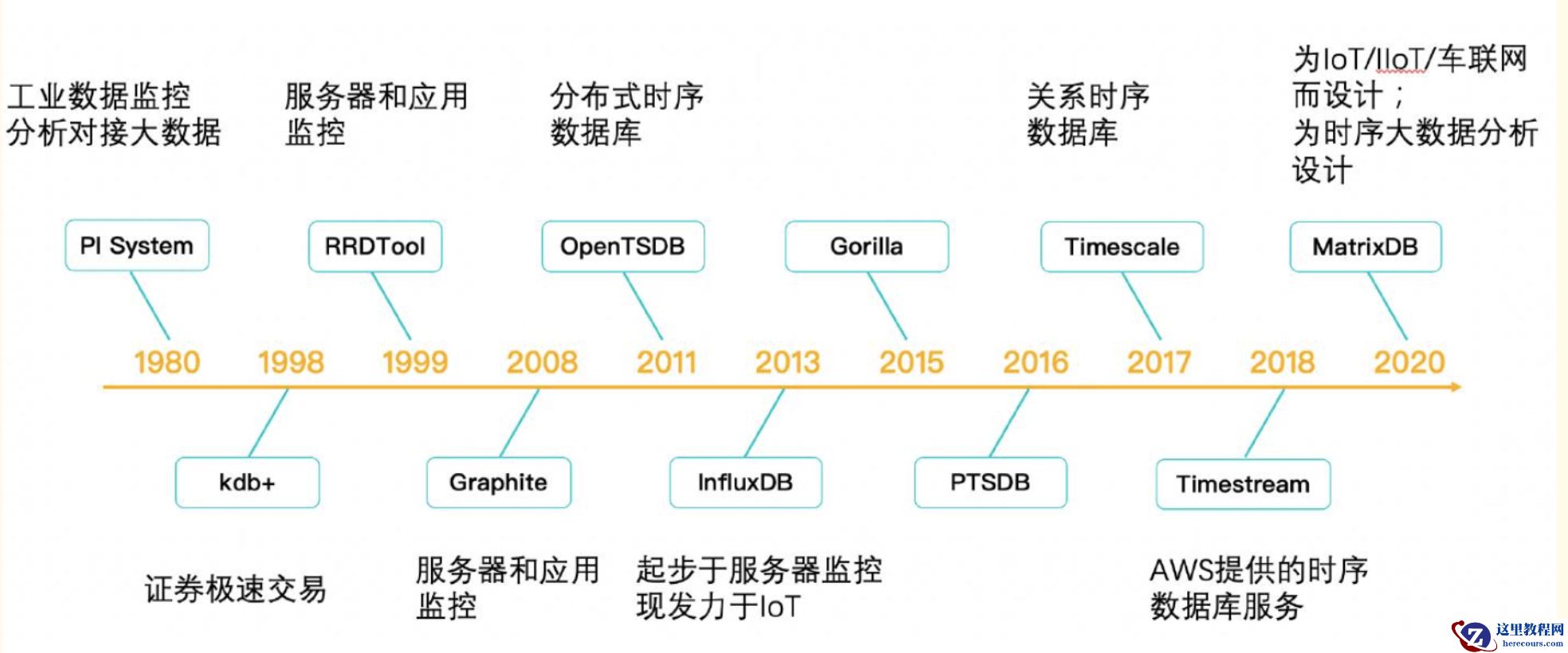
以下是时序数据库的发展史推荐给大家,一起交流学习
???? 5.总结
>随着物联网的发展,时序数据库的需求越来越多,
比如水文监控、工厂的设备监控、国家安全相关的数据监控、
通讯监控、金融行业指标数据、传感器数据等。
在互联网行业中,也有着非常多的时序数据,
例如用户访问网站的行为轨迹,应用程序产生的日志数据等等。
以下是时序数据库的发展史推荐给大家,一起交流学习
时序数据库TimescaleDB是站在了PG的肩膀上?扒了扒了
来源:这里教程网
时间:2026-03-14 21:20:25
作者:
编辑推荐:
下一篇:
相关推荐
-

-
-
-
-
-
-
-
-
-
-
-
-
-
-

雷神推出 MIX PRO II 迷你主机:基于 Ultra 200H,玻璃上盖 + ARGB 灯效
2 月 9 日消息,雷神 (THUNDEROBOT) 现已宣布推出基于英
-

制造商 Musnap 推出彩色墨水屏电纸书 Ocean C:支持手写笔、第三方安卓应用
2 月 10 日消息,制造商 Musnap 现已在海外推出一款 Oce

热文推荐
- 时序数据库TimescaleDB是站在了PG的肩膀上?扒了扒了
时序数据库TimescaleDB是站在了PG的肩膀上?扒了扒了
26-03-14 - RockyLinux使用shutdown命令安全关闭系统(新手必看:详解Linux安全关机操作)
- 向量数据库PGVECTOR,AI浪潮下崛起的新秀!
向量数据库PGVECTOR,AI浪潮下崛起的新秀!
26-03-14 - 聊聊pg_bulkload的大概的实现逻辑
聊聊pg_bulkload的大概的实现逻辑
26-03-14 - 基于知识图谱与异常检测的PG数据库故障定位
基于知识图谱与异常检测的PG数据库故障定位
26-03-14 - PG外部数据包装神器FDW,都在这里了...

PG外部数据包装神器FDW,都在这里了...
26-03-14 - PG备份恢复学的这么差,试用期你都过不了

PG备份恢复学的这么差,试用期你都过不了
26-03-14 - Postgresql生态
Postgresql生态
26-03-14 - 使用plprofiler分析PostgreSQL函数各语句的执行情况
使用plprofiler分析PostgreSQL函数各语句的执行情况
26-03-14 - 掌握RockyLinux anacron命令(轻松实现非24小时运行的定时任务)