Win11安装Linux子系统提示代码0x800701bc怎么解决?众所周知我们的win11系统是可以安装Linux子系统的,但是不少用户在安装过程之中出现报错代码,那么这个问题要怎么解决,本期小编就来和大伙分享一下解决方法,希望能够给大伙带来帮助。
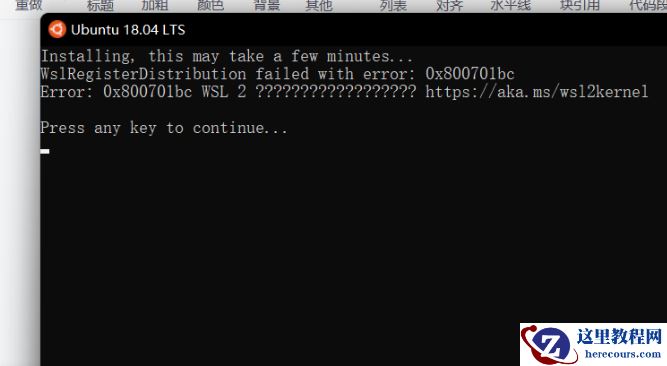
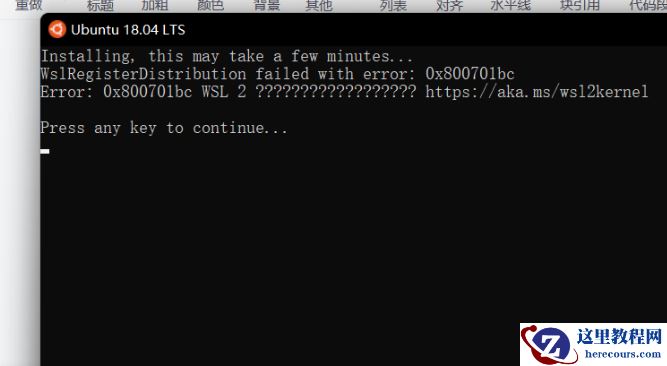
错误提示:
Installing, this may take a few minutes…
WslRegisterDistribution failed with error: 0x800701bc
Error: 0x800701bc WSL 2 ???https://www.herecours.com/d/file/efpub/2026/25-25/20260225165958517877 Press any key to continue…
解决方法:
首先下载Windows Subsystem for Linux Update setup 官方版将WSL1升级到WSL2。
然后再次尝试即可。
如果还没有解决问题,就需要用管理权限打开cmd或者powershell,分别输入下面代码。
用管理权限打开cmd或者powershell,分别输入下面代码:
bcdedit /set hypervisorlaunchtype Auto
Enable-WindowsOptionalFeature -Online -FeatureName Microsoft-Hyper-V -All
Enable-WindowsOptionalFeature -Online -FeatureName VirtualMachinePlatform
Enable-WindowsOptionalFeature -Online -FeatureName Microsoft-Windows-Subsystem-Linux
到这里就应该都没有问题了。